Introduction
Finding the best 1440p gaming desktop for 2026 means choosing a PC that balances powerful graphics, fast processing, sufficient memory, and reliable cooling. At 2560 × 1440 resolution, modern games demand considerably more GPU performance than at 1080p, particularly when using ultra settings or ray tracing.
Whether you enjoy competitive shooters, open-world adventures, racing simulators, or demanding AAA games, a capable gaming desktop can provide sharper visuals and smoother gameplay without requiring the expense of a 4K-focused system.
For my recommendations, I prioritize dedicated graphics cards such as the NVIDIA GeForce RTX 5070, RTX 5070 Ti, RTX 5080, and AMD Radeon RX 9070 XT, alongside modern processors, at least 16GB RAM, and fast SSD storage.
Here are six gaming desktops worth considering for 1440p gaming in 2026.
Quick Summary
For most gamers, my top recommendation is the Lenovo Legion Tower 5-2026, combining an AMD Ryzen 7 7800X3D processor with RTX 5070 graphics and 32GB memory. Budget-conscious buyers should consider the MSI Codex R2, while enthusiasts seeking higher visual settings and greater performance headroom should look toward the Skytech RTX 5070 Ti configurations or the premium ASUS ROG GM700 with RTX 5080 graphics.
Top Product List
- Lenovo Legion Tower 5-2026 - Gaming Desktop - NVIDIA GeForce RTX 5070 - Ryzen 7 7800X3D - 32GB Memory - 1TB Storage - Windows 11 Home - Eclipse Black - Free 3 Months PC Game Pass — Best for overall 1440p gaming.
- msi Codex R2 Gaming Desktop PC | NVIDIA GeForce RTX 5070 12GB | Intel Core i5-14400F | 32GB DDR5 RAM | 1TB NVMe SSD | Air Cooling | Wi-Fi 6E | Windows 11 Home | VR Ready | D14NVP5-613US — Best for value-focused 1440p gaming.
- Skytech Gaming PC Desktop, Ryzen 7 9800X3D, RTX 5070 Ti, 32GB RAM, 1TB SSD — Best for high-refresh-rate 1440p gaming.
- msi Codex Z2 Gaming Desktop, AMD R7-8700F, RTX 5070, 32GB DDR5, 2TB SSD — Best for gamers needing extra storage.
- Skytech Gaming PC Desktop, Ryzen 7 9800X3D, RX 9070 XT, 32GB RAM, 2TB SSD — Best for high-end AMD graphics gaming.
- ASUS ROG GM700 (2026) Gaming Desktop PC, AMD Ryzen™ 7 9800X3D Processor, NVIDIA® GeForce RTX™ 5080, 2TB M.2 NVMe™ PCIe® 4 SSD, 32GB DDR5 RAM, Windows 11 Home, GM700TZ-PS787 — Best for premium 1440p gaming.
Top 6 Best 1440p Gaming Desktop for 2026
Lenovo Legion Tower 5-2026 - Gaming Desktop - NVIDIA GeForce RTX 5070 - Ryzen 7 7800X3D - 32GB Memory - 1TB Storage - Windows 11 Home - Eclipse Black - Free 3 Months PC Game Pass

Short Description
The Lenovo Legion Tower 5-2026 is my best overall pick for gamers who want a powerful 1440p desktop without automatically moving into the most expensive GPU tier.
Its Ryzen 7 7800X3D and RTX 5070 combination is particularly attractive for gaming-focused builds.
Key Specifications
- Processor: AMD Ryzen 7 7800X3D
- Graphics: NVIDIA GeForce RTX 5070
- Memory: 32GB
- Storage: 1TB
- Operating System: Windows 11 Home
- Included benefit: Three months of PC Game Pass, as advertised
Pros
- Gaming-focused Ryzen X3D processor
- RTX 5070 suitable for demanding 1440p gaming
- Generous 32GB memory configuration
- Strong balance between CPU and GPU capability
Cons
- 1TB storage can fill quickly with large games
- Not as much GPU headroom as RTX 5070 Ti or RTX 5080 systems
My Experience
Based on the advertised hardware, I consider this one of the most balanced choices. The 7800X3D is particularly appealing for CPU-sensitive games, while the RTX 5070 is a sensible match for a 1440p monitor.
I would expect the combination to suit both competitive and visually demanding gaming, although exact frame rates depend on the title and settings. I have not physically tested this configuration.
What Other Buyers Say
I could not independently establish a reliable pattern of verified buyer feedback for this exact configuration. Checking recent owner comments about fan noise, delivery condition, and technical support would be worthwhile.
Best For
Gamers who want a versatile 1440p desktop for competitive games, AAA adventures, and everyday multitasking.
➤➤➤ Click Here to Check Price on Amazon
➡️➡️➡️ Explore User Feedback and Current Pricing on Amazon
msi Codex R2 Gaming Desktop PC | NVIDIA GeForce RTX 5070 12GB | Intel Core i5-14400F | 32GB DDR5 RAM | 1TB NVMe SSD | Air Cooling | Wi-Fi 6E | Windows 11 Home | VR Ready | D14NVP5-613US

Short Description
The MSI Codex R2 is an appealing value-oriented 1440p configuration featuring an RTX 5070, Intel Core i5 processor, and 32GB DDR5 memory.
It is particularly interesting for buyers who prioritize graphics performance over purchasing the highest-end processor.
Key Specifications
- Processor: Intel Core i5-14400F
- Graphics: NVIDIA GeForce RTX 5070 12GB
- Memory: 32GB DDR5
- Storage: 1TB NVMe SSD
- Cooling: Air cooling
- Connectivity: Wi-Fi 6E
- Operating System: Windows 11 Home
Pros
- Capable RTX 5070 graphics card
- 32GB DDR5 memory
- NVMe SSD storage
- Wi-Fi 6E connectivity
Cons
- Core i5 processor offers less CPU headroom than higher-tier gaming CPUs
- Air-cooling noise depends on the actual cooler and fan configuration
- Only 1TB of included storage
My Experience
My assessment is that this configuration puts its hardware budget in sensible places for 1440p gaming. The GPU matters heavily at this resolution, and the Core i5-14400F should be a practical partner in many games.
Competitive players chasing extremely high frame rates may benefit from a stronger gaming CPU.
What Other Buyers Say
Verified recurring feedback for this exact SKU was not established. I recommend examining owner reports concerning cooling noise, build quality, and included components before purchasing.
Best For
Value-focused gamers who want RTX 5070 performance, modern memory, and wireless connectivity without prioritizing a premium CPU.
➤➤➤ Click Here to Check Price on Amazon
➡️➡️➡️ Explore User Feedback and Current Pricing on Amazon
Skytech Gaming PC Desktop, Ryzen 7 9800X3D, RTX 5070 Ti, 32GB RAM, 1TB SSD

Short Description
This Skytech desktop combines the AMD Ryzen 7 9800X3D with an NVIDIA RTX 5070 Ti, making it an appealing choice for high-refresh-rate 1440p gaming.
Its hardware offers more graphics headroom than typical RTX 5070 configurations.
Key Specifications
- Processor: AMD Ryzen 7 9800X3D
- Graphics: NVIDIA GeForce RTX 5070 Ti
- Memory: 32GB
- Storage: 1TB SSD
Pros
- Powerful gaming-focused processor
- Higher-tier RTX 5070 Ti graphics
- 32GB memory for gaming and multitasking
- Well-suited hardware combination for demanding games
Cons
- 1TB SSD is relatively modest for an enthusiast desktop
- Actual cooling and power-supply specifications need confirmation
- Higher-end hardware may not be necessary for casual games
My Experience
This is one of my preferred hardware combinations for gamers using fast 1440p monitors.
The Ryzen 7 9800X3D is designed with gaming performance in mind, while the RTX 5070 Ti offers additional graphics capability for demanding settings.
I would consider this especially attractive for players mixing competitive shooters with visually intensive single-player titles.
What Other Buyers Say
I have not verified enough consistent owner reviews of this precise configuration to summarize buyer sentiment reliably. Cooling performance and component quality are important areas to investigate.
Best For
Enthusiasts using 1440p high-refresh-rate monitors who want strong CPU performance and additional GPU capability.
➤➤➤ Click Here to Check Price on Amazon
➡️➡️➡️ Explore User Feedback and Current Pricing on Amazon
msi Codex Z2 Gaming Desktop, AMD R7-8700F, RTX 5070, 32GB DDR5, 2TB SSD

Short Description
The MSI Codex Z2 pairs RTX 5070 graphics with an AMD Ryzen 7 8700F, 32GB DDR5 RAM, and a spacious 2TB SSD.
Its main appeal is balancing 1440p gaming capability with enough storage for a substantial game library.
Key Specifications
- Processor: AMD Ryzen 7 8700F
- Graphics: NVIDIA GeForce RTX 5070
- Memory: 32GB DDR5
- Storage: 2TB SSD
Pros
- RTX 5070 graphics for 1440p gaming
- 32GB DDR5 memory
- Large 2TB SSD
- Suitable hardware for gaming and general productivity
Cons
- Ryzen 7 8700F is not an X3D gaming processor
- RTX 5070 has less graphics headroom than higher-tier options
- Exact cooling and connectivity details require confirmation
My Experience
I particularly like the practical storage configuration here. Modern game installations can consume considerable disk space, so 2TB is valuable for anyone rotating between multiple large titles.
The RTX 5070 makes this a relevant 1440p gaming choice, while the Ryzen 7 8700F provides a capable desktop CPU foundation.
What Other Buyers Say
Reliable recurring feedback specific to this exact Codex Z2 configuration was not independently confirmed. Prospective buyers should examine reviews covering system noise, upgrade access, and reliability.
Best For
Gamers who maintain large Steam or PC Game Pass libraries and want to avoid upgrading storage immediately.
➤➤➤ Click Here to Check Price on Amazon
➡️➡️➡️ Explore User Feedback and Current Pricing on Amazon
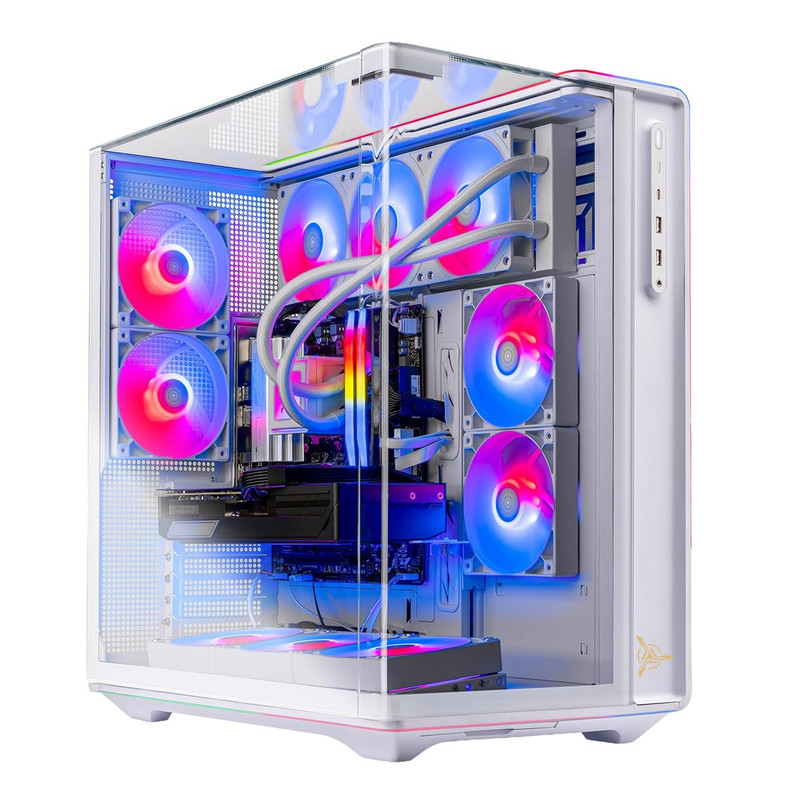
Skytech Gaming PC Desktop, Ryzen 7 9800X3D, RX 9070 XT, 32GB RAM, 2TB SSD
Short Description
This Skytech configuration is an excellent candidate for gamers interested in AMD Radeon graphics.
Combining the Ryzen 7 9800X3D, Radeon RX 9070 XT, and 2TB SSD, it provides an attractive foundation for demanding 1440p gaming.
Key Specifications
- Processor: AMD Ryzen 7 9800X3D
- Graphics: AMD Radeon RX 9070 XT
- Memory: 32GB
- Storage: 2TB SSD
Pros
- Strong gaming-focused Ryzen processor
- High-performance Radeon graphics
- 32GB memory
- Spacious 2TB storage configuration
Cons
- NVIDIA-exclusive features are unavailable
- Ray-tracing performance and upscaling preferences may influence GPU choice
- Exact thermal and acoustic behavior is unverified
My Experience
From a specification standpoint, I find this configuration particularly compelling for gamers who prioritize high-quality rasterized graphics and large game libraries.
The 9800X3D is also an appealing processor for CPU-intensive games. I would compare the RX 9070 XT against NVIDIA alternatives based on the specific games and graphics features I use most.
What Other Buyers Say
I could not confirm a dependable pattern of buyer feedback for this exact Skytech model. Owner experiences regarding Radeon drivers, cooling, and support are worth reviewing separately.
Best For
1440p enthusiasts who prefer AMD graphics, play demanding AAA titles, and want ample built-in storage.
➤➤➤ Click Here to Check Price on Amazon
➡️➡️➡️ Explore User Feedback and Current Pricing on Amazon
ASUS ROG GM700 (2026) Gaming Desktop PC, AMD Ryzen™ 7 9800X3D Processor, NVIDIA® GeForce RTX™ 5080, 2TB M.2 NVMe™ PCIe® 4 SSD, 32GB DDR5 RAM, Windows 11 Home, GM700TZ-PS787

Short Description
The ASUS ROG GM700 is my premium recommendation for gamers who want considerable graphics performance headroom at 1440p.
Its Ryzen 7 9800X3D and RTX 5080 combination is also appealing for gamers considering a future move to 4K.
Key Specifications
- Processor: AMD Ryzen 7 9800X3D
- Graphics: NVIDIA GeForce RTX 5080
- Memory: 32GB DDR5
- Storage: 2TB M.2 NVMe PCIe 4 SSD
- Operating System: Windows 11 Home
Pros
- Powerful RTX 5080 GPU
- Ryzen X3D gaming processor
- 32GB DDR5 memory
- Fast 2TB NVMe storage
- Substantial graphics performance headroom
Cons
- More GPU capability than many 1440p gamers require
- Premium hardware can represent diminishing value for lighter games
- Cooling noise and upgrade accessibility need model-specific verification
My Experience
Based on its components, this is the system I would consider for an uncompromising gaming setup.
The RTX 5080 provides a stronger foundation for demanding graphics settings, while the 9800X3D is well suited to high-performance gaming.
For a 1440p 240Hz monitor or a future 4K display, this hardware combination is particularly attractive, although maintaining 240 FPS depends on the game.
What Other Buyers Say
I cannot substantiate recurring verified buyer feedback for this precise GM700 SKU. I would check customer experiences with cooling, component access, and ASUS support before making a premium purchase.
Best For
Enthusiasts who want a powerful 1440p gaming system with additional headroom for demanding games, ray tracing, and future display upgrades.
➤➤➤ Click Here to Check Price on Amazon
➡️➡️➡️ Explore User Feedback and Current Pricing on Amazon
How to Choose the Right PC Gaming Product
1. Prioritize the graphics card. For 1440p gaming, GPU performance is especially important. The RTX 5070 is a sensible starting point among these selections, while the RTX 5070 Ti, RX 9070 XT, and RTX 5080 offer higher performance tiers.
2. Match your processor to your games. AMD's Ryzen X3D processors are attractive for demanding, CPU-sensitive games. A Core i5 or Ryzen 7 8700F may provide better overall purchasing value when paired with a capable GPU.
3. Choose enough RAM and SSD capacity. I recommend 32GB RAM for a new midrange or high-end gaming desktop. A 1TB SSD is workable, but 2TB offers more convenience for larger libraries.
4. Check cooling and airflow. Look for adequate case ventilation, appropriately sized CPU cooling, and unobstructed air intakes. Good cooling helps maintain stable performance during extended sessions.
5. Confirm compatibility and connectivity. Check monitor outputs, USB availability, Wi-Fi, Ethernet, and peripheral support. For high-refresh-rate 1440p gaming, ensure the monitor and graphics card support the required display connection and refresh rate.
6. Consider upgradeability and power. Verify the power-supply specifications, available memory slots, storage expansion options, and case clearance before purchasing.
7. Compare the total value. The most powerful PC is not necessarily the best purchase. Consider warranty coverage, configuration details, component quality, and the games you actually play.
FAQs
1. What GPU is best for 1440p gaming in 2026?
The RTX 5070 is a strong starting point for these desktop recommendations. Gamers seeking more demanding graphics settings should also consider the RTX 5070 Ti, Radeon RX 9070 XT, or RTX 5080.
2. Is 32GB RAM enough for 1440p gaming?
Yes. For most modern games and typical multitasking, 32GB is a generous configuration. Gaming performance also depends heavily on the processor and graphics card.
3. Is an RTX 5080 overkill for 1440p?
It can be unnecessary for lighter games or modest refresh-rate targets. However, it offers valuable headroom for demanding AAA titles, high-refresh-rate monitors, and future upgrades.
4. Should I buy a 1440p gaming desktop with 1TB or 2TB storage?
I prefer 2TB for gamers who frequently install large titles. A 1TB SSD is sufficient to begin with, particularly if the system supports convenient storage expansion.
5. Can these gaming desktops handle 1440p at 144Hz or 240Hz?
Their graphics hardware makes them relevant choices for high-refresh-rate 1440p gaming, but actual frame rates vary substantially by game, graphics settings, ray tracing, and upscaling. No desktop can be assumed to sustain 144 or 240 FPS in every game.
Conclusion
Choosing the best 1440p gaming desktop for 2026 depends on your gaming priorities, preferred graphics settings, storage requirements, and budget.
My final recommendations are:
- Best Overall: Lenovo Legion Tower 5-2026 — A well-balanced Ryzen 7 7800X3D and RTX 5070 combination suitable for a wide range of 1440p gaming.
- Best Value: MSI Codex R2 — An attractive value-oriented configuration with RTX 5070 graphics, 32GB DDR5 RAM, and a practical Core i5 processor, provided its selling price is competitive.
- Best Premium Choice: ASUS ROG GM700 (2026) — A powerful Ryzen 7 9800X3D and RTX 5080 desktop for enthusiasts seeking greater graphics performance headroom.
For most gamers, I would start with the Lenovo Legion Tower 5-2026 and compare its current price against the MSI Codex R2. If maximizing performance is more important than minimizing cost, the ASUS ROG GM700 is my premium pick.
Ultimately, the right 1440p gaming desktop is the one that delivers the performance you need in your favorite games without making you pay for hardware you will rarely use.