Introduction
Finding the best 4K gaming desktop for 2026 means choosing a powerful gaming PC capable of handling demanding AAA titles, high-resolution textures, advanced graphics settings, and smooth gameplay.
Whether you enjoy Cyberpunk 2077, Microsoft Flight Simulator, Call of Duty, or expansive open-world adventures, playing at 3840 × 2160 resolution places serious demands on your graphics card.
In my opinion, the GPU should be your first priority when shopping for a 4K gaming desktop. NVIDIA GeForce RTX 5080 and RTX 5090 systems are especially attractive for demanding gaming, while RTX 5070 Ti and AMD Radeon RX 9070 XT desktops offer alternatives for buyers seeking better value.
I have selected six gaming desktops based on their listed hardware, gaming suitability, memory, storage, and overall configuration. These are specification-based assessments, not claims of hands-on testing.
Quick Summary
The best 4K gaming desktop for 2026 should combine a powerful dedicated GPU, a capable modern CPU, at least 32GB RAM for a premium configuration, and fast SSD storage. My top overall recommendation is the ASUS ROG GM700 (2026) because its Ryzen 7 9800X3D and RTX 5080 combination is particularly appealing for high-end gaming. The MSI Infinite ZS is my premium pick for enthusiasts seeking RTX 5090 graphics, while the ZOTAC MEK is worth considering as a more value-focused option.
Top Product List
- ASUS ROG GM700 (2026) Gaming Desktop PC, AMD Ryzen™ 7 9800X3D Processor, NVIDIA® GeForce RTX™ 5080, 2TB M.2 NVMe™ PCIe® 4 SSD, 32GB DDR5 RAM, Windows 11 Home, GM700TZ-PS787 — Best for overall 4K gaming
- msi Infinite ZS Gaming PC, AMD Ryzen 9 9950X3D 4.3GHz Processor; NVIDIA GeForce RTX 5090 32GB GDDR7; 32GB DDR5 RAM; 2TB M.2 NVMe Gen5 SSD, 2.5GbE LAN, WiFi 7 — Best for premium 4K gaming
- Skytech Gaming Chronos 3 Gaming PC, AMD Ryzen 7 9800X3D 4.7GHz, NVIDIA RTX 5080 16GB VRAM, X670 Board, 2TB Gen4 NVMe SSD, 32GB DDR5 RAM 6000, 850W Gold ATX 3 PSU, 360 ARGB AIO, Wi-Fi 5, Windows 11 — Best for cooling-focused enthusiasts
- msi Aegis ZS Gaming Desktop, AMD Ryzen 9 9900X, GeForce RTX 5080, 32GB RAM, 2TB SSD, Liquid Cooling, Wi-Fi 7, Keyboard & Mouse Included, DIY Friendly, Windows 11 Pro — Best for gaming and productivity
- Skytech Gaming PC Desktop, Ryzen 7 9800X3D, RX 9070 XT, 32GB RAM, 2TB SSD — Best for AMD 4K gaming
- ZOTAC MEK Gaming PC Desktop, Ryzen 7 9700X, NVIDIA GeForce RTX 5070 Ti 16GB — Best for value-focused 4K gaming
Top 6 Best 4K Gaming Desktop for 2026 – Ultimate Gaming PC Buying Guide
ASUS ROG GM700 (2026) Gaming Desktop PC, AMD Ryzen™ 7 9800X3D Processor, NVIDIA® GeForce RTX™ 5080, 2TB M.2 NVMe™ PCIe® 4 SSD, 32GB DDR5 RAM, Windows 11 Home, GM700TZ-PS787
 #### Short Description
The ASUS ROG GM700 is my best overall choice for gamers who want an excellent balance of powerful graphics, gaming-oriented processing, and modern hardware.
Its RTX 5080 graphics card and Ryzen 7 9800X3D processor make it a strong candidate for demanding 4K gaming.
Key Specifications
- CPU: AMD Ryzen 7 9800X3D
- GPU: NVIDIA GeForce RTX 5080
- RAM: 32GB DDR5
- Storage: 2TB PCIe 4.0 NVMe SSD
- Operating System: Windows 11 Home
Pros
- Powerful CPU and GPU pairing for demanding games.
- 32GB DDR5 memory supports modern gaming and multitasking.
- Spacious 2TB SSD for large game libraries.
- Modern processor platform.
Cons
- High-end specifications may come with a substantial cost.
- Exact PSU, cooling, and expansion details require confirmation.
- Less compelling for gamers using only 1080p displays.
My Experience
Based on its specifications, I consider the GM700 one of the most balanced machines in this selection. The Ryzen 7 9800X3D is particularly appealing for CPU-sensitive gaming, while the RTX 5080 provides substantial graphics capability for 4K workloads.
I would prioritize this machine for high-resolution single-player games and demanding multiplayer titles. Actual frame rates, fan noise, and temperatures remain unverified for this particular desktop configuration.
What Other Buyers Say
I could not verify recurring owner feedback for this exact GM700 configuration. Before purchasing, I recommend checking recent reviews for cooling noise, build quality, delivery condition, and warranty service.
Best For
Gamers seeking a premium, balanced 4K gaming system without necessarily moving to an RTX 5090 desktop.
➡️➡️➡️ Explore User Feedback and Current Pricing on Amazon
msi Infinite ZS Gaming PC, AMD Ryzen 9 9950X3D 4.3GHz Processor; NVIDIA GeForce RTX 5090 32GB GDDR7; 32GB DDR5 RAM; 2TB M.2 NVMe Gen5 SSD, 2.5GbE LAN, WiFi 7

Short Description
The MSI Infinite ZS is the premium performance option in this roundup. Its RTX 5090 GPU and Ryzen 9 9950X3D processor target enthusiasts who want exceptionally capable hardware for intensive games and demanding workloads.
Key Specifications
- CPU: AMD Ryzen 9 9950X3D
- GPU: NVIDIA RTX 5090, 32GB GDDR7
- RAM: 32GB DDR5
- Storage: 2TB Gen5 NVMe SSD
- Networking: 2.5GbE LAN, Wi-Fi 7
Pros
- Flagship-class graphics hardware.
- Generous 32GB graphics memory.
- Strong processor for gaming and productivity.
- Fast Gen5 SSD and modern networking.
Cons
- Likely a costly option.
- Powerful hardware requires appropriate cooling and power delivery.
- Overkill for basic or less demanding games.
My Experience
I view this configuration as the strongest raw 4K performance candidate among these six desktops, based primarily on its RTX 5090.
Its substantial VRAM capacity is particularly interesting for demanding graphics workloads. However, I would carefully check PSU specifications, case airflow, and operating noise before investing in a system of this class.
What Other Buyers Say
Verified recurring feedback for this exact MSI Infinite ZS listing was unavailable. I would pay particular attention to owner reports about GPU cooling, stability under load, shipping protection, and support.
Best For
Enthusiasts who prioritize maximum graphics capability, demanding 4K gaming, high-end visual settings, and creative workloads.
➡️➡️➡️ Explore User Feedback and Current Pricing on Amazon
Skytech Gaming Chronos 3 Gaming PC, AMD Ryzen 7 9800X3D 4.7GHz, NVIDIA RTX 5080 16GB VRAM, X670 Board, 2TB Gen4 NVMe SSD, 32GB DDR5 RAM 6000, 850W Gold ATX 3 PSU, 360 ARGB AIO, Wi-Fi 5, Windows 11
 #### Short Description
The Skytech Chronos 3 is an appealing enthusiast desktop with an RTX 5080, Ryzen 7 9800X3D, and a detailed cooling and power configuration.
For gamers concerned about the supporting hardware inside a powerful prebuilt, this model deserves attention.
Key Specifications
- CPU: AMD Ryzen 7 9800X3D
- GPU: RTX 5080, 16GB VRAM
- RAM: 32GB DDR5-6000
- Storage: 2TB Gen4 NVMe SSD
- Motherboard: X670
- Cooling: 360mm ARGB AIO
- PSU: 850W Gold ATX 3
- Connectivity: Wi-Fi 5
- OS: Windows 11
Pros
- Strong gaming-focused processor.
- 360mm liquid cooling solution.
- Clearly listed power supply specification.
- Fast memory and generous SSD storage.
Cons
- Wi-Fi 5 is less modern than Wi-Fi 6E or Wi-Fi 7.
- Liquid cooling adds components that may eventually require maintenance or replacement.
- Actual noise and thermal performance are unverified.
My Experience
The Chronos 3 appeals to me because its listing provides meaningful details beyond the CPU and GPU.
The 360mm AIO and 850W Gold PSU are important considerations for a performance-focused desktop, although neither specification alone guarantees cool or quiet operation.
What Other Buyers Say
I could not establish reliable recurring buyer feedback for this specific configuration. I recommend checking comments regarding cooler reliability, cable management, and stability during extended gaming sessions.
Best For
4K gamers who want powerful hardware with a clearly specified liquid-cooling and power setup.
➡️➡️➡️ Explore User Feedback and Current Pricing on Amazon
msi Aegis ZS Gaming Desktop, AMD Ryzen 9 9900X, GeForce RTX 5080, 32GB RAM, 2TB SSD, Liquid Cooling, Wi-Fi 7, Keyboard & Mouse Included, DIY Friendly, Windows 11 Pro
 #### Short Description
The MSI Aegis ZS combines an RTX 5080 with a Ryzen 9 9900X, making it attractive for people who use their gaming PC for more than entertainment.
Its configuration also includes liquid cooling, Wi-Fi 7, and bundled peripherals.
Key Specifications
- CPU: AMD Ryzen 9 9900X
- GPU: NVIDIA GeForce RTX 5080
- RAM: 32GB
- Storage: 2TB SSD
- Cooling: Liquid cooling
- Wireless: Wi-Fi 7
- OS: Windows 11 Pro
- Accessories: Keyboard and mouse
Pros
- High-performance CPU and GPU combination.
- Suitable hardware for gaming and multitasking.
- Modern Wi-Fi 7 connectivity.
- Included keyboard and mouse.
- Listed as DIY-friendly.
Cons
- Bundled peripherals may not satisfy enthusiasts.
- Exact liquid cooler specifications are not provided.
- Gaming-only buyers may not need the Ryzen 9 processor or Windows 11 Pro.
My Experience
I particularly like this configuration for someone who games at 4K but also streams, edits video, or runs demanding applications.
The Ryzen 9 processor makes the Aegis ZS interesting as a hybrid gaming and workstation desktop. I would still verify internal expansion space and cooling performance before treating it as a long-term upgrade platform.
What Other Buyers Say
I could not verify a consistent pattern of owner reviews for this exact listing. Prospective buyers should inspect feedback about included accessories, fan noise, upgrade access, and technical support.
Best For
Gamers, streamers, and content creators who need one desktop for high-end gaming and productivity.
➡️➡️➡️ Explore User Feedback and Current Pricing on Amazon
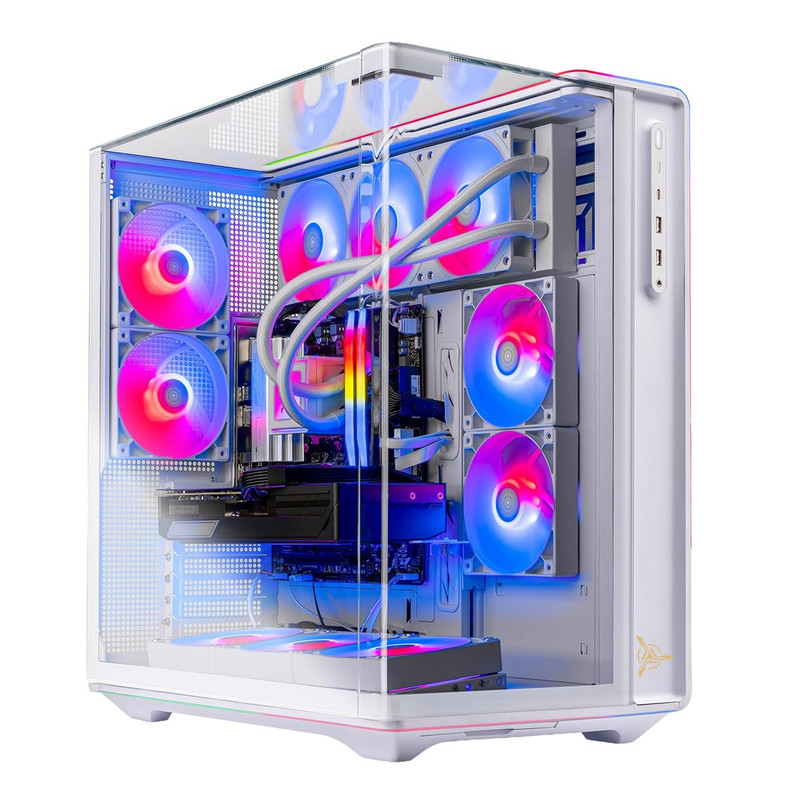
Skytech Gaming PC Desktop, Ryzen 7 9800X3D, RX 9070 XT, 32GB RAM, 2TB SSD
 #### Short Description
This Skytech desktop is a compelling AMD-based alternative for gamers considering 4K gaming without choosing an NVIDIA graphics card.
The pairing of the Ryzen 7 9800X3D and Radeon RX 9070 XT provides a strong foundation for demanding modern games.
Key Specifications
- CPU: AMD Ryzen 7 9800X3D
- GPU: AMD Radeon RX 9070 XT
- RAM: 32GB
- Storage: 2TB SSD
Pros
- Strong AMD CPU and GPU combination.
- Gaming-oriented X3D processor.
- 32GB RAM for modern gaming.
- Spacious SSD storage.
- Supports an AMD-focused gaming setup.
Cons
- NVIDIA-specific graphics and software features are unavailable.
- Cooling and PSU details need confirmation.
- Demanding ray-traced games may require adjusted settings.
My Experience
For gamers who prioritize conventional rasterized graphics, I consider the Radeon RX 9070 XT a worthwhile option to compare against similarly positioned NVIDIA systems.
The Ryzen 7 9800X3D adds an excellent gaming-oriented processor to the configuration. I would compare actual game benchmarks and total system pricing before deciding whether this offers better value than an RTX 5070 Ti desktop.
What Other Buyers Say
Recurring owner sentiment for this exact model could not be independently confirmed. I suggest checking reports about graphics driver stability, cooling performance, and setup experience.
Best For
AMD enthusiasts and 4K gamers who prioritize traditional graphics performance and want to compare alternatives to GeForce systems.
➡️➡️➡️ Explore User Feedback and Current Pricing on Amazon
ZOTAC MEK Gaming PC Desktop, Ryzen 7 9700X, NVIDIA GeForce RTX 5070 Ti 16GB
 #### Short Description
The ZOTAC MEK is my value-focused recommendation for gamers who want capable 4K hardware but do not necessarily need an RTX 5080 or RTX 5090.
Its Ryzen 7 9700X and RTX 5070 Ti provide a sensible combination for high-resolution gaming, particularly when using appropriate graphics settings.
Key Specifications
- CPU: AMD Ryzen 7 9700X
- GPU: NVIDIA GeForce RTX 5070 Ti
- Graphics Memory: 16GB
- Form Factor: Gaming desktop
Pros
- Capable modern gaming processor.
- RTX 5070 Ti supports advanced NVIDIA graphics features.
- 16GB GPU memory is useful for high-resolution textures.
- Potentially appealing alternative to flagship systems.
Cons
- Less graphics performance headroom than RTX 5080 or RTX 5090 systems.
- The supplied listing does not specify RAM capacity or SSD storage.
- Native 4K with demanding settings may require compromises.
My Experience
I think the ZOTAC MEK makes sense for gamers who want to enjoy 4K without automatically choosing the most expensive GPU tier.
I would consider it especially for players comfortable using DLSS and adjusting ray tracing or graphics presets. Before buying, I would verify its RAM, SSD, cooling, and power supply because those details are not established by the available product information.
What Other Buyers Say
Verified recurring customer feedback for this exact configuration was not available. I would check recent owner reviews for system configuration accuracy, thermals, and long-term reliability.
Best For
Value-conscious gamers interested in 4K gaming with optimized settings rather than insisting on maximum native-resolution performance in every game.
➡️➡️➡️ Explore User Feedback and Current Pricing on Amazon
How to Choose the Right PC Gaming Product
Choosing a 4K gaming desktop requires more than finding the fastest processor or the biggest RGB case.
1. Prioritize GPU performance. At 4K resolution, your graphics card is usually the most important component. RTX 5080 and RTX 5090 desktops are particularly appealing for demanding graphics, while RTX 5070 Ti and RX 9070 XT systems can be practical alternatives.
2. Choose a balanced CPU. AMD Ryzen X3D processors are especially appealing for gaming-focused builds. Ryzen 9 processors can also make sense for streaming, rendering, and productivity.
3. Consider memory and storage. I recommend targeting 32GB RAM for a premium 2026 gaming desktop. A 2TB SSD is convenient for installing multiple large games.
4. Check cooling and power delivery. High-end GPUs generate significant heat. Look for adequate case airflow, properly specified cooling, and a quality PSU with suitable connectors and capacity.
5. Verify connectivity and compatibility. Confirm HDMI or DisplayPort support for your specific 4K monitor, along with your desired refresh rate. Wi-Fi 6E, Wi-Fi 7, and wired Ethernet may also matter for your setup.
6. Evaluate upgrades, durability, and value. Check motherboard expansion options, available storage slots, case clearance, warranty coverage, and total configuration cost. A more expensive desktop is not automatically the better purchase.
FAQs
1. What is the best 4K gaming desktop for 2026?
My best overall recommendation is the ASUS ROG GM700 with Ryzen 7 9800X3D and RTX 5080. Its configuration offers an attractive balance for demanding 4K gaming.
2. Is an RTX 5080 enough for 4K gaming in 2026?
Yes, the RTX 5080 is a high-end 4K-capable GPU. Actual performance depends on the game, graphics settings, ray tracing, and use of technologies such as DLSS.
3. How much RAM should a 4K gaming desktop have?
I recommend 32GB for a premium modern gaming system. Some games run well with less, but 32GB provides useful capacity for gaming and background applications.
4. Is the RTX 5090 worth buying for 4K gaming?
The RTX 5090 is attractive for enthusiasts seeking maximum graphics capability. However, an RTX 5080 desktop may offer a more practical balance depending on pricing and performance requirements.
5. Can a less expensive gaming desktop run games at 4K?
Yes, but performance varies considerably. An RTX 5070 Ti or RX 9070 XT gaming desktop can be suitable for 4K gaming, particularly with optimized graphics settings and supported upscaling technologies.
Conclusion
The best 4K gaming desktop for 2026 depends on whether you prioritize maximum graphics capability, balanced gaming performance, productivity, or overall value.
My final recommendations are:
- Best Overall: ASUS ROG GM700 (2026) — The Ryzen 7 9800X3D and RTX 5080 make it my favorite balanced high-end gaming configuration.
- Best Value: ZOTAC MEK Gaming PC Desktop — An appealing RTX 5070 Ti option for buyers seeking a less extreme 4K setup, provided its actual price and complete specifications are competitive.
- Best Premium Choice: MSI Infinite ZS Gaming PC — The RTX 5090 and Ryzen 9 9950X3D make this the standout option for enthusiasts prioritizing powerful hardware.
For most enthusiasts, I would start by comparing the ASUS ROG GM700 and Skytech Chronos 3. Both offer strong RTX 5080 configurations, while the Chronos 3 provides additional listed details about cooling and power delivery.
Whichever desktop you choose, verify its complete configuration, current pricing, warranty, and independent gaming benchmarks before purchasing. The right desktop should not only deliver impressive 4K visuals today but also fit your gaming needs for years to come.