Finding the best 98 gaming keyboard for 2026 means getting the functionality of a nearly full-size keyboard without taking up as much desk space. A 98% layout is particularly appealing because it retains a dedicated number pad, arrow keys, and essential navigation keys while creating more room for mouse movement.
Whether you play competitive FPS games, MMORPGs, racing games, or enjoy long gaming sessions, choosing the right keyboard can make a noticeable difference to your setup. Important features include mechanical switches, wireless connectivity, RGB lighting, hot-swappable switches, build quality, and comfortable key spacing.
Quick Summary
My top recommendation is the GravaStar Mercury K98 Pro because it combines a genuine 98-key layout with an aluminum chassis, wireless connectivity, and an impressive feature set. For a more affordable alternative, the AULA S98 Pro and AULA F99 Pro are worth considering. If you want a gaming-focused design with premium branding, the ASUS ROG Strix Morph 96 is another interesting option.
Top 6 Product List
- GravaStar Mercury K98 Pro 98 Keys Wireless Mechanical Gaming Keyboard — Best overall.
- AULA S98 Pro Wireless Mechanical Gaming Keyboard with Screen, Knob, 96 Keys — Best for customization.
- AULA F99 Pro Wireless Mechanical Keyboard with Number Pad, Knob, 99 Keys — Best for gaming and productivity.
- SOLAKAKA KI99 Pro 96% Wireless Mechanical Keyboard, RGB Gaming Keyboard, Hot-Swappable Pre-Lubed Switches, Gasket Structure Creamy Keyboards (Gradient-Black, Non-Silent Version) — Best for wireless versatility.
- ASUS ROG Strix Morph 96 Wireless Mechanical Gaming Keyboard - 96% Full-Size — Best ROG-style option.
- KR110 Wireless Keyboard, 98-Key Gaming Keyboard with Display, Green — Best alternative with a display.
Top 6 Best 98 Gaming Keyboards for 2026
1. GravaStar Mercury K98 Pro 98 Keys Wireless Mechanical Gaming Keyboard

Short Description
The GravaStar Mercury K98 Pro is my top choice for gamers who want a premium compact keyboard without sacrificing the number pad.
Its distinctive futuristic appearance makes it stand out from traditional gaming keyboards. More importantly, its specifications include several enthusiast-oriented features designed for gaming and everyday typing.
Key Specifications
- 98-key compact layout.
- Custom UFO linear mechanical switches.
- CNC-machined aluminum alloy chassis.
- 8000Hz polling rate in wired and 2.4GHz wireless modes.
- Tri-mode connectivity: USB-C, Bluetooth 5.4, and 2.4GHz.
- 8000mAh rechargeable battery.
- 1.65-inch TFT display.
- Customizable RGB lighting.
- Gasket-mounted construction.
- Five-layer acoustic dampening.
Pros
- Excellent combination of gaming and productivity features.
- Dedicated number pad in a compact layout.
- Premium aluminum construction.
- High polling rate for competitive gaming.
- Convenient wireless connectivity.
- Customizable display and RGB effects.
Cons
- Premium feature set may not suit budget-conscious buyers.
- Futuristic appearance might not match minimalist setups.
- Its aluminum construction makes it relatively heavy.
My Experience
From an expert specification perspective, the Mercury K98 Pro is particularly interesting because it combines features that are usually associated with enthusiast mechanical keyboards.
The 8000Hz polling rate is appealing to competitive players who prioritize input responsiveness. I also like the flexibility of having both 2.4GHz wireless and USB-C connectivity.
The TFT display adds another layer of customization, while the gasket construction and acoustic dampening should appeal to people who care about typing feel and sound.
I would consider this keyboard for a premium gaming setup where appearance and functionality are equally important.
What Other Buyers Say
The manufacturer provides customer feedback highlighting the keyboard's distinctive construction and feature set. Its design, display, and mechanical typing experience are important considerations when evaluating this premium model.
Best For
- Competitive PC gamers.
- Premium gaming setups.
- Gamers who need a dedicated number pad.
- Players who enjoy customizable RGB and displays.
➤➤➤ Click Here to Check Price on Amazon
➡️➡️➡️ Explore User Feedback and Current Pricing on Amazon
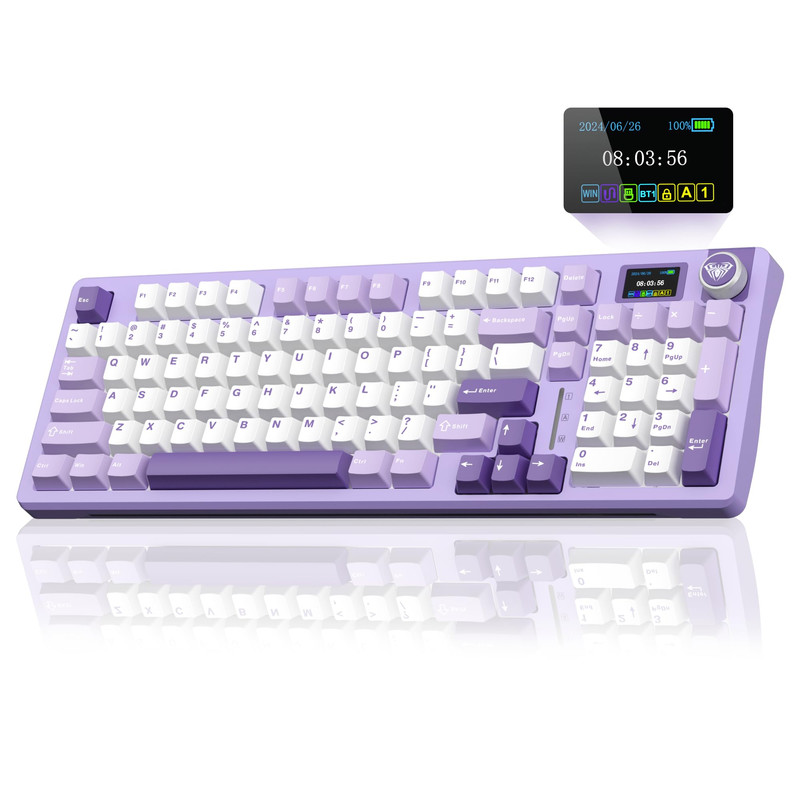
2. AULA S98 Pro Wireless Mechanical Gaming Keyboard with Screen, Knob, 96 Keys
Short Description
The AULA S98 Pro is a compact mechanical gaming keyboard featuring a 96-key layout, wireless connectivity, and an integrated control knob.
It is a close alternative to a traditional 98-key keyboard and makes sense for gamers who want to retain essential full-size functionality while reducing their keyboard's footprint.
Key Specifications
- 96-key compact layout.
- Wireless mechanical keyboard.
- Tri-mode Bluetooth 5.0, 2.4GHz, and USB-C connectivity.
- RGB backlighting.
- Dedicated control knob.
- LCD screen.
- Hot-swappable 3-pin and 5-pin switches.
- Gasket-style construction.
- Sound-absorbing pads.
- Custom linear mechanical switches.
Pros
- Compact layout with number pad functionality.
- Multiple connectivity options.
- Hot-swappable switches.
- Integrated control knob.
- Customizable RGB lighting.
- Screen for additional functionality.
Cons
- The 96-key arrangement may require an adjustment period.
- Wireless settings can take some time to configure.
- The display may be unnecessary for gamers who prefer simple keyboards.
My Experience
What I like about the AULA S98 Pro is its combination of practical features.
The compact layout provides a useful balance between gaming and productivity. The dedicated knob is convenient for adjusting settings, while hot-swappable switches provide opportunities to customize the typing experience.
The three connectivity options also make it suitable for people who use multiple devices.
For gaming, I would prioritize its 2.4GHz connection or USB-C wired mode rather than relying on Bluetooth.
What Other Buyers Say
Customer feedback on the manufacturer's product page highlights the RGB customization, satisfying typing sound, and overall keyboard feel. Some buyers also mention that the instructions for configuring certain functions could be clearer.
Best For
- Gamers who want a customizable keyboard.
- People who enjoy mechanical keyboards.
- Users who switch between multiple devices.
- Gaming and everyday productivity.
➤➤➤ Click Here to Check Price on Amazon
➡️➡️➡️ Explore User Feedback and Current Pricing on Amazon
3. AULA F99 Pro Wireless Mechanical Keyboard with Number Pad, Knob, 99 Keys

Short Description
The AULA F99 Pro is a strong option for gamers who want a compact mechanical keyboard with a dedicated number pad.
Its 99-key layout provides a practical alternative to conventional full-size keyboards. It also includes wireless connectivity, RGB lighting, and customization features.
Key Specifications
- 99-key layout.
- Wireless mechanical keyboard.
- Number pad.
- Dedicated multimedia control knob.
- Gasket-mounted construction.
- Hot-swappable mechanical switches.
- Pre-lubricated linear switches.
- Tri-mode connectivity.
- RGB backlighting.
- 8000mAh battery.
Pros
- Retains number pad functionality.
- Compact design.
- Hot-swappable switches.
- Multiple connectivity options.
- Dedicated control knob.
- Large battery capacity.
Cons
- The compact layout requires some familiarization.
- RGB keycap visibility may depend on the keycap design.
- Wireless features require occasional charging.
My Experience
I particularly like the balance between functionality and customization offered by the AULA F99 Pro.
The dedicated number pad is useful for players who also work with spreadsheets, creative applications, or productivity software.
Its gasket-mounted construction and pre-lubricated switches are attractive features for people who prefer a smoother mechanical typing experience.
For gaming, the 2.4GHz wireless connection provides a practical cable-free option, while USB-C remains useful for uninterrupted wired sessions.
What Other Buyers Say
Recurring customer feedback on the manufacturer's product listings highlights the keyboard's solid construction, enjoyable typing feel, and RGB lighting options. Buyers also appreciate the compact design and number pad combination.
Best For
- Gamers who also work at their computers.
- MMO and RPG players.
- Users who need a number pad.
- People interested in wireless mechanical keyboards.
➤➤➤ Click Here to Check Price on Amazon
➡️➡️➡️ Explore User Feedback and Current Pricing on Amazon
4. SOLAKAKA KI99 Pro 96% Wireless Mechanical Keyboard, RGB Gaming Keyboard, Hot-Swappable Pre-Lubed Switches, Gasket Structure Creamy Keyboards (Gradient-Black, Non-Silent Version)

Short Description
The SOLAKAKA KI99 Pro is a close alternative for gamers looking for a compact keyboard with a number pad, wireless connectivity, and customizable mechanical switches.
Its 96% arrangement helps reduce desk space requirements while preserving important keys for gaming and everyday use.
Key Specifications
- 96% compact layout.
- Wireless mechanical keyboard.
- RGB backlighting.
- Hot-swappable switches.
- Pre-lubricated mechanical switches.
- Gasket-mounted construction.
- PBT keycaps.
- 10,000mAh battery.
- 2.4GHz wireless connectivity.
- Bluetooth and wired connectivity.
Pros
- Practical compact layout.
- Large battery capacity.
- Hot-swappable mechanical switches.
- Gasket-mounted design.
- PBT keycaps.
- Wireless flexibility.
Cons
- Software customization may be relatively basic.
- Stabilizers may not satisfy every mechanical keyboard enthusiast.
- Not designed for people who prefer silent switches in this particular version.
My Experience
The SOLAKAKA KI99 Pro is appealing because it focuses on features that matter during everyday gaming.
I particularly like the combination of a compact layout, PBT keycaps, and hot-swappable switches.
The larger battery is another advantage for people who prefer wireless peripherals.
Its gasket structure is also worth considering if you want a more cushioned typing experience rather than the harder feel of a conventional mechanical keyboard.
What Other Buyers Say
Available product feedback and published reviews emphasize the comfortable typing experience, wireless performance, battery capacity, and overall feature selection. Software customization and stabilizer refinement are areas worth considering before purchasing.
Best For
- Wireless gaming setups.
- Gamers who want a number pad.
- Mechanical keyboard enthusiasts.
- Users who enjoy customizing switches and keycaps.
➤➤➤ Click Here to Check Price on Amazon
➡️➡️➡️ Explore User Feedback and Current Pricing on Amazon
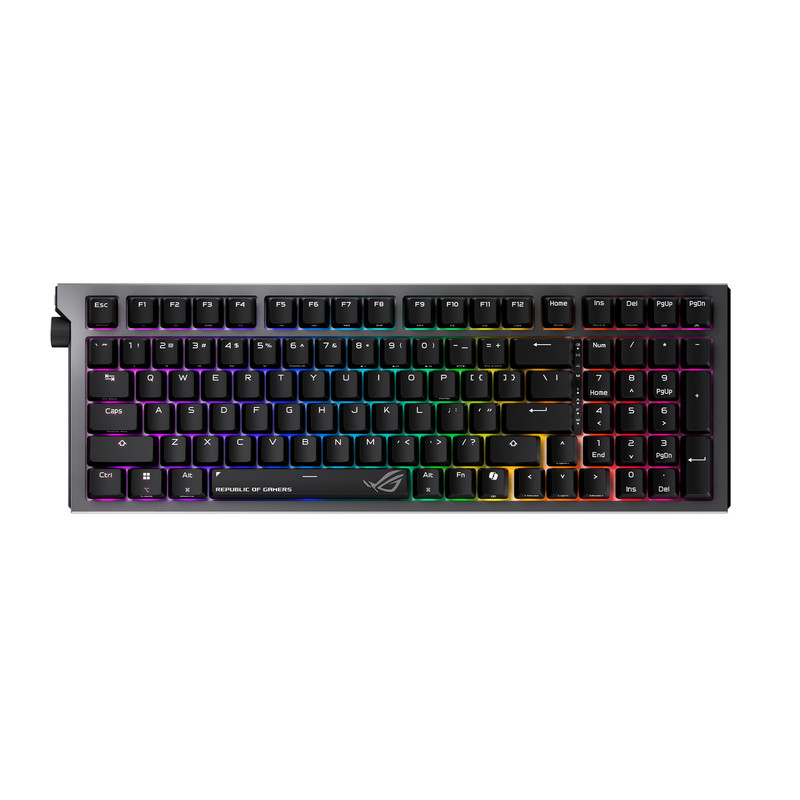
5. ASUS ROG Strix Morph 96 Wireless Mechanical Gaming Keyboard - 96% Full-Size
Short Description
The ASUS ROG Strix Morph 96 is another compact full-size-style gaming keyboard worth considering.
Its 96% layout makes it relevant to gamers who want a smaller footprint without moving to a tenkeyless or 60% keyboard.
It is a close alternative rather than an exact 98-key match.
Key Specifications
- 96% full-size layout.
- Wireless mechanical gaming keyboard.
- ASUS ROG gaming product family.
- Compact keyboard arrangement.
Pros
- Space-saving layout.
- Gaming-focused product positioning.
- Retains more functionality than smaller keyboard formats.
- Interesting option for ROG-oriented gaming setups.
Cons
- Not an exact 98-key layout.
- Detailed switch and battery specifications should be confirmed for the particular listing.
- May not be the best option for buyers seeking extensive customization information.
My Experience
I would consider the ASUS ROG Strix Morph 96 for someone who wants a compact gaming keyboard rather than a traditional full-size model.
The main advantage of this category is the balance between desk space and functionality.
For competitive gaming, I would pay particular attention to the connection mode, switch characteristics, and software support before choosing this keyboard.
It is important to verify the exact configuration rather than assuming that every 96% keyboard offers identical features.
What Other Buyers Say
I could not establish a sufficiently consistent body of buyer feedback for this exact model to identify reliable recurring strengths or weaknesses. I would therefore compare the actual product specifications and seller information before purchasing.
Best For
- ASUS ROG-oriented gaming setups.
- Gamers considering a 96% layout.
- Players who want more keys than a TKL keyboard.
- Compact desktop configurations.
➤➤➤ Click Here to Check Price on Amazon
➡️➡️➡️ Explore User Feedback and Current Pricing on Amazon
6. KR110 Wireless Keyboard, 98-Key Gaming Keyboard with Display, Green

Short Description
The KR110 is an interesting alternative for gamers searching specifically for a 98-key wireless keyboard with a display.
Its product listing identifies the compact layout and integrated display as its main distinguishing features.
It is worth considering if you prefer a visually distinctive keyboard instead of a conventional gaming design.
Key Specifications
- 98-key layout.
- Wireless keyboard.
- Integrated display.
- Green color variant.
- Gaming-oriented keyboard design.
Pros
- Exact 98-key category.
- Wireless design.
- Integrated display.
- Distinctive appearance.
- Compact alternative to a conventional full-size keyboard.
Cons
- Detailed switch specifications are not established by the available product information.
- Battery capacity is not confirmed.
- RGB capabilities and polling rate should be verified before purchase.
- Limited verified buyer feedback.
My Experience
The KR110 stands out because it directly targets people searching for a 98-key keyboard with an integrated display.
I like the idea of having a compact arrangement while retaining the essential functionality of a larger keyboard.
However, I would be more cautious about this model than the GravaStar or AULA alternatives because detailed technical specifications are less established.
Before purchasing, I would verify the switch type, connection options, display functionality, and gaming compatibility.
What Other Buyers Say
I could not verify enough recurring customer feedback for this exact model to make reliable claims about long-term durability, typing feel, or gaming responsiveness.
Best For
- Gamers specifically looking for a 98-key layout.
- Users interested in integrated keyboard displays.
- People who prefer wireless peripherals.
- Buyers considering alternative compact keyboard designs.
➤➤➤ Click Here to Check Price on Amazon
➡️➡️➡️ Explore User Feedback and Current Pricing on Amazon
How to Choose the Right 98 Gaming Keyboard
Before buying a compact gaming keyboard, I recommend considering several important factors.
1. Keyboard Layout
A 98% keyboard is designed to retain the number pad and important navigation keys while reducing the overall footprint.
However, not every manufacturer uses exactly the same arrangement.
Check whether the keyboard includes:
- Dedicated arrow keys.
- Full number pad.
- Function keys.
- Navigation keys.
- Convenient spacing between key groups.
A 96% or 99-key model can also be a suitable alternative.
2. Mechanical Switches
Switch type directly influences how a keyboard feels.
Common options include:
- Linear switches: Smooth keystrokes without a tactile bump.
- Tactile switches: Provide noticeable feedback during key presses.
- Clicky switches: Produce audible feedback.
For competitive FPS gaming, I generally favor smooth linear switches because they offer consistent movement inputs.
3. Wireless vs. Wired Connectivity
Wireless keyboards offer a cleaner desk setup, while wired keyboards provide continuous power without battery concerns.
Look for:
- USB-C wired connectivity.
- 2.4GHz wireless connectivity.
- Bluetooth connectivity.
- Reliable wireless receiver support.
For competitive gaming, 2.4GHz or wired connectivity is generally preferable to Bluetooth.
4. RGB Lighting
RGB lighting is a popular feature for gaming setups.
Look for per-key customization, adjustable brightness, different lighting effects, and software support.
However, I would prioritize switch quality and connectivity over decorative lighting.
5. Hot-Swappable Switches
Hot-swappable keyboards let you replace compatible switches without soldering.
This is particularly useful if you want to experiment with different switch types or replace a faulty switch.
Always check the supported switch compatibility before purchasing replacement switches.
6. Build Quality and Ergonomics
A good gaming keyboard should feel comfortable during extended sessions.
Consider:
- Case construction.
- Keycap material.
- Stabilizer quality.
- Keyboard weight.
- Adjustable feet.
- Wrist-rest compatibility.
- Desk space requirements.
A compact keyboard can also give your mouse more room, which is especially useful for low-sensitivity FPS gaming.
FAQs
1. Is a 98% keyboard good for gaming?
Yes. A 98% keyboard offers most of the functionality of a full-size keyboard while taking up less desk space. It is suitable for FPS, MMO, RPG, and productivity use.
2. Is a 98% keyboard better than a 75% keyboard?
It depends on your needs. A 98% keyboard retains the number pad and more dedicated keys, while a 75% keyboard saves additional desk space.
3. Are wireless 98 gaming keyboards good for competitive gaming?
Yes, particularly models with reliable 2.4GHz wireless connectivity. Wired connections are also excellent for competitive gaming.
4. Should I choose linear or tactile switches for gaming?
Linear switches are a popular choice for gaming because of their smooth keystrokes. Tactile switches are worth considering if you prefer additional physical feedback.
5. What is the best 98 gaming keyboard for 2026?
My top choice is the GravaStar Mercury K98 Pro because of its 98-key layout, aluminum construction, 8000Hz polling, tri-mode connectivity, and customizable display.
Conclusion
Choosing the best 98 gaming keyboard for 2026 comes down to balancing gaming responsiveness, comfort, customization, and desk space.
Here are my final recommendations:
- Best Overall: GravaStar Mercury K98 Pro — An impressive combination of premium construction, 98-key functionality, wireless connectivity, and gaming features.
- Best Value: AULA S98 Pro — A compelling compact mechanical keyboard with hot-swappable switches, a display, and multiple connection options.
- Best Premium Alternative: AULA F99 Pro — An attractive choice for gamers who want a number pad, wireless connectivity, and extensive customization.
Ultimately, I would start with the GravaStar Mercury K98 Pro if performance features and premium design are your priorities. If you want a more practical balance of gaming and everyday use, the AULA S98 Pro and F99 Pro deserve a closer look.