Choosing the best gaming keyboard for PS5 in 2026 can make gaming, chatting, and navigating your console more convenient. Whether you enjoy competitive shooters, online multiplayer games, or simply want a better typing experience, the right keyboard can improve your setup.
However, not every gaming keyboard offers the same experience on PlayStation 5. Connection type, key responsiveness, layout, build quality, and console compatibility are important factors to consider.
In this guide, I'll cover six gaming keyboards worth considering, including mechanical, compact, wireless, and budget-friendly options.
Quick Summary
For PS5 owners who want a premium mechanical keyboard, the Corsair K70 CORE RGB is my leading choice because of its linear switches and dedicated PlayStation compatibility mode. The SteelSeries Apex 7 is another attractive mechanical option, while the Redragon K552 offers a simpler wired alternative. If you prefer wireless convenience, the AULA and LED keyboard options are worth exploring.
Top 6 Best Gaming Keyboard for PS5
- Corsair K70 CORE RGB Mechanical Wired Gaming Keyboard — Best overall.
- SteelSeries Apex 7 Mechanical Gaming Keyboard – OLED Smart Display – USB Passthrough and Media Controls – Linear , Quiet – RGB Backlit (Red Switch) — Best premium mechanical option.
- Redragon K552 Mechanical Keyboard, LED Gaming Keyboard with Red Switches — Best budget mechanical option.
- AULA F99 Pro Wireless Mechanical Keyboard with Number Pad, Knob, 99 Keys — Best full-layout wireless option.
- AULA S98 Pro Wireless Mechanical Gaming Keyboard with Screen, Knob, 96 Keys — Best feature-rich wireless option.
- LED Light Up keyboards, Wireless Gaming Mouse and Keyboard for Xbox PS4 PS5 PC Laptop — Best PS5-focused budget combo.
Top 6 Best Gaming Keyboard for PS5 for 2026
1. Corsair K70 CORE RGB Mechanical Wired Gaming Keyboard
 Best OverallShort Description
The Corsair K70 CORE RGB is an excellent option for gamers who prefer mechanical switches and a traditional full-size gaming keyboard. It combines linear switches, customizable RGB lighting, and convenient media controls.
It is particularly interesting for PS5 users because its documentation includes a dedicated PlayStation connection mode.
Key Specifications
- Pre-lubed MLX Red linear mechanical switches.
- 1000Hz polling rate.
- Double-shot ABS keycaps.
- RGB backlighting.
- Sound-dampening construction.
- Media control dial.
- Wired USB connectivity.
- Dedicated PlayStation support mode.
Pros
- Smooth linear mechanical switches.
- Dedicated PlayStation compatibility mode.
- Convenient media controls.
- Sound-dampening design.
- Customizable RGB lighting.
Cons
- Wired design limits placement flexibility.
- Full-size layout takes up desk space.
- Some advanced customization may require a computer.
My Experience
I consider the K70 CORE a particularly sensible choice for gamers who want a straightforward mechanical keyboard rather than relying on complicated wireless configurations.
Its linear switches are suited to users who prefer smooth key movement. The dedicated PlayStation mode also makes it more appealing than keyboards that only advertise general PC compatibility.
What Other Buyers Say
I couldn't establish sufficiently consistent buyer-feedback themes to make specific claims about long-term reliability or customer satisfaction.
Best For
PS5 players looking for a premium wired mechanical keyboard with documented PlayStation support.
➡️➡️➡️ Explore User Feedback and Current Pricing on Amazon
2. SteelSeries Apex 7 Mechanical Gaming Keyboard
 Best Premium ChoiceShort Description
The SteelSeries Apex 7 is designed for gamers who appreciate mechanical switches, additional controls, and a premium desktop setup.
Its integrated OLED smart display makes it stand out from more traditional gaming keyboards.
Key Specifications
- Mechanical red linear switches.
- OLED smart display.
- RGB backlighting.
- USB passthrough.
- Dedicated media controls.
- Wired USB connection.
Pros
- Mechanical linear switches.
- Useful OLED display.
- Convenient media controls.
- RGB customization.
- Tenkeyless and full-size Apex 7 versions are available in the product family.
Cons
- Requires more desk space than compact keyboards if using the full-size version.
- OLED and advanced customization features are primarily PC-oriented.
- Premium-style features may be unnecessary for casual PS5 users.
My Experience
What makes the Apex 7 interesting is its combination of mechanical typing and additional functionality.
For a console gaming setup, I would prioritize its basic USB keyboard functionality rather than expecting every OLED or software feature to work on PS5.
The Apex series also appears in published PS5 keyboard compatibility lists, although individual features can vary.
What Other Buyers Say
I don't have sufficiently verified recurring buyer comments to identify reliable long-term satisfaction or durability trends for this particular listing.
Best For
Gamers who want a premium mechanical keyboard that can also complement a PC gaming setup.
➡️➡️➡️ Explore User Feedback and Current Pricing on Amazon
3. Redragon K552 Mechanical Keyboard
 Best Budget MechanicalShort Description
The Redragon K552 is a compact mechanical gaming keyboard designed for gamers who want physical mechanical switches without choosing an expensive premium model.
Its straightforward wired design makes it an interesting option for PS5 players who want a simple keyboard connection.
Key Specifications
- Mechanical red switches.
- LED backlighting.
- Wired USB connectivity.
- Compact tenkeyless-style layout.
- 87-key configuration for the standard K552 model.
Pros
- Mechanical key switches.
- Compact footprint.
- Wired connection.
- LED illumination.
- Straightforward design.
Cons
- No wireless connectivity.
- No dedicated OLED display.
- Compact layout lacks a dedicated number pad.
- Exact switch and lighting configurations can vary by version.
My Experience
I like the practical approach of the K552. It focuses on essential mechanical keyboard functionality rather than unnecessary extras.
For PS5 gaming, a wired keyboard is often a convenient starting point because there is no need to manage a separate wireless pairing process.
Its compact layout also leaves additional room for a mouse, making it attractive for smaller gaming desks.
What Other Buyers Say
I couldn't verify consistent recurring buyer-feedback patterns for this exact listing, so I would avoid assuming that every K552 version offers identical typing or durability characteristics.
Best For
Budget-conscious PS5 gamers who prefer a compact wired mechanical keyboard.
➡️➡️➡️ Explore User Feedback and Current Pricing on Amazon
4. AULA F99 Pro Wireless Mechanical Keyboard with Number Pad, Knob, 99 Keys
 Best Wireless LayoutShort Description
The AULA F99 Pro is an interesting choice for gamers who want a wireless mechanical keyboard with a more complete layout.
Its 99-key configuration provides a number pad while maintaining a more compact footprint than many traditional full-size keyboards.
Key Specifications
- 99-key layout.
- Wireless mechanical keyboard.
- Dedicated number pad.
- Control knob.
- RGB lighting.
- Product listing identifies it as a mechanical gaming keyboard.
Pros
- Convenient wireless design.
- Number pad included.
- Control knob for additional convenience.
- More compact than many traditional full-size layouts.
- Attractive RGB gaming aesthetic.
Cons
- Wireless compatibility should be checked before purchasing.
- Advanced customization may require PC software.
- More features than some casual console players need.
My Experience
The biggest attraction for me is the layout. A 99-key keyboard offers a useful compromise between a compact gaming keyboard and a traditional full-size model.
The wireless design can also help keep a gaming desk organized.
However, I would confirm the exact connection mode supported by the PS5 before purchasing. A keyboard supporting Bluetooth and wireless connectivity does not automatically guarantee that every connection mode works with the console.
What Other Buyers Say
I couldn't establish reliable recurring buyer-feedback themes for this exact configuration, particularly regarding wireless performance on PS5.
Best For
Gamers who want a wireless mechanical keyboard with a number pad for mixed gaming and everyday use.
➡️➡️➡️ Explore User Feedback and Current Pricing on Amazon
5. AULA S98 Pro Wireless Mechanical Gaming Keyboard with Screen, Knob, 96 Keys
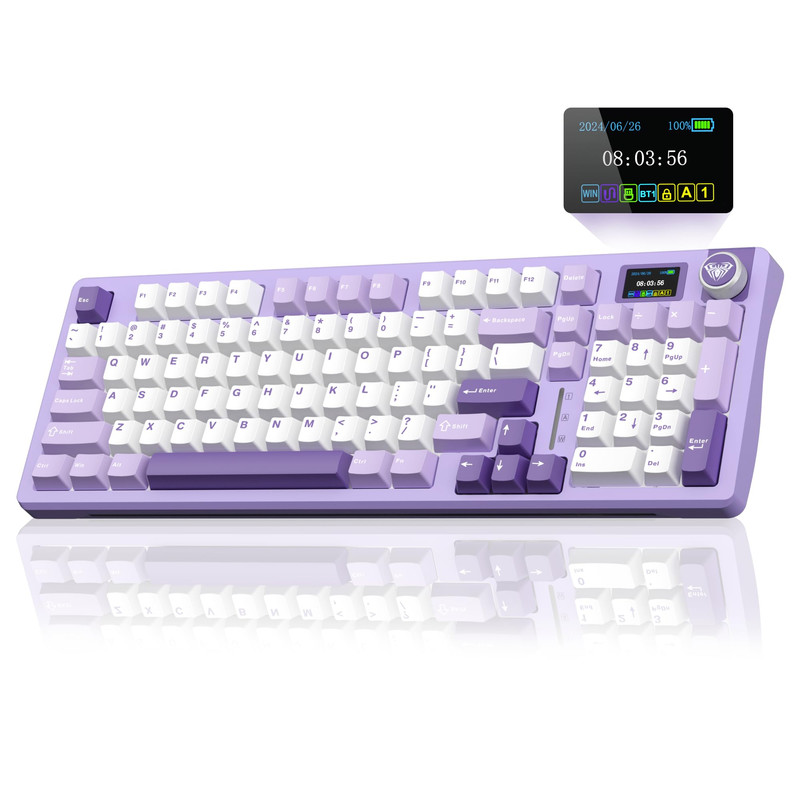 Best Feature-Rich OptionShort Description
The AULA S98 Pro is another appealing wireless mechanical keyboard for gamers who enjoy additional controls and a modern keyboard design.
Its 96-key configuration, screen, and control knob make it an interesting alternative to traditional mechanical keyboards.
Key Specifications
- 96-key layout.
- Wireless mechanical design.
- Integrated screen.
- Control knob.
- Gaming-oriented keyboard design.
Pros
- Compact 96-key layout.
- Integrated screen.
- Convenient control knob.
- Wireless design.
- Interesting desktop aesthetic.
Cons
- PS5 compatibility should be confirmed for the exact connection mode.
- Screen functionality may depend on software.
- Fewer keys than a conventional full-size keyboard.
My Experience
I find the S98 Pro appealing because it combines a relatively compact layout with features normally associated with more elaborate mechanical keyboards.
For a PS5 setup, the most important consideration is whether the basic keyboard functions work correctly. I wouldn't purchase it solely for its screen or software-dependent customization.
What Other Buyers Say
I don't have enough verified recurring buyer feedback to make specific claims about the screen's reliability, wireless stability, or long-term durability.
Best For
Players who want a stylish wireless mechanical keyboard with additional controls and a compact layout.
➡️➡️➡️ Explore User Feedback and Current Pricing on Amazon
6. LED Light Up keyboards, Wireless Gaming Mouse and Keyboard for Xbox PS4 PS5 PC Laptop
 Best PS5-Focused ComboShort Description
This wireless keyboard and mouse combination is specifically marketed for Xbox, PS4, PS5, and PC users.
For gamers who want both input devices in one package, it is an option worth investigating.
Unlike the other products in this list, it is a keyboard-and-mouse bundle rather than an individual mechanical keyboard.
Key Specifications
- Wireless keyboard and mouse combination.
- LED lighting.
- PS5 listed among supported platforms in the product name.
- Also marketed for Xbox, PS4, PC, and laptops.
Pros
- Keyboard and mouse combination.
- Wireless design.
- LED illumination.
- Explicit PS5 marketing.
- Convenient option for users seeking two peripherals together.
Cons
- Exact keyboard switch type is not specified.
- Wireless connection method needs verification.
- Detailed key rollover information is unavailable.
- Gaming performance depends on individual game compatibility.
My Experience
I would consider this combination for someone building a basic console gaming setup without wanting to purchase a keyboard and mouse separately.
Its biggest advantage is convenience.
However, I would check the receiver connection, keyboard layout, and mouse compatibility before buying. Marketing a product for PS5 does not mean every PS5 game supports keyboard and mouse controls.
What Other Buyers Say
I couldn't verify recurring buyer-feedback themes for this exact bundle, so I would check recent customer comments about connection stability and build quality before making a purchase.
Best For
PS5 owners looking for an affordable keyboard-and-mouse combination for compatible games and everyday console navigation.
➡️➡️➡️ Explore User Feedback and Current Pricing on Amazon
How to Choose the Right Gaming Keyboard for PS5
Before choosing a keyboard, I recommend considering the following factors.
1. PS5 Compatibility
This is the most important consideration.
Sony supports USB and Bluetooth keyboards at the system level, but not every device is guaranteed to work.
Additionally, individual games must support keyboard input for gameplay. Connecting a keyboard does not automatically allow you to play every PS5 game using it.
2. Wired vs. Wireless
Both connection types have advantages.
- Wired keyboards: Simple USB connections and no battery charging.
- Wireless keyboards: More flexibility and fewer cables.
- 2.4GHz wireless: Typically connects through a USB receiver.
- Bluetooth: Can be paired through the PS5 Bluetooth accessories menu when supported.
For gaming, I generally favor a straightforward wired USB connection when compatibility is the priority.
3. Mechanical vs. Membrane
Mechanical keyboards use individual mechanical switches, while membrane keyboards use a different key activation mechanism.
Mechanical keyboards are worth considering if you prefer distinct key feedback and a more traditional mechanical typing experience.
Membrane keyboards can be attractive if you prefer quieter operation and simpler designs.
4. Keyboard Layout
Consider how much desk space you have.
- 60%: Very compact.
- 75%: Compact with additional functionality.
- TKL: Removes the number pad.
- 96%: Retains most full-size functionality in a smaller footprint.
- Full-size: Includes a dedicated number pad.
5. Build Quality and Ergonomics
Look for comfortable key spacing, a stable base, durable keycaps, and a suitable typing angle.
If you regularly play for extended periods, comfort can matter just as much as additional gaming features.
6. Game Compatibility
Before buying, check whether your favorite games actually support keyboard and mouse input on PS5.
This is especially important for competitive shooters and multiplayer games.
FAQs
1. Can I use any gaming keyboard on PS5?
Not necessarily. PS5 supports USB and Bluetooth keyboards at the system level, but Sony notes that not every device works with the console.
2. Are mechanical keyboards good for PS5 gaming?
Yes, provided the keyboard is compatible with the console and the game supports keyboard input. Mechanical switches can provide satisfying tactile or linear feedback.
3. Is a wired or wireless keyboard better for PS5?
Wired USB keyboards are often the simpler option. Wireless keyboards offer more flexibility but require checking connection compatibility.
4. Can I play Fortnite on PS5 with a gaming keyboard?
Fortnite supports keyboard and mouse gameplay on PS5. However, support varies between games, so check the individual game's settings.
5. Do RGB gaming keyboards work on PS5?
Basic keyboard input may work even if advanced RGB customization does not. Many lighting controls and software features are designed primarily for PC.
Conclusion
Choosing the best gaming keyboard for PS5 in 2026 comes down to your preferred layout, connection type, typing experience, and gaming requirements.
Here are my final recommendations:
- Best Overall: Corsair K70 CORE RGB Mechanical Wired Gaming Keyboard. Its linear mechanical switches and dedicated PlayStation mode make it my strongest overall choice.
- Best Value: Redragon K552 Mechanical Keyboard. A straightforward wired mechanical option for budget-conscious gamers.
- Best Premium Choice: SteelSeries Apex 7 Mechanical Gaming Keyboard. An attractive option for gamers who appreciate mechanical switches, an OLED display, and additional controls.
If wireless convenience matters more, consider the AULA F99 Pro or AULA S98 Pro.
Most importantly, check PS5 connection compatibility and individual game support before purchasing. A good keyboard should fit your gaming habits rather than simply offer the most features.