Introduction
The best gaming keyboard software for 2026 can make a major difference in how you customize your gaming experience. Whether you're playing competitive FPS games, exploring RPGs, or streaming, the right software helps you configure macros, customize RGB lighting, remap keys, and manage gaming profiles.
However, gaming keyboard software is usually designed for specific keyboards rather than being universally compatible. That's why choosing the right keyboard and its companion software matters.
In this guide, I'll compare six gaming keyboards with software customization options, including Razer Synapse, Corsair iCUE, Logitech G HUB, SteelSeries GG, ASUS Gear Link, and Redragon's configuration software.
I'll focus on functionality, compatibility, convenience, and value without claiming hands-on testing.
Quick Summary
For gamers who want advanced customization, I recommend the Razer BlackWidow V4 X with Razer Synapse as my Best Overall choice. Logitech G915 X LIGHTSPEED is an excellent premium wireless alternative with G HUB, while Redragon K580 is worth considering for gamers prioritizing affordable macro customization. The other options offer different strengths, including OLED controls, RGB integration, and browser-based configuration.
Top Product List
- Razer BlackWidow V4 X Mechanical Gaming Keyboard, Yellow Switches, Black — Best for Overall Keyboard Software Customization
- Corsair K70 CORE RGB Mechanical Wired Gaming Keyboard with Palmrest – Black — Best for RGB Customization with Corsair iCUE
- Logitech G915 X LIGHTSPEED Wireless Gaming Keyboard, Mechanical Keyboard — Best for Premium Wireless Gaming and G HUB
- SteelSeries USB Apex 5 Hybrid Mechanical Gaming Keyboard – Per-Key RGB Illumination – Aircraft Grade Aluminum Alloy Frame – OLED Smart Display (Hybrid Blue Switch) — Best for OLED Display and Gaming Profiles
- ASUS ROG Strix Morph 96 Wireless Mechanical Gaming Keyboard - 96% Full-Size — Best for Browser-Based Keyboard Customization
- Redragon K580 Wired RGB Mechanical Gaming Keyboard, Macro Key & Media Wheel — Best for Budget-Friendly Macro Programming
Top 6 Best Gaming Keyboard Software for 2026
Razer BlackWidow V4 X Mechanical Gaming Keyboard, Yellow Switches, Black

Short Description
The Razer BlackWidow V4 X is a full-size mechanical gaming keyboard designed for users who want extensive control over their keys and RGB lighting.
Its companion software, Razer Synapse 4, offers key remapping, macro programming, and lighting customization through the Razer Chroma ecosystem.
Key Specifications
- Switches: Razer Yellow mechanical switches
- Layout: Full-size
- Connectivity: Wired USB
- Lighting: Razer Chroma RGB
- Software: Razer Synapse 4
- Dedicated macro keys: Six
- Polling rate: Up to 1,000 Hz
Pros
- Extensive macro customization
- Per-key RGB lighting controls
- Dedicated programmable macro keys
- Integration with Razer Chroma devices
Cons
- Wired-only connection
- Full-size design requires more desk space
- Advanced customization depends on companion software
My Experience
Based on its specifications, I consider the BlackWidow V4 X especially appealing for gamers who frequently switch between games requiring different controls.
I particularly like the combination of dedicated macro keys and Synapse customization. It offers more practical flexibility than relying entirely on complicated key combinations.
What Other Buyers Say
I couldn't establish a reliable recurring buyer-feedback pattern for this exact listing. Its verified features make it worth considering, but I recommend checking recent owner feedback about switch feel and software reliability.
Best For
Competitive gamers, MMO players, and users who want extensive macro programming and synchronized RGB lighting.
➡️➡️➡️ Explore User Feedback and Current Pricing on Amazon
Corsair K70 CORE RGB Mechanical Wired Gaming Keyboard with Palmrest – Black

Short Description
The Corsair K70 CORE RGB is a mechanical gaming keyboard built for users who appreciate customizable lighting, configurable keys, and comfortable everyday gaming.
Its major software advantage is Corsair iCUE, which lets users control compatible Corsair peripherals through one interface.
Key Specifications
- Keyboard type: Mechanical
- Connection: Wired USB
- Layout: Full-size
- RGB: Customizable through iCUE
- Software: Corsair iCUE
- Accessories: Palm rest
- Customization: Macros, profiles, and lighting
Pros
- Centralized software for compatible Corsair devices
- Customizable RGB effects
- Onboard settings support
- Included palm rest
Cons
- No wireless functionality
- Advanced features require iCUE
- Full-size layout may not suit compact desks
My Experience
What attracts me most to the K70 CORE is how iCUE can simplify managing multiple Corsair accessories.
For someone building a coordinated RGB setup, controlling keyboard lighting and other compatible components from one application is a meaningful convenience.
What Other Buyers Say
I couldn't verify a consistent pattern of buyer comments for this exact listing. I'd check recent reviews for typing comfort, stabilizer sound, and iCUE stability before purchasing.
Best For
Gamers building Corsair-based setups who want customizable lighting, macros, and convenient software integration.
➡️➡️➡️ Explore User Feedback and Current Pricing on Amazon
Logitech G915 X LIGHTSPEED Wireless Gaming Keyboard, Mechanical Keyboard

Short Description
The Logitech G915 X LIGHTSPEED is a premium low-profile mechanical gaming keyboard offering wireless flexibility and advanced customization using Logitech G HUB.
Its KEYCONTROL technology supports extensive key remapping and layered functions, making it useful for gaming and productivity.
Key Specifications
- Switch type: Low-profile mechanical
- Connectivity: LIGHTSPEED wireless, Bluetooth, and wired USB
- Layout: Full-size
- Lighting: LIGHTSYNC RGB
- Software: Logitech G HUB
- Customization: KEYCONTROL
- Controls: Dedicated media controls
Pros
- Three connection methods
- Advanced key remapping
- Low-profile keyboard design
- Wireless convenience
- Customizable RGB lighting
Cons
- Premium positioning
- Full-size footprint
- Configuration features depend on G HUB
My Experience
From a software perspective, G HUB's KEYCONTROL system is the feature I find most interesting.
Its layered key assignments can be especially useful for gamers who also use their keyboards for editing, streaming, and productivity.
I would favor this keyboard for a clean wireless setup where customization remains important.
What Other Buyers Say
I couldn't substantiate recurring buyer feedback specifically for this listing. Buyers should examine recent reports about wireless reliability, battery life, and G HUB updates.
Best For
Premium PC gaming setups, wireless enthusiasts, and gamers who frequently switch between gaming and productivity tasks.
➡️➡️➡️ Explore User Feedback and Current Pricing on Amazon
SteelSeries USB Apex 5 Hybrid Mechanical Gaming Keyboard – Per-Key RGB Illumination – Aircraft Grade Aluminum Alloy Frame – OLED Smart Display (Hybrid Blue Switch)

Short Description
The SteelSeries Apex 5 combines hybrid mechanical switches, an OLED Smart Display, and customizable RGB lighting.
SteelSeries GG Engine provides settings for compatible device profiles, macros, key assignments, and display customization.
Key Specifications
- Switches: Hybrid Blue
- Connection: Wired USB
- Lighting: Per-key RGB
- Display: OLED Smart Display
- Frame: Aluminum alloy
- Software: SteelSeries GG Engine
- Customization: Profiles, macros, and OLED settings
Pros
- Integrated OLED display
- Flexible RGB lighting
- Software-based profiles and macros
- Rigid metal top plate
Cons
- Hybrid switches are not traditional full-mechanical switches
- Wired-only design
- OLED functionality varies by application integration
My Experience
I find the Apex 5 particularly interesting because its software customization extends beyond lighting and macros.
The integrated OLED display gives users another way to access information and keyboard settings without constantly switching applications.
What Other Buyers Say
I couldn't verify consistent buyer feedback for this exact listing. I recommend looking for owner comments about Hybrid Blue switch noise and the usefulness of supported OLED integrations.
Best For
Gamers who enjoy hardware displays, custom profiles, RGB effects, and additional software-controlled functionality.
➡️➡️➡️ Explore User Feedback and Current Pricing on Amazon
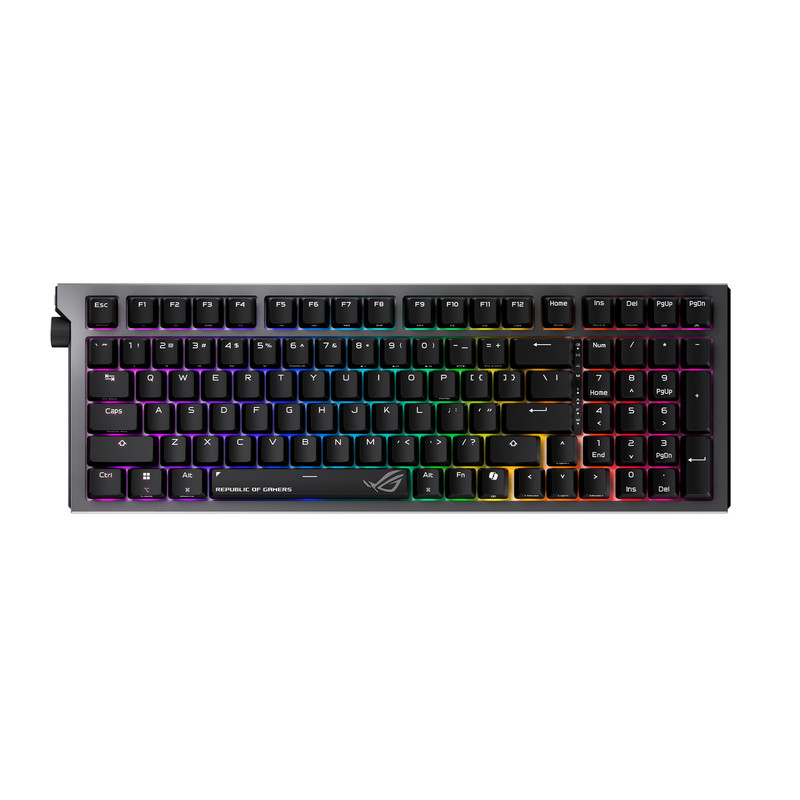
ASUS ROG Strix Morph 96 Wireless Mechanical Gaming Keyboard - 96% Full-Size
Short Description
The ASUS ROG Strix Morph 96 is a compact mechanical gaming keyboard that retains a number pad while reducing its overall footprint.
One of its most interesting advantages is support for ASUS Gear Link, a web-based customization tool that lets users adjust key assignments and lighting without installing a conventional desktop configuration suite.
Key Specifications
- Layout: 96%
- Switches: Mechanical
- Connectivity: 2.4 GHz wireless, Bluetooth, and USB-C
- Software: ASUS Gear Link
- Customization: Key assignments and lighting
- Switch support: Hot-swappable
- Design: Gasket-mounted structure
Pros
- Browser-based configuration
- Space-efficient full-function layout
- Multiple connectivity options
- Hot-swappable switches
Cons
- Less space-efficient than a TKL keyboard
- Lacks Hall-effect rapid-trigger functionality
- Some advanced features depend on supported software
My Experience
For me, the appeal is the combination of wireless flexibility and straightforward browser-based customization.
Gear Link could be especially convenient for users who prefer avoiding additional desktop software whenever possible.
What Other Buyers Say
Published reviewer feedback has praised its versatile connectivity, typing feel, and customization options. Criticisms include ABS keycaps, some case flex, and competition from less expensive keyboards offering comparable features.
Best For
Gamers wanting a nearly full-size keyboard with wireless connectivity and simpler software setup.
➡️➡️➡️ Explore User Feedback and Current Pricing on Amazon
Redragon K580 Wired RGB Mechanical Gaming Keyboard, Macro Key & Media Wheel

Short Description
The Redragon K580 is a wired mechanical gaming keyboard offering dedicated macro keys, RGB lighting, and physical media controls.
Its compatible Redragon software supports macro management and lighting customization, although its interface is more basic than some premium alternatives.
Key Specifications
- Keyboard type: Mechanical
- Connectivity: Wired
- Lighting: RGB backlighting
- Macro keys: Five dedicated keys
- Media control: Multifunction wheel
- Software: Redragon K580 configuration utility
- Profiles: Three software profiles
Pros
- Dedicated macro keys
- On-keyboard macro recording
- RGB customization
- Convenient media wheel
- Practical alternative to premium software ecosystems
Cons
- Basic configuration software
- Wired-only connection
- Software profiles may be less convenient to manage
My Experience
I like the K580's emphasis on practical customization without making software installation mandatory for every adjustment.
Its onboard macro recording provides an alternative when users prefer immediate control over opening another configuration application.
What Other Buyers Say
Published review feedback has praised its onboard controls and customization options. However, software limitations have also been reported, including inconvenient profile switching and occasional configuration issues.
Best For
Budget-conscious PC gamers who want macro keys, RGB settings, and useful hardware controls without paying for a premium keyboard ecosystem.
➡️➡️➡️ Explore User Feedback and Current Pricing on Amazon
How to Choose the Right PC Gaming Product
When comparing gaming keyboard software in 2026, I recommend considering the following factors.
1. Software compatibility
Confirm that the exact keyboard supports the configuration application you want. Razer Synapse, Logitech G HUB, Corsair iCUE, and SteelSeries GG are designed around compatible hardware ecosystems.
2. Macro customization
Look for programmable keys, multiple profiles, and useful shortcut options. MMO and RPG players may benefit particularly from dedicated macro keys, provided the game permits their use.
3. RGB customization
If lighting matters, prioritize per-key lighting, customizable effects, and synchronization with your existing peripherals.
4. Connection and performance
Wired keyboards avoid wireless battery management. Wireless models provide more flexibility, but connection modes, polling behavior, and latency capabilities vary by product.
5. Form factor and ergonomics
Full-size keyboards provide number pads and additional controls. Compact 96%, TKL, and 60% designs free desk space. Wrist rests and low-profile switches can affect long-session comfort.
6. Software convenience and durability
Check whether the software supports your operating system, whether profiles can be saved onboard, and whether firmware updates are available. Also consider keycap materials, switch construction, and warranty support.
7. Value and upgradeability
Choose the keyboard whose software features you'll actually use. Hot-swappable switches, where supported, can offer more long-term flexibility, but a basic wired keyboard may be sufficient for simpler setups.
FAQs
1. What is the best gaming keyboard software for 2026?
Razer Synapse 4 is my top recommendation for extensive customization on compatible Razer keyboards. Logitech G HUB and Corsair iCUE are also strong alternatives, especially for users already invested in their ecosystems.
2. Can gaming keyboard software improve gaming performance?
It can improve control convenience through key remapping, profiles, and permitted macros. However, software alone does not guarantee lower latency, higher FPS, or better competitive results.
3. Is gaming keyboard software free?
The configuration utilities discussed here are generally provided without an additional software purchase for compatible hardware. Feature availability depends on the device.
4. Can I use one software application for different keyboard brands?
Generally, manufacturer configuration utilities are primarily intended for their own supported devices. Third-party utilities may offer limited functionality, but compatibility is not universal.
5. Do gaming keyboards work without software installed?
Most support basic typing and gaming without companion software. Advanced macros, RGB customization, and automatic profile switching may require the supported application, although some keyboards offer onboard controls and stored profiles.
Conclusion
Choosing the best gaming keyboard software for 2026 means finding the right combination of hardware, customization features, and everyday convenience.
My final recommendations are:
- Best Overall: Razer BlackWidow V4 X — An excellent combination of programmable controls, RGB lighting, and Synapse customization.
- Best Value: Redragon K580 — A practical choice for gamers who want macro programming and useful onboard controls.
- Best Premium Choice: Logitech G915 X LIGHTSPEED — A wireless mechanical keyboard offering advanced customization through Logitech G HUB.
For most gamers who prioritize keyboard software, I would start with the Razer BlackWidow V4 X. Its dedicated macro controls, extensive configuration options, and established customization ecosystem make it my leading choice for 2026.