Introduction
Finding the best gaming keyboard in 2026 is about more than RGB lighting and attractive designs. Whether you're playing competitive FPS games, exploring massive open worlds, or enjoying casual multiplayer sessions, your keyboard influences responsiveness, comfort, and control.
Today's gaming keyboards offer advanced features such as Hall Effect magnetic switches, adjustable actuation, rapid trigger technology, wireless connectivity, and customizable mechanical switches.
I've selected six gaming keyboards that address different gaming needs, from competitive esports performance to affordable wireless setups. My comparisons focus on their advertised features, practical advantages, and potential limitations rather than unverified performance claims.
Quick Summary
For competitive gamers seeking advanced input control, my top recommendation is the Razer Huntsman V3 Pro 8KHz Analog Optical Gaming Keyboard. Players interested in magnetic switches should also consider the GravaStar Mercury V75. The AULA F75 is my value-oriented choice for wireless mechanical gaming, while the ASUS ROG Strix Morph 96 offers a compact alternative to traditional full-size keyboards.
Top Product List
- Razer Huntsman V3 Pro 8KHz Analog Optical Gaming Keyboard, Black — Best for competitive esports gaming
- GravaStar Mercury V75 Hall Effect Gaming Keyboard, 8000Hz Polling Rate — Best for Hall Effect gaming
- ASUS ROG Strix Morph 96 Wireless Mechanical Gaming Keyboard - 96% Full-Size — Best for compact full-size wireless gaming
- CORSAIR K70 CORE TKL RGB Tenkeyless Mechanical Gaming Keyboard - Black — Best for a streamlined mechanical gaming setup
- AULA F75 75% Wireless Mechanical Keyboard, Hot Swappable Creamy Keyboard, Pre-lubed Linear Switches, 2.4GHz/Type-C/BT5.0, RGB Backlit Gaming Keyboards(White&Brown) — Best for budget-conscious wireless gaming
- NuPhy Air75 V3 Low Pofile Mechanical Keyboard with Multi-Function Knob — Best for low-profile mechanical typing and gaming
Top 6 Best Gaming Keyboards in the Market for 2026
Razer Huntsman V3 Pro 8KHz Analog Optical Gaming Keyboard, Black

Short Description
The Razer Huntsman V3 Pro 8KHz is designed for gamers who prioritize advanced keyboard input technology. Its analog optical design makes it particularly interesting for competitive players looking beyond conventional mechanical switches.
Key Specifications
- Switch technology: Analog optical
- Advertised polling rate: 8,000Hz
- Gaming focus: Competitive esports
- Color: Black
Pros
- Advanced analog optical switch technology
- High advertised polling rate
- Designed with competitive gaming in mind
- Suitable for players interested in precise input customization
Cons
- Advanced features may be unnecessary for casual players
- Players need to understand software and game compatibility to benefit fully
- Not primarily positioned as a budget keyboard
My Experience
From my assessment of its design and advertised specifications, the Huntsman V3 Pro 8KHz is one of the more compelling choices for competitive gaming.
I particularly appreciate the potential of analog optical technology for players who want control over how their inputs register. However, an 8,000Hz polling specification alone does not guarantee a noticeable competitive advantage.
I haven't personally tested this keyboard, so I cannot confirm its actual latency, sound, or long-term switch durability.
What Other Buyers Say
I couldn't independently verify a representative sample of buyer reviews for this exact listing. Before purchasing, I recommend checking recent feedback about software configuration, key feel, and reliability.
Best For
Competitive FPS players, esports enthusiasts, and gamers who want advanced keyboard input technology.
➤➤➤ Click Here to Check Price on Amazon
➡️➡️➡️ Explore User Feedback and Current Pricing on Amazon
GravaStar Mercury V75 Hall Effect Gaming Keyboard, 8000Hz Polling Rate

Short Description
The GravaStar Mercury V75 combines Hall Effect magnetic switch technology with an advertised 8,000Hz polling rate. It is aimed at gamers seeking a modern alternative to traditional mechanical keyboard designs.
Key Specifications
- Switch technology: Hall Effect magnetic
- Advertised polling rate: 8,000Hz
- Product family: Mercury V75
- Primary application: PC gaming
Pros
- Hall Effect switch technology
- High advertised polling rate
- Appealing option for performance-oriented gaming
- Modern alternative to conventional mechanical switches
Cons
- Magnetic switches may require adjustment for unfamiliar users
- Software capabilities should be confirmed before purchasing
- High polling rates may offer limited practical benefits in some setups
My Experience
My assessment is that the Mercury V75 deserves attention from gamers exploring magnetic switch technology.
Hall Effect switches can support sophisticated input behavior, although individual features depend on the keyboard's firmware and software implementation.
I would investigate its available actuation settings and configuration software before selecting it for competitive play.
What Other Buyers Say
Verified recurring feedback was unavailable for this exact product. I recommend examining recent buyer comments concerning magnetic switch consistency, firmware updates, and customization.
Best For
Competitive gamers interested in Hall Effect keyboards and high polling rates.
➤➤➤ Click Here to Check Price on Amazon
➡️➡️➡️ Explore User Feedback and Current Pricing on Amazon
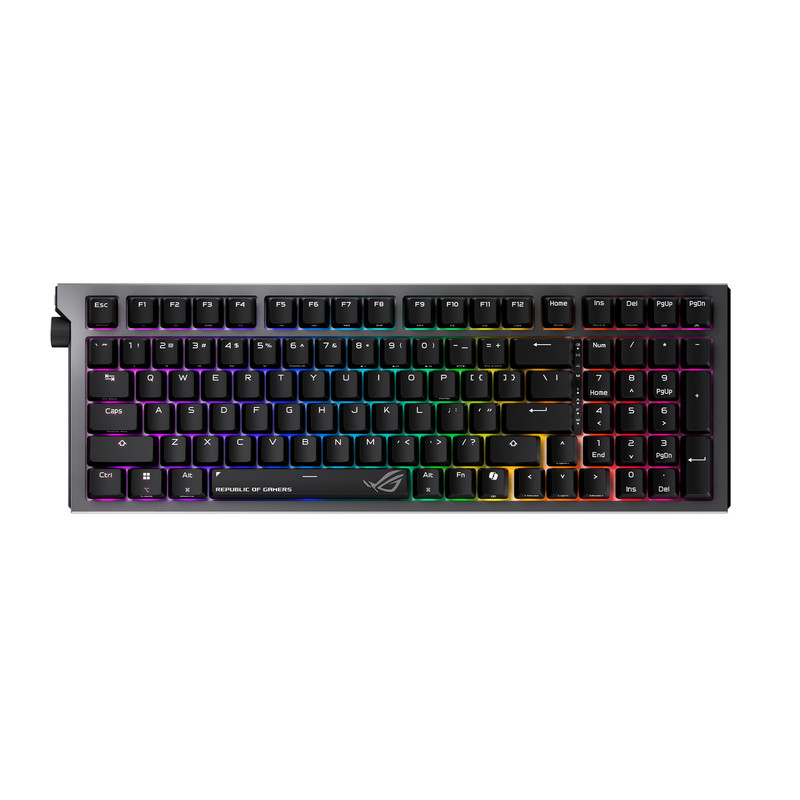
ASUS ROG Strix Morph 96 Wireless Mechanical Gaming Keyboard - 96% Full-Size
Short Description
The ASUS ROG Strix Morph 96 combines wireless mechanical keyboard functionality with a 96% layout. This format is appealing to gamers who want a nearly full-size keyboard without the usual amount of desk space.
Key Specifications
- Layout: 96% compact full-size
- Switch category: Mechanical
- Connectivity: Wireless
- Gaming family: ASUS ROG Strix
Pros
- Space-efficient layout
- Retains more functionality than smaller minimalist layouts
- Wireless operation reduces desk cable clutter
- Suitable for gaming and everyday productivity
Cons
- Compact key spacing requires adjustment
- Wireless battery life needs consideration
- Exact switch options and connectivity modes should be checked
My Experience
I consider the 96% layout an attractive compromise for someone who games regularly but also needs a keyboard for productivity.
Compared with 60% keyboards, this layout avoids many of the compromises associated with removing frequently used keys.
For my buying decision, I would prioritize switch feel, wireless stability, and charging convenience over decorative features.
What Other Buyers Say
I haven't verified enough independent buyer feedback to characterize a consensus. Check recent owner reports covering wireless reliability, typing comfort, and battery performance.
Best For
Gamers who want wireless convenience and near-full-size functionality in a more compact footprint.
➤➤➤ Click Here to Check Price on Amazon
➡️➡️➡️ Explore User Feedback and Current Pricing on Amazon
CORSAIR K70 CORE TKL RGB Tenkeyless Mechanical Gaming Keyboard – Black

Short Description
The CORSAIR K70 CORE TKL is a tenkeyless mechanical gaming keyboard that removes the numeric keypad while maintaining a familiar gaming-oriented layout.
Its compact design is particularly attractive for gamers who want additional mouse movement space.
Key Specifications
- Layout: Tenkeyless (TKL)
- Switch category: Mechanical
- Lighting: RGB
- Color: Black
- Numeric keypad: Not included
Pros
- Space-saving TKL layout
- Mechanical switches
- RGB lighting
- Practical layout for gaming desks
Cons
- No dedicated numeric keypad
- Mechanical switch feel depends on the exact configuration
- Less suitable for frequent numeric data entry
My Experience
I often recommend TKL keyboards as a sensible middle ground between full-size and extremely compact layouts.
The K70 CORE TKL fits that approach. By removing the number pad, it leaves more room for mouse movements while preserving a conventional keyboard experience.
Its main appeal to me is the practical layout rather than an assumption that RGB lighting or mechanical switches automatically improve competitive performance.
What Other Buyers Say
A reliable buyer-review consensus for this exact listing wasn't established. I suggest checking current feedback about stabilizer noise, switch consistency, and software usability.
Best For
FPS gamers, general PC gamers, and anyone who prefers a traditional keyboard layout without a number pad.
➤➤➤ Click Here to Check Price on Amazon
➡️➡️➡️ Explore User Feedback and Current Pricing on Amazon
AULA F75 75% Wireless Mechanical Keyboard, Hot Swappable Creamy Keyboard, Pre-lubed Linear Switches, 2.4GHz/Type-C/BT5.0, RGB Backlit Gaming Keyboards(White&Brown)

Short Description
The AULA F75 offers a 75% compact layout, wireless connectivity options, hot-swappable mechanical switches, and RGB lighting.
For gamers who prioritize a versatile feature set without automatically choosing a premium esports keyboard, it is an appealing option.
Key Specifications
- Layout: 75%
- Switches: Pre-lubed linear mechanical switches
- Hot-swappable switches
- Connectivity: 2.4GHz, Bluetooth 5.0, USB Type-C
- Lighting: RGB backlighting
- Color: White and brown
Pros
- Three advertised connectivity options
- Hot-swappable mechanical switches
- Compact desktop footprint
- Pre-lubed linear switches
- RGB customization possibilities
Cons
- No dedicated number pad
- Battery life depends on usage and lighting settings
- Bluetooth may be less suitable than 2.4GHz or wired mode for latency-sensitive gaming
My Experience
Based on its listed features, I think the AULA F75 is one of the most versatile options in this selection.
I particularly like the combination of hot-swappable switches and multiple connection methods. It provides flexibility for someone who uses a keyboard for gaming, typing, and general computer work.
I would choose its wired or 2.4GHz connection for competitive gaming and reserve Bluetooth for more relaxed activities.
What Other Buyers Say
I couldn't validate recurring feedback for this exact configuration. Buyers should check recent reviews focusing on key sound, wireless stability, battery life, and switch quality.
Best For
Budget-conscious gamers, mechanical keyboard beginners, and users wanting compact wireless versatility.
➤➤➤ Click Here to Check Price on Amazon
➡️➡️➡️ Explore User Feedback and Current Pricing on Amazon
NuPhy Air75 V3 Low Pofile Mechanical Keyboard with Multi-Function Knob

Short Description
The NuPhy Air75 V3 brings a low-profile mechanical keyboard design to users who want a thinner typing experience that can also accommodate gaming.
Its multi-function knob adds another input feature for everyday desktop use.
Key Specifications
- Product model: Air75 V3
- Switch category: Low-profile mechanical
- Layout family: 75%
- Control feature: Multi-function knob
Pros
- Low-profile mechanical design
- Compact 75% layout
- Dedicated multi-function knob
- Attractive crossover option for work and gaming
Cons
- Low-profile switches feel different from conventional mechanical switches
- Not specifically positioned around Hall Effect esports features
- Switch and keycap compatibility should be confirmed
My Experience
The Air75 V3 appeals to me because not every gaming keyboard needs to prioritize extreme polling rates or adjustable actuation.
For someone who spends several hours typing and then transitions into gaming, a lower-profile design can be worth considering.
I would evaluate the switch travel, key feel, and wrist positioning before making a final choice, since ergonomic preferences are highly individual.
What Other Buyers Say
I haven't independently established recurring buyer feedback for this exact model. Current owner reviews about typing comfort, switch feel, and the knob's functionality would be especially valuable.
Best For
Gamers who also spend significant time writing, studying, programming, or working at their computers.
➤➤➤ Click Here to Check Price on Amazon
➡️➡️➡️ Explore User Feedback and Current Pricing on Amazon
How to Choose the Right PC Gaming Product
Choosing the right gaming keyboard in 2026 means balancing performance features against your actual gaming habits.
1. Switch technology: Mechanical switches remain useful for general gaming and typing. Hall Effect and analog optical switches are worth investigating for players interested in advanced actuation behavior.
2. Layout and ergonomics: Full-size and 96% keyboards suit users who need extensive key access. TKL and 75% keyboards conserve desk space and provide more room for mouse movement.
3. Connectivity: Wired and 2.4GHz wireless connections are generally preferable for latency-sensitive gaming. Bluetooth can be convenient for productivity and switching devices.
4. Polling rate and responsiveness: Higher polling rates can reduce the interval between input reports, but overall responsiveness also depends on firmware, switch behavior, the computer, and the game.
5. Customization: Hot-swappable switches, programmable keys, and adjustable actuation can make a keyboard more adaptable. Verify which features are supported by the exact model.
6. Build quality and long-term value: Consider keycap durability, chassis stability, replacement-part availability, software support, warranty, and the cost relative to the features you will actually use.
FAQs
1. What is the best gaming keyboard in 2026?
My overall pick from these six is the Razer Huntsman V3 Pro 8KHz for competitive-focused gamers. The best keyboard for an individual player will depend on layout, switch preference, connectivity, and budget.
2. Are Hall Effect keyboards better for gaming?
Hall Effect keyboards can offer advanced actuation options, making them interesting for competitive gaming. However, performance depends on implementation, and conventional mechanical keyboards remain excellent for many players.
3. Is a 75% keyboard good for FPS gaming?
Yes. A 75% keyboard provides a compact footprint while keeping many frequently used keys. It can also create additional mouse movement space.
4. Should I choose a wired or wireless gaming keyboard?
Wired keyboards offer straightforward connectivity without battery management. Quality 2.4GHz wireless keyboards can also be suitable for gaming, while Bluetooth is generally better suited to convenience-focused use.
5. Is an 8,000Hz polling rate necessary for gaming in 2026?
No. Although an 8,000Hz polling rate is a premium feature, many gamers will not require it. Switch feel, comfort, consistency, and the complete input system are often more important purchase considerations.
Conclusion
The best gaming keyboards in 2026 serve different types of players. My selections emphasize advertised features, layout suitability, and practical purchasing considerations rather than unverified benchmark results.
Best Overall: Razer Huntsman V3 Pro 8KHz Analog Optical Gaming Keyboard — My leading recommendation for competitive gamers interested in advanced optical input technology.
Best Value: AULA F75 75% Wireless Mechanical Keyboard — My value-oriented choice thanks to its combination of hot-swappable switches, compact design, and multiple connection methods, subject to current pricing.
Best Premium Choice: GravaStar Mercury V75 Hall Effect Gaming Keyboard — A compelling premium-feature option for enthusiasts interested in magnetic switches and high polling rates.
For most gamers, I recommend choosing the keyboard that best matches their preferred layout, switch feel, and gaming style rather than purchasing based on technical specifications alone.