Introduction
If you're searching for the top 6 best gaming PC in the world with 4K graphics for 2026, you're probably looking for a gaming desktop that can deliver stunning visuals, responsive gameplay, and enough power to handle demanding AAA titles.
A great 4K gaming PC needs more than a powerful processor. The graphics card, video memory, cooling system, system RAM, and storage all influence the overall experience.
For 2026, high-end gaming desktops equipped with NVIDIA GeForce RTX 5090, RTX 5080, or AMD Radeon RX 9070 XT graphics are compelling options for 3840 × 2160 gaming.
I've selected six prebuilt gaming PCs based on their listed hardware, suitability for 4K gaming, and different gaming needs. These are specifications-based recommendations, not results from my own hands-on testing.
Quick Summary
For gamers who want the strongest graphics hardware among these six systems, my top recommendation is the MSI Infinite ZS with RTX 5090 and Ryzen 9 9950X3D. Its 32GB graphics card makes it particularly attractive for demanding 4K gaming.
The ASUS ROG GM700 is another excellent high-end choice, while the Skytech Chronos 3 offers a compelling combination of a gaming-focused processor, RTX 5080 graphics, and detailed cooling specifications. Gamers interested in AMD graphics should consider the Skytech RX 9070 XT configuration.
Top Product List
- msi Infinite ZS Gaming PC, AMD Ryzen 9 9950X3D 4.3GHz Processor; NVIDIA GeForce RTX 5090 32GB GDDR7; 32GB DDR5 RAM; 2TB M.2 NVMe Gen5 SSD, 2.5GbE LAN, WiFi 7 — Best for ultimate 4K gaming performance.
- ASUS ROG GM700 (2026) Gaming Desktop PC, AMD Ryzen™ 7 9800X3D Processor, NVIDIA® GeForce RTX™ 5080, 2TB M.2 NVMe™ PCIe® 4 SSD, 32GB DDR5 RAM, Windows 11 Home, GM700TZ-PS787 — Best for premium 4K AAA gaming.
- Skytech Gaming Chronos 3 Gaming PC, AMD Ryzen 7 9800X3D 4.7GHz, NVIDIA RTX 5080 16GB VRAM, X670 Board, 2TB Gen4 NVMe SSD, 32GB DDR5 RAM 6000, 850W Gold ATX 3 PSU, 360 ARGB AIO, Wi-Fi 5, Windows 11 — Best for balanced high-end gaming and cooling.
- msi Aegis ZS2 Gaming Desktop, AMD Ryzen 9 9900X, NVIDIA GeForce RTX 5080 16GB GDDR7, 64GB DDR5, 5TB Storage (4TB SSD+1TB Docking Station Set), Wi‑Fi 7, Keyboard & Mouse, Windows 11 Pro, Black — Best for gaming, streaming, and multitasking.
- Skytech Gaming PC Desktop, Ryzen 7 9800X3D, RX 9070 XT, 32GB RAM, 2TB SSD — Best for AMD-based 4K gaming value.
- Thermaltake LCGS Traveler 9880S Mini-ITX Gaming PC (AMD Ryzen™ 7 9800X3D, ToughRam 32GB DDR5 6000MT/s RGB Memory, NVIDIA® GeForce RTX™ 5080, 2TB NVMe M.2, WiFi, Windows 11) TR1S-B850-580-LCS — Best for compact 4K gaming setups.
Top 6 Best Gaming PC in the World with 4K Graphics for 2026
msi Infinite ZS Gaming PC, AMD Ryzen 9 9950X3D 4.3GHz Processor; NVIDIA GeForce RTX 5090 32GB GDDR7; 32GB DDR5 RAM; 2TB M.2 NVMe Gen5 SSD, 2.5GbE LAN, WiFi 7

Short Description
The MSI Infinite ZS is my Best Overall pick for enthusiasts prioritizing 4K graphics performance. It combines NVIDIA's RTX 5090 with AMD's Ryzen 9 9950X3D, making it an exceptionally powerful configuration on paper.
Key Specifications
- CPU: AMD Ryzen 9 9950X3D
- GPU: NVIDIA GeForce RTX 5090
- VRAM: 32GB GDDR7
- Memory: 32GB DDR5
- Storage: 2TB M.2 NVMe Gen5 SSD
- Networking: 2.5GbE LAN and Wi-Fi 7
Pros
- Flagship-class graphics hardware
- Large 32GB graphics memory capacity
- Powerful Ryzen X3D processor
- Fast Gen5 SSD storage
- Modern wired and wireless networking
Cons
- Premium hardware is likely to command a substantial cost
- Cooling and noise performance need configuration-specific verification
- Excessive graphics power for casual 1080p gaming
My Experience
From my assessment of the specifications, this is the system I would prioritize for visually demanding 4K games, especially when high-resolution textures and ray tracing are important.
The Ryzen 9 9950X3D is also appealing for users who combine gaming with demanding productivity workloads. Actual frame rates and acoustics will depend on individual games and the system's cooling configuration.
What Other Buyers Say
I couldn't verify a reliable pattern of owner feedback for this exact configuration. Before purchasing, I recommend checking recent owner reports about cooling, fan noise, shipping protection, and support.
Best For
Enthusiast gamers seeking a flagship 4K gaming desktop for demanding AAA titles, ray tracing, and long-term high-end use.
➡️➡️➡️ Explore User Feedback and Current Pricing on Amazon
ASUS ROG GM700 (2026) Gaming Desktop PC, AMD Ryzen™ 7 9800X3D Processor, NVIDIA® GeForce RTX™ 5080, 2TB M.2 NVMe™ PCIe® 4 SSD, 32GB DDR5 RAM, Windows 11 Home, GM700TZ-PS787
 #### Short Description
The ASUS ROG GM700 is designed for gamers who want a premium 2026 desktop with an excellent gaming processor and powerful NVIDIA graphics.
Its Ryzen 7 9800X3D and RTX 5080 combination is particularly attractive for high-detail 4K gaming.
Key Specifications
- CPU: AMD Ryzen 7 9800X3D
- GPU: NVIDIA GeForce RTX 5080
- RAM: 32GB DDR5
- Storage: 2TB M.2 NVMe PCIe 4 SSD
- Operating System: Windows 11 Home
Pros
- Gaming-focused X3D processor
- RTX 5080 graphics for demanding titles
- Generous memory and storage
- Premium ASUS ROG desktop configuration
Cons
- Less graphics processing capability than the RTX 5090 option
- Proprietary components or upgrade constraints should be checked before buying
- Actual cooling performance is not established here
My Experience
I find the Ryzen 7 9800X3D and RTX 5080 combination especially appealing for gamers who prioritize a strong CPU and GPU balance rather than simply buying the most expensive graphics card.
This is a configuration I would seriously consider for a dedicated 4K gaming station.
What Other Buyers Say
Verified recurring buyer feedback for this exact model was not available. I suggest checking reports about ASUS software, cooling behavior, and component accessibility.
Best For
Gamers who want a premium ROG desktop for cinematic single-player titles and demanding multiplayer games.
➡️➡️➡️ Explore User Feedback and Current Pricing on Amazon
Skytech Gaming Chronos 3 Gaming PC, AMD Ryzen 7 9800X3D 4.7GHz, NVIDIA RTX 5080 16GB VRAM, X670 Board, 2TB Gen4 NVMe SSD, 32GB DDR5 RAM 6000, 850W Gold ATX 3 PSU, 360 ARGB AIO, Wi-Fi 5, Windows 11
 #### Short Description
The Skytech Chronos 3 is an appealing high-end prebuilt PC for gamers who pay attention to cooling hardware and internal components.
Unlike some listings that only mention the CPU and GPU, this configuration specifies the motherboard, power supply, memory speed, and liquid cooler.
Key Specifications
- CPU: AMD Ryzen 7 9800X3D
- GPU: NVIDIA RTX 5080 with 16GB VRAM
- RAM: 32GB DDR5-6000
- Storage: 2TB Gen4 NVMe SSD
- Motherboard: X670
- Power Supply: 850W Gold ATX 3
- Cooling: 360mm ARGB AIO
- Connectivity: Wi-Fi 5
Pros
- Strong 4K gaming component pairing
- Specified 360mm liquid cooling
- 850W Gold-rated power supply
- 2TB SSD and 32GB DDR5 memory
Cons
- Wi-Fi 5 is older than the wireless standards on some competitors
- Large liquid cooler adds maintenance considerations
- Case airflow and noise require independent confirmation
My Experience
I particularly like that this configuration identifies its cooling and power hardware. Those details matter when evaluating a high-performance prebuilt desktop.
The combination looks suitable for extended gaming sessions, although the cooler's presence alone doesn't prove low temperatures or quiet operation.
What Other Buyers Say
I haven't established consistent, verified owner feedback for this specific configuration. Pay attention to recent reports about assembly quality, shipping, fan noise, and warranty handling.
Best For
Enthusiasts who want RTX 5080 graphics with clearly specified cooling, memory, and power components.
➡️➡️➡️ Explore User Feedback and Current Pricing on Amazon
msi Aegis ZS2 Gaming Desktop, AMD Ryzen 9 9900X, NVIDIA GeForce RTX 5080 16GB GDDR7, 64GB DDR5, 5TB Storage (4TB SSD+1TB Docking Station Set), Wi‑Fi 7, Keyboard & Mouse, Windows 11 Pro, Black
 #### Short Description
The MSI Aegis ZS2 stands out for combining powerful graphics with generous system memory and storage.
For anyone running games alongside content creation, streaming, or productivity applications, it offers an attractive set of specifications.
Key Specifications
- CPU: AMD Ryzen 9 9900X
- GPU: RTX 5080, 16GB GDDR7
- RAM: 64GB DDR5
- Storage: 4TB SSD plus 1TB docking station set
- Networking: Wi-Fi 7
- OS: Windows 11 Pro
- Accessories: Keyboard and mouse
Pros
- 64GB RAM for demanding multitasking
- Powerful RTX 5080 graphics
- Large advertised storage package
- Modern Wi-Fi 7 connectivity
- Included keyboard and mouse
Cons
- Ryzen 9 9900X is less gaming-specialized than the X3D CPUs featured here
- Part of the advertised storage is associated with a docking station set
- 64GB RAM may be unnecessary for gaming alone
My Experience
My assessment is that this desktop makes particular sense for someone who wants one computer for gaming and work.
The 64GB of DDR5 memory provides substantial headroom for running multiple applications, while the RTX 5080 supplies the graphics capability needed for demanding 4K gaming.
What Other Buyers Say
I couldn't confirm recurring feedback specific to this exact package. Buyers should verify what the docking station includes and check recent reports on cooling and bundled accessories.
Best For
4K gamers who also stream, edit videos, run creative software, or multitask heavily.
➡️➡️➡️ Explore User Feedback and Current Pricing on Amazon
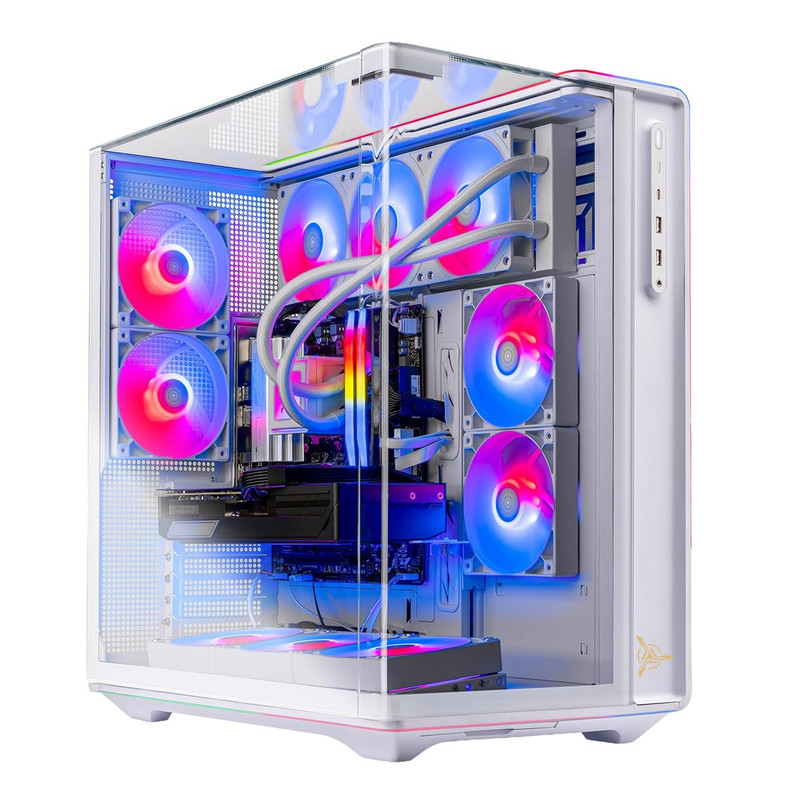
Skytech Gaming PC Desktop, Ryzen 7 9800X3D, RX 9070 XT, 32GB RAM, 2TB SSD
 #### Short Description
The Skytech RX 9070 XT desktop offers a compelling alternative to the NVIDIA-based systems in this roundup.
Its AMD Ryzen 7 9800X3D processor and Radeon RX 9070 XT graphics make it worth considering for high-resolution gaming.
Key Specifications
- CPU: AMD Ryzen 7 9800X3D
- GPU: AMD Radeon RX 9070 XT
- RAM: 32GB
- Storage: 2TB SSD
- Form Factor: Desktop gaming PC
Pros
- High-performance AMD graphics card
- Ryzen X3D processor suited to gaming
- 32GB memory capacity
- Spacious 2TB storage
- Alternative to NVIDIA-based systems
Cons
- Ray-tracing performance and feature support differ from NVIDIA alternatives
- Memory generation isn't specified in the supplied product name
- Cooling and power supply details require verification
My Experience
I see this configuration as a sensible choice for gamers who prefer AMD's graphics ecosystem.
The RX 9070 XT is capable hardware for high-resolution gaming, but I would compare game-specific performance and upscaling support before choosing it over an RTX 5080 desktop.
What Other Buyers Say
Reliable recurring owner feedback for this exact prebuilt configuration wasn't established. Check assembly quality, thermal performance, and graphics-driver experiences before purchasing.
Best For
AMD enthusiasts seeking a high-end 4K gaming experience without automatically choosing NVIDIA graphics.
➡️➡️➡️ Explore User Feedback and Current Pricing on Amazon
Thermaltake LCGS Traveler 9880S Mini-ITX Gaming PC (AMD Ryzen™ 7 9800X3D, ToughRam 32GB DDR5 6000MT/s RGB Memory, NVIDIA® GeForce RTX™ 5080, 2TB NVMe M.2, WiFi, Windows 11) TR1S-B850-580-LCS

Short Description
The Thermaltake Traveler 9880S is ideal for gamers who want desktop-class hardware in a smaller Mini-ITX form factor.
Its combination of RTX 5080 graphics, Ryzen 7 9800X3D processing, and DDR5-6000 memory is especially attractive for a compact gaming station.
Key Specifications
- CPU: AMD Ryzen 7 9800X3D
- GPU: NVIDIA GeForce RTX 5080
- RAM: 32GB DDR5-6000 RGB
- Storage: 2TB NVMe M.2
- Form Factor: Mini-ITX
- Connectivity: Wi-Fi
- OS: Windows 11
Pros
- Compact Mini-ITX design
- High-end RTX 5080 graphics
- Gaming-focused Ryzen X3D processor
- Fast DDR5-6000 memory
- 2TB NVMe storage
Cons
- Smaller chassis can limit upgrades
- Thermal and noise behavior requires careful evaluation
- Mini-ITX builds can have tighter component-clearance restrictions
My Experience
I appreciate the appeal of a small gaming computer that doesn't sacrifice high-end CPU and GPU specifications.
However, with compact desktops, I pay extra attention to airflow, cable clearance, component access, and sustained cooling performance before recommending a final purchase.
What Other Buyers Say
I haven't verified a consistent body of owner feedback for this exact Mini-ITX system. Look particularly for long-session temperature reports and comments about serviceability.
Best For
Gamers who want premium 4K graphics in a compact desktop for limited desk space or minimalist setups.
➡️➡️➡️ Explore User Feedback and Current Pricing on Amazon
How to Choose the Right PC Gaming Product
Buying a 4K gaming desktop requires understanding which components genuinely affect gaming performance.
1. Prioritize the graphics card. At 3840 × 2160 resolution, the GPU usually carries a substantial workload. An RTX 5090 offers a higher performance tier than an RTX 5080, while the RX 9070 XT is worth comparing for AMD-based gaming.
2. Choose a suitable processor. Ryzen X3D processors are particularly attractive for gaming. Ryzen 9 processors can also offer excellent flexibility for productivity and multitasking.
3. Consider memory and storage. For a premium gaming desktop, 32GB RAM is a sensible starting point. A 2TB SSD provides useful room for modern game libraries, while 64GB RAM is more valuable for demanding multitasking.
4. Evaluate cooling and power. Check the case airflow, CPU cooler, power supply capacity, and GPU cooling design. Powerful hardware needs adequate thermal management.
5. Verify connectivity and compatibility. Make sure the system has the display outputs, USB ports, networking features, and expansion capability you need. A 4K high-refresh-rate monitor is also essential if your goal is to enjoy high-frame-rate 4K gameplay.
6. Think about upgradeability. Standard motherboard layouts, accessible storage slots, and adequate power headroom can make future upgrades easier. Compact Mini-ITX machines may involve more compromises.
7. Compare total value. Don't judge a desktop by its GPU alone. Cooling, warranty, assembly quality, component transparency, and after-sales support all matter.
FAQs
1. What is the best gaming PC for 4K graphics in 2026?
Among these six selections, my Best Overall choice is the MSI Infinite ZS featuring the RTX 5090 and Ryzen 9 9950X3D. It has the highest graphics hardware tier in this roundup, although no comparative system benchmarks were established.
2. Is an RTX 5080 good enough for 4K gaming?
Yes. The RTX 5080 is a high-end graphics card suitable for 4K gaming. Achievable frame rates depend on the game, graphics settings, ray tracing, and whether upscaling is enabled.
3. How much RAM does a 4K gaming PC need?
For most high-end gaming setups, 32GB is a strong choice. A 64GB configuration is useful when gaming is combined with streaming, editing, or other memory-intensive workloads.
4. Is AMD or NVIDIA better for 4K gaming in 2026?
Both offer capable high-end graphics options. NVIDIA may be preferable when specific ray-tracing and DLSS features matter, while AMD Radeon hardware can be attractive depending on the games, performance, and purchase cost.
5. Can a prebuilt gaming PC run 4K games at 144 FPS?
Some powerful prebuilts can reach 144 FPS at 4K in certain games and settings, especially with upscaling or frame-generation features. However, no desktop guarantees that result across every demanding AAA game.
Conclusion
Choosing from the top 6 best gaming PC in the world with 4K graphics for 2026 ultimately depends on whether you prioritize maximum GPU performance, overall balance, compact design, or multitasking capability.
My final recommendations are:
- Best Overall: MSI Infinite ZS with RTX 5090 — the strongest GPU configuration in this selection.
- Best Value Candidate: Skytech Gaming PC with Ryzen 7 9800X3D and RX 9070 XT — a compelling AMD alternative, subject to current price comparison.
- Best Premium Choice: ASUS ROG GM700 (2026) with RTX 5080 — an attractive premium gaming-focused configuration.
If maximum 4K graphics capability is your priority, I would start with the MSI Infinite ZS. If you prefer a balanced enthusiast desktop, the ASUS ROG GM700 and Skytech Chronos 3 deserve serious consideration.
Whichever you choose, verify the exact configuration, current availability, warranty, and recent owner feedback before purchasing.