Introduction
Gaming at 4K resolution has become one of the most exciting ways to experience modern PC games in 2026. Whether you're exploring detailed open worlds, playing cinematic AAA adventures, or enjoying competitive games on a high-resolution monitor, the right gaming desktop can make a substantial difference.
However, not every gaming PC advertised as 4K-capable delivers the same experience. Graphics card performance, video memory, processor speed, cooling, and system RAM all influence how well games run at 3840 × 2160 resolution.
I've selected six promising gaming desktops featuring NVIDIA GeForce RTX 5090, RTX 5080, RTX 5070 Ti, and AMD Radeon RX 9070 XT graphics. These systems cover different priorities, from premium 4K gaming to more balanced configurations.
My comparison focuses on their listed hardware, practical strengths, limitations, and suitability for 4K gaming rather than unverified FPS claims or supposed hands-on testing.
Quick Summary
For gamers seeking the strongest graphics hardware in this selection, my top recommendation is the MSI Infinite ZS with RTX 5090, particularly for demanding 4K gaming and high-end visual settings. The ASUS ROG GM700 and Skytech Chronos 3 are excellent RTX 5080 alternatives, while the Skytech RX 9070 XT and ZOTAC RTX 5070 Ti systems offer other routes into 4K gaming. Your ideal choice depends on the games you play, your performance expectations, and the final selling price.
Top Product List
- msi Infinite ZS Gaming PC, AMD Ryzen 9 9950X3D 4.3GHz Processor; NVIDIA GeForce RTX 5090 32GB GDDR7; 32GB DDR5 RAM; 2TB M.2 NVMe Gen5 SSD, 2.5GbE LAN, WiFi 7 — Best for ultimate 4K gaming performance.
- ASUS ROG GM700 (2026) Gaming Desktop PC, AMD Ryzen™ 7 9800X3D Processor, NVIDIA® GeForce RTX™ 5080, 2TB M.2 NVMe™ PCIe® 4 SSD, 32GB DDR5 RAM, Windows 11 Home, GM700TZ-PS787 — Best for premium 4K gaming.
- Skytech Gaming Chronos 3 Gaming PC, AMD Ryzen 7 9800X3D 4.7GHz, NVIDIA RTX 5080 16GB VRAM, X670 Board, 2TB Gen4 NVMe SSD, 32GB DDR5 RAM 6000, 850W Gold ATX 3 PSU, 360 ARGB AIO, Wi-Fi 5, Windows 11 — Best for enthusiast gaming and cooling-focused builds.
- msi Aegis ZS Gaming Desktop, AMD Ryzen 9 9900X, GeForce RTX 5080, 32GB RAM, 2TB SSD, Liquid Cooling, Wi-Fi 7, Keyboard & Mouse Included, DIY Friendly, Windows 11 Pro — Best for 4K gaming and content creation.
- Skytech Gaming PC Desktop, Ryzen 7 9800X3D, RX 9070 XT, 32GB RAM, 2TB SSD — Best for AMD Radeon 4K gaming.
- ZOTAC MEK Gaming PC Desktop, Ryzen 7 9700X, NVIDIA GeForce RTX 5070 Ti 16GB — Best for a balanced entry into 4K gaming.
Top 6 Best Gaming PC With 4K Graphics for 2026
msi Infinite ZS Gaming PC, AMD Ryzen 9 9950X3D 4.3GHz Processor; NVIDIA GeForce RTX 5090 32GB GDDR7; 32GB DDR5 RAM; 2TB M.2 NVMe Gen5 SSD, 2.5GbE LAN, WiFi 7

Short Description
The MSI Infinite ZS stands out as my strongest overall choice for enthusiasts who prioritize high-end 4K graphics.
Its RTX 5090 provides substantially more graphics horsepower and VRAM capacity than the lower-tier GPUs in this roundup, while the Ryzen 9 9950X3D adds powerful gaming-focused processing capabilities.
Key Specifications
- Processor: AMD Ryzen 9 9950X3D
- Graphics: NVIDIA GeForce RTX 5090
- Video memory: 32GB GDDR7
- RAM: 32GB DDR5
- Storage: 2TB M.2 NVMe Gen5 SSD
- Networking: 2.5Gb Ethernet and Wi-Fi 7
Pros
- Flagship-class GPU for demanding 4K graphics.
- Generous 32GB VRAM capacity.
- Ryzen X3D processor suited to enthusiast gaming.
- Fast Gen5 SSD interface and modern networking.
Cons
- High-end hardware carries a potentially substantial purchase cost.
- Excessive for gamers who primarily play at 1080p.
- Actual cooling and acoustic performance need configuration-specific verification.
My Experience
Based on the hardware, this is the PC I'd place first when 4K graphical fidelity matters more than keeping the budget modest.
The RTX 5090 provides substantial headroom for demanding visual effects, while the Ryzen 9 9950X3D is a strong match for gaming and demanding multitasking.
I haven't personally tested this assembled system, so I wouldn't promise particular frame rates or noise levels.
What Other Buyers Say
I couldn't establish a reliable pattern of verified owner feedback for this exact configuration. Before purchasing, I'd check recent reviews specifically for shipping condition, system stability, and cooling noise.
Best For
Enthusiast gamers seeking flagship 4K graphics, high-resolution textures, demanding ray tracing, and a premium long-term desktop configuration.
➡️➡️➡️ Explore User Feedback and Current Pricing on Amazon
ASUS ROG GM700 (2026) Gaming Desktop PC, AMD Ryzen™ 7 9800X3D Processor, NVIDIA® GeForce RTX™ 5080, 2TB M.2 NVMe™ PCIe® 4 SSD, 32GB DDR5 RAM, Windows 11 Home, GM700TZ-PS787
 #### Short Description
The ASUS ROG GM700 combines an AMD Ryzen 7 9800X3D with an NVIDIA RTX 5080, creating an attractive combination for premium 4K gaming.
I particularly like the emphasis on a gaming-focused CPU rather than relying entirely on an expensive graphics card.
Key Specifications
- Processor: AMD Ryzen 7 9800X3D
- Graphics: NVIDIA GeForce RTX 5080
- RAM: 32GB DDR5
- Storage: 2TB M.2 NVMe PCIe 4 SSD
- Operating system: Windows 11 Home
Pros
- Strong RTX 5080 graphics performance class.
- Excellent gaming-oriented CPU architecture.
- 32GB DDR5 memory.
- Spacious 2TB SSD.
Cons
- Less graphics headroom than the RTX 5090 system.
- Detailed cooling and motherboard expansion specifications aren't established here.
- Prebuilt component configurations should be checked before purchasing.
My Experience
From a specification standpoint, I see the GM700 as one of the most balanced premium machines in this comparison.
The Ryzen 7 9800X3D is particularly appealing for gaming, while the RTX 5080 targets demanding high-resolution workloads. DLSS can also help in games that support it.
I'd consider it a particularly sensible alternative when the RTX 5090's additional capabilities aren't necessary.
What Other Buyers Say
Reliable recurring feedback for this exact GM700 configuration wasn't available for me to substantiate. I recommend examining recent owner comments about fan acoustics, component quality, and customer support.
Best For
Gamers seeking a premium 4K desktop for AAA adventures, immersive single-player titles, and high-refresh-rate gaming where settings and upscaling can be adjusted.
➡️➡️➡️ Explore User Feedback and Current Pricing on Amazon
Skytech Gaming Chronos 3 Gaming PC, AMD Ryzen 7 9800X3D 4.7GHz, NVIDIA RTX 5080 16GB VRAM, X670 Board, 2TB Gen4 NVMe SSD, 32GB DDR5 RAM 6000, 850W Gold ATX 3 PSU, 360 ARGB AIO, Wi-Fi 5, Windows 11
 #### Short Description
The Skytech Chronos 3 is an appealing enthusiast gaming desktop because its listing provides useful details about the power supply, motherboard, and CPU cooling setup.
For me, that additional component information makes it easier to assess than systems listing only a CPU and GPU.
Key Specifications
- Processor: AMD Ryzen 7 9800X3D
- Graphics: NVIDIA RTX 5080 with 16GB VRAM
- Motherboard: X670
- RAM: 32GB DDR5-6000
- Storage: 2TB Gen4 NVMe SSD
- Cooling: 360mm ARGB liquid CPU cooler
- Power supply: 850W Gold ATX 3
- Connectivity: Wi-Fi 5
- Operating system: Windows 11
Pros
- Powerful RTX 5080 and Ryzen X3D combination.
- Clearly specified 360mm liquid cooling setup.
- 32GB DDR5-6000 memory.
- Listed 850W Gold ATX 3 PSU.
Cons
- Wi-Fi 5 is older than the connectivity offered by some competitors.
- Liquid cooling adds maintenance considerations over time.
- Case airflow and operating noise still require independent confirmation.
My Experience
I like this configuration for buyers who care about what's inside their prebuilt desktop.
Its listed cooling hardware and power supply provide useful clues about the system design, although they don't independently prove low temperatures or quiet operation.
For demanding 4K games, I consider the RTX 5080 and Ryzen 7 9800X3D combination particularly compelling.
What Other Buyers Say
I haven't verified enough configuration-specific owner reviews to establish recurring buyer sentiment. I'd focus on reports concerning liquid cooler reliability, shipping protection, and thermal behavior.
Best For
Enthusiasts seeking high-end 4K gaming with an explicitly listed liquid cooling system and power supply.
➡️➡️➡️ Explore User Feedback and Current Pricing on Amazon
msi Aegis ZS Gaming Desktop, AMD Ryzen 9 9900X, GeForce RTX 5080, 32GB RAM, 2TB SSD, Liquid Cooling, Wi-Fi 7, Keyboard & Mouse Included, DIY Friendly, Windows 11 Pro
 #### Short Description
The MSI Aegis ZS combines capable 4K gaming hardware with a processor suited to demanding productivity and multitasking.
It's a particularly interesting option for gamers who also edit videos, livestream, or manage other CPU-intensive projects.
Key Specifications
- Processor: AMD Ryzen 9 9900X
- Graphics: NVIDIA GeForce RTX 5080
- RAM: 32GB
- Storage: 2TB SSD
- Cooling: Liquid cooling
- Wireless connectivity: Wi-Fi 7
- Operating system: Windows 11 Pro
- Included accessories: Keyboard and mouse
Pros
- Strong GPU for 4K gaming.
- Ryzen 9 processor with substantial multitasking capabilities.
- Wi-Fi 7 connectivity.
- Included peripherals and liquid cooling.
Cons
- Included keyboard and mouse may not match enthusiast preferences.
- CPU-focused upgrades don't necessarily translate into proportionate 4K gaming gains.
- Specific cooling performance isn't verified.
My Experience
The Aegis ZS is the model I'd consider when gaming is only part of the workload.
The Ryzen 9 9900X offers an appealing balance for demanding applications, while the RTX 5080 handles graphics-intensive gaming.
I also appreciate having Wi-Fi 7, particularly for users with compatible network equipment.
What Other Buyers Say
I couldn't verify consistent feedback from owners of this exact configuration. Buyers should investigate setup experience, fan noise, peripheral quality, and after-sales support before ordering.
Best For
4K gamers who also livestream, edit videos, create digital content, or need a powerful everyday workstation.
➡️➡️➡️ Explore User Feedback and Current Pricing on Amazon
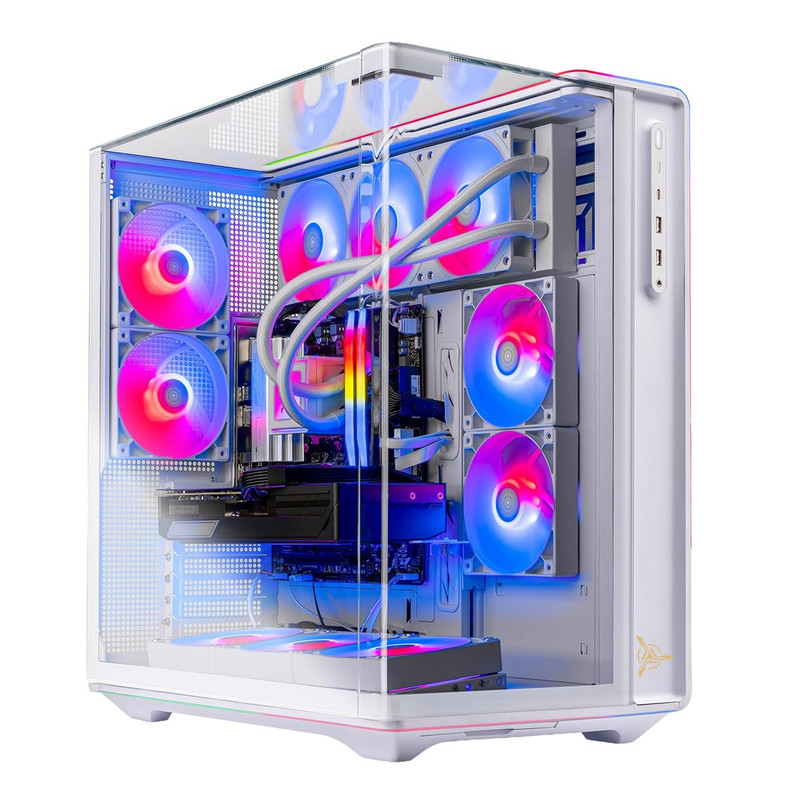
Skytech Gaming PC Desktop, Ryzen 7 9800X3D, RX 9070 XT, 32GB RAM, 2TB SSD
 #### Short Description
The Skytech Radeon RX 9070 XT configuration is a strong alternative for gamers who prefer AMD graphics.
Pairing an RX 9070 XT with the Ryzen 7 9800X3D makes sense for high-resolution gaming, particularly when conventional rasterized graphics performance is a priority.
Key Specifications
- Processor: AMD Ryzen 7 9800X3D
- Graphics: AMD Radeon RX 9070 XT
- RAM: 32GB
- Storage: 2TB SSD
- Target use: High-resolution PC gaming
Pros
- Strong AMD gaming hardware combination.
- Ryzen X3D processor designed for gaming workloads.
- 32GB system memory.
- Generous 2TB storage capacity.
Cons
- Heavy ray-traced workloads may favor competing higher-end NVIDIA configurations.
- Exact motherboard, PSU, and cooling components aren't specified.
- Performance with AMD FSR depends on game support and implementation.
My Experience
I see this as a practical alternative to the NVIDIA-heavy selection.
The Ryzen 7 9800X3D is a powerful gaming CPU, and the RX 9070 XT is capable of handling modern 4K workloads with appropriate graphics settings.
I'd pay particular attention to individual game performance and upscaling support rather than assuming all 4K titles will perform equally.
What Other Buyers Say
Verified recurring buyer feedback for this precise Skytech build wasn't established. I'd examine recent customer reports about GPU temperatures, system assembly, and driver setup.
Best For
AMD enthusiasts and gamers primarily interested in 4K rasterized graphics who are comfortable adjusting settings for demanding games.
➡️➡️➡️ Explore User Feedback and Current Pricing on Amazon
ZOTAC MEK Gaming PC Desktop, Ryzen 7 9700X, NVIDIA GeForce RTX 5070 Ti 16GB
 #### Short Description
The ZOTAC MEK offers a more moderate graphics configuration than the flagship systems above, while retaining an RTX 5070 Ti with 16GB VRAM.
It's worth considering for gamers who want to experience 4K without necessarily purchasing the highest-tier graphics card.
Key Specifications
- Processor: AMD Ryzen 7 9700X
- Graphics: NVIDIA GeForce RTX 5070 Ti
- Video memory: 16GB
- Form factor: Prebuilt desktop gaming PC
Pros
- RTX 5070 Ti supports modern NVIDIA gaming features.
- 16GB VRAM is useful for high-resolution textures.
- Capable Ryzen 7 processor.
- Potentially more economical GPU tier than RTX 5080 or RTX 5090 builds.
Cons
- Less graphics processing headroom than flagship options.
- Demanding 4K games may require reduced settings or upscaling.
- RAM, storage, and cooling details require confirmation.
My Experience
For someone moving from 1440p to 4K, I think the RTX 5070 Ti makes an interesting starting point.
I wouldn't treat this machine as an uncompromised maximum-settings 4K solution. Instead, I'd use DLSS where supported and prioritize the visual settings that contribute most to image quality.
The Ryzen 7 9700X also provides a capable foundation for modern games.
What Other Buyers Say
I don't have enough verified feedback for this exact ZOTAC configuration to summarize recurring experiences. Check recent buyer reviews for component specifications, fan noise, and setup reliability.
Best For
Gamers seeking an accessible entry into 4K gaming who don't mind optimizing settings and using supported upscaling technologies.
➡️➡️➡️ Explore User Feedback and Current Pricing on Amazon
How to Choose the Right PC Gaming Product
Selecting the best 4K gaming PC requires more than choosing the system with the most powerful processor.
1. Prioritize the graphics card. At 4K resolution, GPU performance becomes particularly important. An RTX 5090 offers the greatest graphics headroom among these selections, while RTX 5080, RTX 5070 Ti, and RX 9070 XT systems can be attractive depending on your settings and performance targets.
2. Consider VRAM. High-resolution textures and demanding visual effects can require substantial graphics memory. Having 16GB or more is desirable for a premium 4K gaming configuration.
3. Choose a capable processor. Ryzen X3D processors are particularly appealing for gaming. However, a more powerful CPU cannot completely compensate for a graphics card that struggles with 4K rendering.
4. Aim for sufficient RAM and storage. I favor 32GB RAM for a premium gaming desktop and recommend at least 1TB of SSD storage, preferably 2TB for extensive game libraries. Check upgrade options and available slots.
5. Check cooling, power, and compatibility. Review case ventilation, CPU cooling, PSU capacity, graphics card power connections, and display outputs. A powerful gaming system also needs a suitable 4K monitor and the appropriate HDMI or DisplayPort connection.
6. Compare actual value. Consider the complete configuration, warranty coverage, upgradeability, and selling price. A slightly less powerful GPU can be a better purchase if the price difference is significant.
FAQs
1. What is the best gaming PC with 4K graphics for 2026?
Among these six configurations, I favor the MSI Infinite ZS with RTX 5090 for buyers seeking maximum graphics capability. Its Ryzen 9 9950X3D and 32GB GDDR7 GPU memory make it a particularly powerful option.
2. Is an RTX 5080 enough for 4K gaming in 2026?
Yes. The RTX 5080 is a high-end graphics card suitable for demanding 4K gaming. Actual frame rates depend on the title, visual settings, ray tracing, and whether upscaling is enabled.
3. How much RAM should a 4K gaming PC have?
I recommend 32GB for a premium 2026 gaming desktop. Although many games work with 16GB, additional RAM provides flexibility for background applications and multitasking.
4. Can the Radeon RX 9070 XT run games at 4K?
Yes. The RX 9070 XT is a capable 4K graphics card, although particularly demanding games may benefit from adjusted settings or supported FSR upscaling.
5. Is an RTX 5090 worth buying over an RTX 5070 Ti for 4K gaming?
An RTX 5090 offers considerably greater graphics capability, making it attractive for demanding 4K experiences. However, an RTX 5070 Ti may be sufficient for gamers willing to compromise on certain settings. The price difference is a key consideration.
Conclusion
Finding the best gaming PC with 4K graphics in 2026 comes down to matching your desired visual quality, game selection, and budget with the right hardware.
My final picks are:
- Best Overall: MSI Infinite ZS Gaming PC with Ryzen 9 9950X3D and RTX 5090, for maximum graphics capability.
- Best Value Candidate: ZOTAC MEK Gaming PC with Ryzen 7 9700X and RTX 5070 Ti 16GB, provided its selling price offers worthwhile savings over higher-tier systems.
- Best Premium Choice: ASUS ROG GM700 (2026) with Ryzen 7 9800X3D and RTX 5080, for a powerful gaming-focused combination.
The Skytech Chronos 3 deserves particular consideration for its detailed cooling and power specifications, while the MSI Aegis ZS suits gamers with serious productivity needs. The Skytech RX 9070 XT is also a compelling choice for AMD enthusiasts.
My top recommendation remains the MSI Infinite ZS RTX 5090 if premium 4K gaming capability is the priority. For most buyers, however, comparing current prices, warranty terms, and configuration-specific customer feedback is essential before making the final decision.