Finding the right mechanical keyboard can make everyday PC gaming more enjoyable. Whether you play Minecraft, Fortnite, Roblox, The Sims 4, RPGs, racing games, or casual multiplayer titles, a good keyboard should feel comfortable, respond consistently, and fit your desk setup.
You don't necessarily need an expensive competitive gaming keyboard with advanced magnetic switches or extremely high polling rates. For casual gaming, I recommend focusing on comfortable switches, reliable connectivity, useful layouts, RGB lighting, and good everyday typing performance.
In this guide, I'll cover six mechanical keyboards worth considering in 2026, including compact wired options, versatile wireless models, and customizable keyboards.
Quick Summary
The best mechanical keyboard for most casual gamers is the EPOMAKER x Aula F75 Gasket Mechanical Keyboard because of its 75% layout, wireless connectivity, hot-swappable switches, and RGB lighting. The Corsair K70 CORE is a strong choice if you prefer a traditional wired gaming keyboard, while the AULA F99 Pro is worth considering if you want a larger layout with a number pad.
Top 6 Best Mechanical Keyboards for Casual Gaming
- EPOMAKER x Aula F75 Gasket Mechanical Keyboard — Best Overall
- Corsair K70 CORE RGB Mechanical Wired Gaming Keyboard – Pre-Lubed MLX Red Linear Switches, SOCD, ABS Double-Shot Keycaps, Sound Dampening, Media Control Dial, 1000Hz Polling, QWERTY NA – Black — Best Wired Gaming Keyboard
- DIERYA DK63 60% Wireless Mechanical Gaming Keyboard | Bluetooth/2.4G/Wired | RGB Backlit Compact 63 Keys Mini Office Keyboard | with Red Switch | for Windows Laptop PC Gamer Typist-White — Best Compact Wireless Option
- AULA WIN60 HE PRO 60% Mechanical Gaming Keyboard Wired, Magnetic Switch Hot Swappable, Adjustable Actuation Rapid Trigger Mode, 8000Hz Polling Rate, RGB Small Keyboard 60 Percent Compact Design for PC — Best Customizable Compact Option
- AULA S98 Pro Wireless Mechanical Gaming Keyboard with Screen, Knob, 96 Keys — Best for Productivity and Gaming
- AULA F99 Pro Wireless Mechanical Keyboard with Number Pad, Knob, 99 Keys — Best Full-Size Alternative
Top 6 Best Mechanical Keyboard for Casual Gaming for 2026
1. EPOMAKER x Aula F75 Gasket Mechanical Keyboard, 75% Wireless Hot Swappable Gaming Keyboard with Five-Layer Padding&Knob, BT/2.4GHz/USB-C, RGB (Black Gradient, LEOBOG Reaper Switch)

Short Description
The EPOMAKER x Aula F75 is my top overall recommendation for casual gamers who want a versatile mechanical keyboard.
Its 75% layout provides a compact footprint while retaining useful navigation keys. The gasket construction and multiple connectivity options also make it appealing for people who use their keyboard for gaming, browsing, and everyday work.
Key Specifications
- 75% keyboard layout.
- LEOBOG Reaper switches.
- Hot-swappable mechanical switches.
- Bluetooth, 2.4GHz wireless, and USB-C connectivity.
- RGB backlighting.
- Five-layer internal padding.
- Multifunction knob.
Pros
- Compact design saves desk space.
- Multiple connection options.
- Hot-swappable switches provide customization flexibility.
- RGB lighting adds visual appeal.
- Gasket construction offers a more enthusiast-oriented design.
Cons
- Smaller layout takes some adjustment.
- No dedicated number pad.
- Wireless features may require battery management.
My Experience
From its specifications, I particularly like the flexibility of this keyboard. Casual gamers don't always sit at their computers exclusively to play games. Having Bluetooth, 2.4GHz, and USB-C connectivity makes this design suitable for different desktop activities.
The 75% layout is also a sensible compromise between compactness and everyday usability.
I would put this keyboard near the top of my shortlist for someone who wants one device for gaming and general computer use. This is a specification-based assessment rather than a claim of personal hands-on testing.
What Other Buyers Say
Buyer feedback should be checked against the specific listing and switch configuration. Features worth evaluating include switch feel, wireless reliability, stabilizer noise, and the overall sound profile.
Best For
Casual gamers who want a customizable wireless mechanical keyboard with RGB lighting and a compact but practical layout.
➤➤➤ Click Here to Check Price on Amazon
➡️➡️➡️ Explore User Feedback and Current Pricing on Amazon
2. Corsair K70 CORE RGB Mechanical Wired Gaming Keyboard – Pre-Lubed MLX Red Linear Switches, SOCD, ABS Double-Shot Keycaps, Sound Dampening, Media Control Dial, 1000Hz Polling, QWERTY NA – Black

Short Description
The Corsair K70 CORE RGB is an attractive option for gamers who prefer a conventional wired mechanical keyboard.
It combines MLX Red linear switches, RGB lighting, sound-dampening features, and convenient media controls. Its straightforward USB connection also avoids the need to manage wireless batteries.
Key Specifications
- Mechanical wired gaming keyboard.
- Pre-lubed MLX Red linear switches.
- 1000Hz polling rate.
- RGB backlighting.
- ABS double-shot keycaps.
- Sound-dampening construction.
- Media control dial.
- SOCD functionality.
- QWERTY North American layout.
Pros
- Linear switches provide smooth key movement.
- Wired connectivity keeps the setup straightforward.
- Dedicated media control dial.
- Sound-dampening features.
- RGB lighting.
- Gaming-focused functionality.
Cons
- No wireless connectivity.
- No hot-swappable switch support listed.
- ABS keycaps may not appeal to everyone.
- Requires a wired desk setup.
My Experience
I particularly like the straightforward approach of the K70 CORE.
For casual gaming, a reliable wired keyboard is often all you need. The MLX Red linear switches are an appealing choice for players who prefer smooth keystrokes rather than pronounced tactile feedback.
The media dial is another useful feature because it makes adjusting audio more convenient when switching between games, music, and videos.
What Other Buyers Say
When evaluating this keyboard, pay attention to feedback about switch noise, key stability, RGB customization, and the feel of the linear switches. These factors are particularly important when you also use your gaming keyboard for everyday typing.
Best For
Gamers who prefer a traditional wired mechanical keyboard with linear switches, RGB lighting, and convenient media controls.
➤➤➤ Click Here to Check Price on Amazon
➡️➡️➡️ Explore User Feedback and Current Pricing on Amazon
3. DIERYA DK63 60% Wireless Mechanical Gaming Keyboard | Bluetooth/2.4G/Wired | RGB Backlit Compact 63 Keys Mini Office Keyboard | with Red Switch | for Windows Laptop PC Gamer Typist-White

Short Description
The DIERYA DK63 is a compact mechanical keyboard designed for people who want to save desk space.
Its 63-key layout makes it considerably smaller than conventional full-size keyboards. It also offers three connection options, making it a flexible choice for compatible computers and laptops.
Key Specifications
- 63-key compact layout.
- Red mechanical switches.
- Bluetooth connectivity.
- 2.4GHz wireless connectivity.
- Wired connectivity.
- RGB backlighting.
- White keyboard design.
- Windows compatibility listed.
Pros
- Small footprint.
- Three connectivity options.
- Red switches.
- RGB lighting.
- Suitable for compact gaming desks.
- Can be used with compatible laptops.
Cons
- No dedicated number pad.
- Compact layout requires learning key combinations.
- May not suit people who frequently use function keys.
- Wireless gaming performance depends on the selected connection.
My Experience
I consider the DIERYA DK63 an interesting choice for casual gamers with limited desk space.
A compact keyboard leaves more room for mouse movement, which can be helpful in games that involve frequent camera movement.
I also appreciate having Bluetooth, 2.4GHz, and wired connectivity. However, I would prioritize the 2.4GHz receiver or wired connection for gaming rather than Bluetooth.
What Other Buyers Say
Before purchasing, look for feedback about wireless stability, battery convenience, switch consistency, and the learning curve associated with the 63-key layout.
Best For
Laptop gamers, students, and casual PC gamers who want a compact wireless mechanical keyboard.
➤➤➤ Click Here to Check Price on Amazon
➡️➡️➡️ Explore User Feedback and Current Pricing on Amazon
4. AULA WIN60 HE PRO 60% Mechanical Gaming Keyboard Wired, Magnetic Switch Hot Swappable, Adjustable Actuation Rapid Trigger Mode, 8000Hz Polling Rate, RGB Small Keyboard 60 Percent Compact Design for PC

Short Description
The AULA WIN60 HE PRO is a more gaming-focused alternative for people who want advanced input customization.
Unlike traditional mechanical keyboards, this model uses magnetic switches. Its adjustable actuation and Rapid Trigger functionality are features typically associated with competitive gaming.
Although these capabilities are not essential for casual gaming, they provide additional flexibility.
Key Specifications
- 60% compact layout.
- Magnetic switches.
- Hot-swappable switches.
- Adjustable actuation.
- Rapid Trigger mode.
- 8000Hz polling rate.
- RGB backlighting.
- Wired connectivity.
Pros
- Adjustable actuation.
- Rapid Trigger functionality.
- Compact design.
- RGB lighting.
- Hot-swappable magnetic switches.
- Gaming-oriented specifications.
Cons
- Wired-only connectivity.
- Small layout sacrifices dedicated keys.
- Advanced features may be unnecessary for casual players.
- Requires adjustment to the compact layout.
My Experience
What makes this keyboard interesting is its emphasis on customization.
For everyday gaming, you probably don't need Rapid Trigger or an 8000Hz polling rate. However, these features may be attractive if you occasionally play fast-paced shooters or rhythm games.
I would consider this a more specialized option rather than the default choice for someone who mainly plays relaxed single-player games.
What Other Buyers Say
When researching this model, prioritize feedback about magnetic switch consistency, software configuration, Rapid Trigger behavior, and long-term reliability.
Best For
Gamers who enjoy experimenting with keyboard settings and want a compact gaming-focused magnetic-switch keyboard.
➤➤➤ Click Here to Check Price on Amazon
➡️➡️➡️ Explore User Feedback and Current Pricing on Amazon
5. AULA S98 Pro Wireless Mechanical Gaming Keyboard with Screen, Knob, 96 Keys
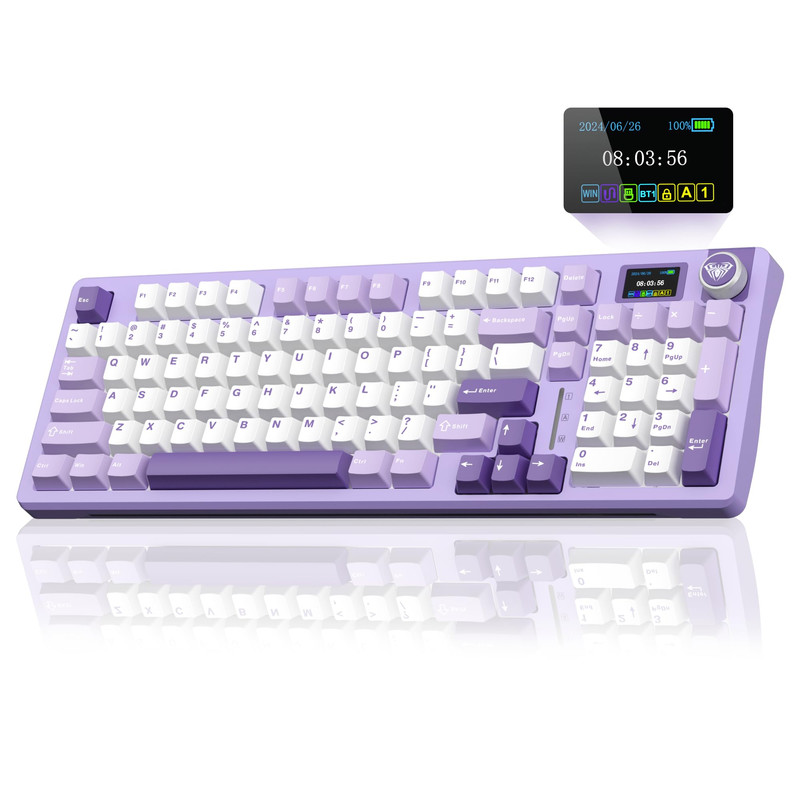
Short Description
The AULA S98 Pro is an interesting option for gamers who want more keys without occupying as much space as a traditional full-size keyboard.
Its 96-key layout combines a relatively compact footprint with a number pad. The built-in screen and control knob also give it a distinctive appearance.
Key Specifications
- 96-key layout.
- Wireless mechanical keyboard.
- Built-in screen.
- Multifunction control knob.
- Number pad.
- Gaming-oriented keyboard design.
Pros
- Retains number-pad functionality.
- More compact than a conventional full-size layout.
- Built-in display.
- Convenient control knob.
- Wireless design.
- Suitable for gaming and productivity.
Cons
- Dense key arrangement may require adjustment.
- Display features may not matter to every gamer.
- Wireless battery management is necessary.
- Exact switch and connectivity configurations should be checked before purchase.
My Experience
I like the idea behind the S98 Pro because it balances gaming and productivity.
Some compact keyboards remove too many keys, making everyday computer tasks less convenient. A 96-key arrangement is a useful alternative if you regularly work with numbers or use additional navigation keys.
The screen and knob also make the keyboard visually distinctive.
For someone who uses a gaming PC for entertainment, browsing, and school or office tasks, this design deserves consideration.
What Other Buyers Say
Check the product listing for the exact wireless modes and switch configuration. Buyer feedback about screen functionality, typing comfort, and battery performance will be particularly useful.
Best For
Casual gamers who also work, study, or regularly use a number pad.
➤➤➤ Click Here to Check Price on Amazon
➡️➡️➡️ Explore User Feedback and Current Pricing on Amazon
6. AULA F99 Pro Wireless Mechanical Keyboard with Number Pad, Knob, 99 Keys

Short Description
The AULA F99 Pro is a wireless mechanical keyboard with a 99-key layout, number pad, and multifunction knob.
It is a suitable alternative for gamers who prefer a larger keyboard layout while still wanting a more compact arrangement than many conventional full-size boards.
Key Specifications
- 99-key layout.
- Wireless mechanical keyboard.
- Integrated number pad.
- Multifunction knob.
- Gaming-oriented design.
Pros
- Number pad included.
- Larger layout for everyday use.
- Wireless functionality.
- Convenient control knob.
- Suitable for gaming and productivity.
Cons
- Takes up more space than 60% and 75% keyboards.
- Wireless battery requirements.
- Exact connection modes should be verified.
- May be unnecessary for gamers who rarely use number keys.
My Experience
I would consider the AULA F99 Pro for someone who wants a keyboard that can handle more than gaming.
The 99-key layout is particularly practical if you regularly switch between playing games, working with spreadsheets, and general computer activities.
The multifunction knob is another convenient addition, especially for users who enjoy having physical controls within easy reach.
Compared with a compact 60% keyboard, this model offers a more familiar arrangement for everyday typing.
What Other Buyers Say
Before buying, check feedback about wireless connectivity, knob functionality, key stability, and the exact switch configuration offered by the seller.
Best For
Casual gamers who want a wireless mechanical keyboard with a number pad and additional controls.
➤➤➤ Click Here to Check Price on Amazon
➡️➡️➡️ Explore User Feedback and Current Pricing on Amazon
How to Choose the Right Mechanical Keyboard for Casual Gaming
Choosing a mechanical keyboard isn't just about RGB lighting or having the highest polling rate. The best option should match your gaming habits, available desk space, and typing preferences.
Here are the most important factors I recommend considering.
1. Choose the Right Mechanical Switch
Mechanical switches influence how your keyboard feels and sounds.
- Red switches: Linear movement without a tactile bump. A popular option for gamers who prefer smooth keystrokes.
- Brown switches: Tactile feedback without the pronounced click of traditional clicky switches.
- Blue switches: Audible clicking and tactile feedback, suitable for people who enjoy noticeable typing feedback.
For casual gaming, I generally recommend linear or tactile switches.
2. Consider Keyboard Size
Keyboard layout makes a significant difference to everyday convenience.
| Layout | Best For |
|---|---|
| 60% | Minimalist gaming desks |
| 65% | Compact setups with additional navigation keys |
| 75% | Gaming and everyday typing |
| 96% | Gaming and productivity with a number pad |
| Full-size | Traditional keyboard users |
If you are unsure, a 75% or 96% keyboard is a sensible starting point.
3. Wired vs. Wireless Connectivity
Both wired and wireless mechanical keyboards can work well for casual gaming.
Wired keyboards are straightforward and don't require battery charging.
Wireless models offer more flexibility and help reduce cable clutter.
If you choose wireless, I recommend looking for a 2.4GHz receiver for gaming. Bluetooth is convenient for everyday use but generally has higher latency.
4. Look for Useful Gaming Features
Some features are genuinely useful, while others are optional extras.
Consider:
- Anti-ghosting or N-key rollover.
- RGB backlighting.
- Dedicated media controls.
- Adjustable keyboard height.
- Detachable USB-C cable.
- Hot-swappable switches.
- Reliable wireless connectivity.
You don't need every feature to enjoy casual PC gaming.
5. Consider Build Quality and Comfort
A keyboard should feel comfortable during extended gaming sessions.
Pay attention to key stability, stabilizer noise, keyboard weight, construction, and typing angle.
Gasket-mounted keyboards can also be appealing if you prefer a softer typing feel.
6. Check Compatibility
Before purchasing, check whether the keyboard supports your operating system and preferred connection method.
For PC gaming, verify Windows compatibility, USB connectivity, and whether any additional software is required for RGB customization or programmable functions.
FAQs
1. What is the best mechanical keyboard for casual gaming in 2026?
The EPOMAKER x Aula F75 is my overall recommendation. It combines a 75% layout, hot-swappable switches, RGB lighting, and multiple connectivity options.
2. Are mechanical keyboards worth buying for casual gaming?
Yes. Mechanical keyboards offer different switch options, distinct typing feedback, and customizable features. They can make gaming and everyday typing more enjoyable.
3. Are red switches better for casual gaming?
Red linear switches are a popular choice because they provide smooth keystrokes without a tactile bump. However, brown and other switch types can also work well depending on personal preference.
4. Is a 60% keyboard good for casual gaming?
Yes. A 60% keyboard can be excellent for compact gaming setups. However, it removes dedicated function and navigation keys, so you should be comfortable using key combinations.
5. Should I buy a wired or wireless mechanical gaming keyboard?
Choose wired if you want a simple setup without battery management. Choose wireless if you value flexibility and fewer cables. For gaming, 2.4GHz wireless is generally preferable to Bluetooth when available.
Conclusion
The best mechanical keyboard for casual gaming in 2026 doesn't have to be the most expensive or technologically advanced option. It should provide comfortable typing, dependable connectivity, and a layout that suits your everyday activities.
Here are my final recommendations:
- Best Overall: EPOMAKER x Aula F75 Gasket Mechanical Keyboard. Its 75% layout, wireless connectivity, and hot-swappable switches make it a versatile choice.
- Best Value: DIERYA DK63 60% Wireless Mechanical Gaming Keyboard. Its compact design and three connection options make it worth considering for smaller setups.
- Best Premium Choice: Corsair K70 CORE RGB Mechanical Wired Gaming Keyboard. Its MLX Red linear switches, sound-dampening features, and media controls make it an appealing wired gaming option.
Ultimately, I would start with the EPOMAKER x Aula F75 if you want a versatile keyboard for gaming and everyday computer use. If you prefer a straightforward wired setup, the Corsair K70 CORE is another excellent candidate to investigate.
Choose the layout and switch feel that you enjoy most, and you'll have a much better everyday gaming experience.