Finding the right mechanical keyboard for gaming and productivity in 2026 means balancing responsiveness, typing comfort, durability, connectivity, and customization. A good keyboard should perform well during competitive gaming while remaining comfortable for long hours of writing, programming, studying, and office work.
However, not every gaming keyboard is equally suitable for productivity. Compact layouts can save desk space, but they may sacrifice dedicated navigation keys and number pads. Wireless keyboards offer flexibility, while wired models provide a straightforward connection for desktop gaming.
In this guide, I'll look at six mechanical keyboards from different categories, including wireless mechanical models, full-size options, and Hall-effect gaming keyboards. My goal is to help you find a keyboard that makes sense for both your gaming setup and everyday workflow.
Quick Summary
For an all-around combination of gaming and productivity, I recommend the EPOMAKER x Aula F75 because of its compact 75% layout, hot-swappable switches, RGB lighting, and three connection modes. The Corsair K70 CORE is a strong choice if you prefer a traditional full-size layout, while the AULA F99 Pro is worth considering if you want a wireless keyboard with a number pad. Competitive gamers should also consider the AULA WIN60 HE PRO for its adjustable magnetic switches and rapid-trigger functionality.
Top Product List
- EPOMAKER x Aula F75 Gasket Mechanical Keyboard, 75% Wireless Hot Swappable Gaming Keyboard with Five-Layer Padding&Knob, BT/2.4GHz/USB-C, RGB (Black Gradient, LEOBOG Reaper Switch) — Best overall for gaming and productivity.
- Corsair K70 CORE RGB Mechanical Wired Gaming Keyboard – Pre-Lubed MLX Red Linear Switches, SOCD, ABS Double-Shot Keycaps, Sound Dampening, Media Control Dial, 1000Hz Polling, QWERTY NA – Black — Best full-size gaming keyboard.
- RK ROYAL KLUDGE S98 Wireless Mechanical Keyboard w/Smart Display & Knob — Best for multitasking and wireless productivity.
- AULA S98 Pro Wireless Mechanical Gaming Keyboard with Screen, Knob, 96 Keys — Best for productivity-focused wireless setups.
- AULA F99 Pro Wireless Mechanical Keyboard with Number Pad, Knob, 99 Keys — Best for typing and number-intensive work.
- AULA WIN60 HE PRO 60% Mechanical Gaming Keyboard Wired, Magnetic Switch Hot Swappable, Adjustable Actuation Rapid Trigger Mode, 8000Hz Polling Rate, RGB Small Keyboard 60 Percent Compact Design for PC — Best for competitive gaming.
Top 6 Best Mechanical Keyboard for Gaming and Productivity for 2026
1. EPOMAKER x Aula F75 Gasket Mechanical Keyboard, 75% Wireless Hot Swappable Gaming Keyboard with Five-Layer Padding&Knob, BT/2.4GHz/USB-C, RGB (Black Gradient, LEOBOG Reaper Switch)

Short Description
The EPOMAKER x Aula F75 is my top overall recommendation for people who regularly switch between gaming and productivity.
Its 75% layout provides a useful balance between compact dimensions and everyday functionality. Unlike smaller 60% keyboards, it retains dedicated arrow keys and a function row.
Its wireless connectivity and hot-swappable mechanical switches make it particularly attractive for people who enjoy customizing their setup.
Key Specifications
- 75% compact layout with 80 keys.
- LEOBOG Reaper linear mechanical switches.
- Bluetooth, 2.4GHz wireless, and USB-C connectivity.
- Hot-swappable mechanical switches.
- Five-layer internal padding.
- RGB backlighting.
- 4000mAh rechargeable battery.
- Multifunction rotary knob.
Pros
- Excellent balance between gaming and productivity.
- Three connection options.
- Hot-swappable switches.
- Compact design with dedicated arrow keys.
- Multiple RGB lighting options.
- Comfortable gasket-mounted typing experience.
Cons
- No dedicated numeric keypad.
- Not completely silent during typing.
- Its configuration software is limited compared with more advanced customization platforms.
My Experience
When evaluating a keyboard for mixed gaming and work, I prioritize versatility. The F75 checks several important boxes.
I particularly like the 75% layout because it avoids the compromises of extremely compact keyboards. Having dedicated arrow keys and function keys makes navigating documents and using keyboard shortcuts more convenient.
The three connection modes are another advantage. Bluetooth is useful for everyday wireless productivity, while 2.4GHz provides a convenient wireless option for gaming. USB-C is available when I prefer a wired connection.
Its hot-swappable design also means you can experiment with different mechanical switches without replacing the entire keyboard.
What Other Buyers Say
Available customer feedback on the F75 highlights its typing feel, sound profile, and overall value. Its factory-lubricated linear switches and internal dampening are frequently highlighted in product discussions.
Best For
Gamers, programmers, students, and office workers who want one versatile mechanical keyboard for multiple tasks.
➤➤➤ Click Here to Check Price on Amazon
➡️➡️➡️ Explore User Feedback and Current Pricing on Amazon
2. Corsair K70 CORE RGB Mechanical Wired Gaming Keyboard – Pre-Lubed MLX Red Linear Switches, SOCD, ABS Double-Shot Keycaps, Sound Dampening, Media Control Dial, 1000Hz Polling, QWERTY NA – Black

Short Description
The Corsair K70 CORE RGB is an excellent option for people who prefer a traditional full-size mechanical keyboard.
It combines linear MLX Red switches, RGB lighting, sound-dampening layers, and a multifunction control dial. Its 104-key layout is especially useful for productivity tasks requiring a numeric keypad.
Key Specifications
- Full-size 104-key layout.
- Corsair MLX Red linear mechanical switches.
- Wired USB connectivity.
- 1000Hz polling rate.
- RGB lighting.
- Double-shot ABS keycaps.
- Two sound-dampening foam layers.
- Multifunction rotary dial.
- Magnetic palm rest.
- Full-key NKRO and anti-ghosting.
Pros
- Full-size layout with dedicated number pad.
- Smooth linear mechanical switches.
- Useful multimedia control dial.
- Sound-dampening construction.
- Comfortable magnetic palm rest.
- Suitable for gaming and everyday typing.
Cons
- Wired-only connectivity.
- Requires more desk space than compact keyboards.
- Linear switches may not suit people who prefer pronounced tactile feedback.
My Experience
The K70 CORE makes sense for users who want a dependable desktop keyboard without sacrificing productivity features.
I particularly appreciate its full-size layout. Spreadsheet work, numerical input, document navigation, and everyday office shortcuts are more convenient when the number pad and dedicated keys are available.
For gaming, the linear switches offer a straightforward and smooth keystroke experience. The 1000Hz polling rate also makes it a suitable option for regular PC gaming.
The rotary dial is another useful addition because it can control functions such as volume, RGB brightness, zoom, and scrolling.
What Other Buyers Say
The K70 CORE has established coverage in mechanical keyboard reviews. Its linear switches, control dial, and sound-dampening construction are among its notable strengths. Individual preferences regarding linear switches and wired connectivity remain important considerations.
Best For
Full-size keyboard enthusiasts, office professionals, spreadsheet users, and gamers who prefer a wired desktop setup.
➤➤➤ Click Here to Check Price on Amazon
➡️➡️➡️ Explore User Feedback and Current Pricing on Amazon
3. RK ROYAL KLUDGE S98 Wireless Mechanical Keyboard w/Smart Display & Knob

Short Description
The RK ROYAL KLUDGE S98 is designed for people who want a feature-rich wireless mechanical keyboard.
Its smart display and rotary knob give it additional functionality beyond conventional mechanical keyboards. The layout is also more practical for productivity than an extremely compact 60% model.
Key Specifications
- Wireless mechanical keyboard.
- Smart display.
- Multifunction rotary knob.
- 98% compact layout.
- Mechanical switches.
- Hot-swappable construction.
- Gasket-mounted design.
- Designed for gaming and everyday computer use.
Pros
- Smart display adds convenience.
- Rotary knob provides quick controls.
- Compact layout retains more keys than a 75% keyboard.
- Wireless functionality.
- Hot-swappable customization.
- Suitable for mixed-use desktop setups.
Cons
- Takes up more space than a 75% keyboard.
- Not as compact as a dedicated gaming keyboard.
- Switch preferences vary between users.
- Wireless battery management requires occasional attention.
My Experience
For productivity, I think the RK S98 has an interesting advantage: its smart display and control knob.
Small convenience features can make a difference when spending several hours at a desk. Having quick access to keyboard information and rotary controls makes the overall experience more practical.
The 98% layout is also appealing because it preserves a more comprehensive key arrangement without taking up as much space as a conventional full-size keyboard.
For gaming, I would consider it a versatile everyday mechanical keyboard rather than a specialized competitive esports model.
What Other Buyers Say
The S98 is commonly discussed as a value-oriented wireless keyboard with a display, knob, and customizable mechanical switches. Typing feel and stock switch smoothness are important considerations when comparing it with more expensive enthusiast keyboards.
Best For
People who multitask, work with documents, enjoy wireless setups, and want a mechanical keyboard with additional controls.
➤➤➤ Click Here to Check Price on Amazon
➡️➡️➡️ Explore User Feedback and Current Pricing on Amazon
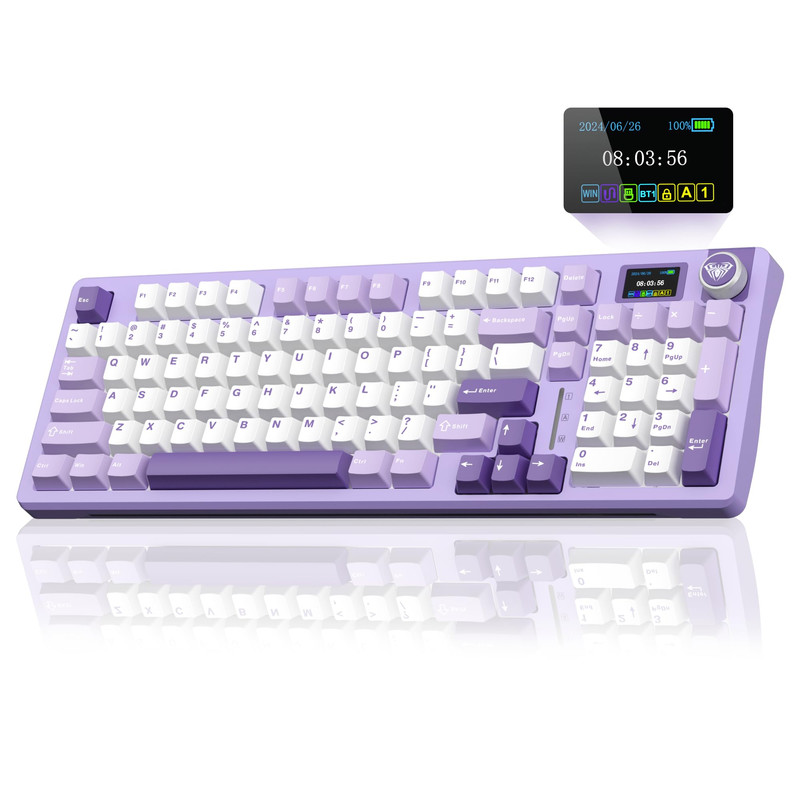
4. AULA S98 Pro Wireless Mechanical Gaming Keyboard with Screen, Knob, 96 Keys
Short Description
The AULA S98 Pro is another interesting option for users who want a wireless mechanical keyboard that supports gaming and productivity.
Its 96% layout provides a relatively compact arrangement while retaining a substantial number of keys. The integrated screen and rotary knob make it particularly attractive for users who appreciate additional desktop controls.
Key Specifications
- 96% layout with 98 keys.
- Wireless mechanical keyboard.
- Bluetooth 5.0 connectivity.
- 2.4GHz wireless connectivity.
- USB-C wired connectivity.
- Hot-swappable mechanical switches.
- Custom linear switches.
- Dedicated rotary knob.
- Smart display.
- Sound-absorbing padding.
Pros
- Three connection modes.
- Compact layout with extensive key functionality.
- Integrated display.
- Convenient rotary control.
- Hot-swappable switches.
- Suitable for gaming and office work.
Cons
- Larger than a 75% keyboard.
- No specialized Hall-effect gaming functionality.
- Screen and software features may require additional configuration.
My Experience
I like the AULA S98 Pro because it focuses on everyday usability rather than only gaming aesthetics.
Its compact layout is useful for people who need a relatively complete keyboard without dedicating too much desk space to it.
The screen and rotary knob are also practical additions. For example, quick volume adjustments can be useful when switching between gaming, video meetings, and music.
Its three connection modes provide flexibility when connecting to different devices.
For people who type frequently, I would pay particular attention to the switch configuration before purchasing because typing preference can significantly affect long-term comfort.
What Other Buyers Say
Product discussions emphasize the S98 Pro's feature combination, particularly its display, knob, wireless connectivity, and mechanical switch customization. Individual typing preferences and software usability should be considered before buying.
Best For
Remote workers, students, gamers, and multitaskers who want a compact wireless keyboard with additional controls.
➤➤➤ Click Here to Check Price on Amazon
➡️➡️➡️ Explore User Feedback and Current Pricing on Amazon
5. AULA F99 Pro Wireless Mechanical Keyboard with Number Pad, Knob, 99 Keys

Short Description
The AULA F99 Pro is an excellent candidate for productivity-focused users who still want gaming functionality.
Its 99-key layout retains a number pad while maintaining a more compact arrangement than a conventional full-size keyboard.
It also offers wireless connectivity, hot-swappable switches, RGB lighting, and a multifunction knob.
Key Specifications
- 96% layout with 99 keys.
- Wireless mechanical keyboard.
- 2.4GHz wireless, Bluetooth, and USB-C.
- Hot-swappable 3-pin and 5-pin switches.
- Pre-lubricated LEOBOG switches.
- Gasket-mounted construction.
- Five-layer dampening.
- PBT keycaps.
- 8000mAh battery.
- Metal multimedia control knob.
- RGB backlighting.
Pros
- Retains a dedicated numeric keypad.
- Three connection modes.
- Hot-swappable switches.
- Large battery capacity.
- PBT keycaps.
- Gasket-mounted typing construction.
- Useful multimedia controls.
Cons
- Not as compact as a 75% keyboard.
- The number pad still occupies additional desk space.
- Not specifically designed for adjustable-actuation competitive gaming.
My Experience
The AULA F99 Pro is one of my favorite choices in this list for people who spend considerable time working with numbers.
A dedicated number pad makes financial documents, spreadsheets, calculations, and data entry more convenient.
I also appreciate the combination of wireless connectivity and mechanical customization. You can use the keyboard for work during the day and gaming in the evening without needing a completely different peripheral.
The large battery capacity is another attractive feature for anyone who prefers a wireless setup.
What Other Buyers Say
The F99 Pro's advertised feature set emphasizes its layout, gasket construction, switch customization, and wireless flexibility. These are useful characteristics for people looking for a multifunction keyboard. I would still recommend checking the exact switch variant before purchasing.
Best For
Programmers, accountants, students, office workers, and gamers who regularly use a numeric keypad.
➤➤➤ Click Here to Check Price on Amazon
➡️➡️➡️ Explore User Feedback and Current Pricing on Amazon
6. AULA WIN60 HE PRO 60% Mechanical Gaming Keyboard Wired, Magnetic Switch Hot Swappable, Adjustable Actuation Rapid Trigger Mode, 8000Hz Polling Rate, RGB Small Keyboard 60 Percent Compact Design for PC

Short Description
The AULA WIN60 HE PRO is different from the other keyboards on this list because it uses Hall-effect magnetic switches.
Instead of conventional mechanical switch contacts, Hall-effect keyboards detect key movement magnetically. This enables adjustable actuation and rapid-trigger functionality.
It is particularly interesting for competitive FPS players who want greater control over key activation.
Key Specifications
- 60% compact layout.
- Wired USB-C connectivity.
- Hall-effect magnetic switches.
- Hot-swappable magnetic switches.
- Adjustable actuation.
- Rapid-trigger functionality.
- 8000Hz polling rate.
- RGB backlighting.
- Designed for competitive gaming.
Pros
- Adjustable actuation.
- Rapid-trigger functionality.
- High polling rate.
- Extremely compact layout.
- Magnetic switch customization.
- Excellent feature set for competitive gaming.
Cons
- No dedicated number pad.
- No dedicated arrow-key cluster.
- Wired-only connectivity.
- Productivity shortcuts may require additional function-layer combinations.
- Magnetic switches are not interchangeable with ordinary mechanical switches.
My Experience
If competitive gaming is your main priority, the WIN60 HE PRO deserves serious consideration.
Its Hall-effect technology provides a different experience from traditional mechanical keyboards. Adjustable actuation allows gamers to configure how far a key needs to travel before registering an input.
Rapid Trigger is particularly interesting for fast-paced games where repeated directional inputs matter.
However, I would not automatically recommend a 60% keyboard for everyone. The reduced layout can become inconvenient for spreadsheet work, document navigation, and programming if you frequently use dedicated function and arrow keys.
For someone who primarily plays competitive FPS games and only performs occasional productivity tasks, its compact form factor can be a worthwhile trade-off.
What Other Buyers Say
The magnetic-switch category is generally valued for adjustable actuation and rapid-trigger functionality. However, the actual experience depends on software configuration, switch implementation, and individual preferences. I would avoid assuming that an 8000Hz polling rate alone guarantees a noticeable competitive advantage.
Best For
Competitive FPS players, esports enthusiasts, and gamers who prioritize adjustable actuation over traditional productivity features.
➤➤➤ Click Here to Check Price on Amazon
➡️➡️➡️ Explore User Feedback and Current Pricing on Amazon
How to Choose the Right Mechanical Keyboard for Gaming and Productivity
Choosing a mechanical keyboard is about more than RGB lighting and attractive keycaps. Here are the factors I recommend considering before making a purchase.
1. Choose the Right Keyboard Layout
Keyboard layout affects your daily experience.
| Layout | Best use |
|---|---|
| 60% | Competitive gaming and minimal desks |
| 75% | Balanced gaming and productivity |
| TKL | Gaming with dedicated navigation keys |
| 96% | Productivity with a compact number pad |
| Full-size | Office work, spreadsheets, and general use |
For most people, I recommend starting with a 75% or 96% keyboard.
2. Understand Mechanical Switch Types
Switch selection affects typing comfort and gaming responsiveness.
- Linear switches: Smooth keystrokes without a pronounced tactile bump. Suitable for gaming and fast typing.
- Tactile switches: Provide noticeable feedback during key activation. Good for people who enjoy a more defined typing sensation.
- Clicky switches: Produce audible clicks and tactile feedback. They can be enjoyable but may be distracting in shared offices.
My recommendation is to consider linear switches if gaming is your primary activity and tactile switches if you prioritize typing feedback.
3. Consider Wired and Wireless Connectivity
Wired keyboards are straightforward and do not require battery management.
Wireless keyboards offer a cleaner desk and greater flexibility. If you choose wireless, look for 2.4GHz connectivity for gaming and Bluetooth for connecting multiple everyday devices.
Tri-mode connectivity is particularly convenient.
4. Check Hot-Swappable Compatibility
Hot-swappable keyboards let you replace compatible switches without soldering.
This is useful if you want to experiment with different typing experiences or replace a faulty switch.
However, always check whether the keyboard supports 3-pin, 5-pin, or proprietary magnetic switches. These are not universally interchangeable.
5. Pay Attention to Ergonomics
Typing comfort matters when you spend several hours working or gaming.
Consider:
- Keyboard height and adjustable feet.
- Wrist-rest availability.
- Keycap shape and material.
- Switch actuation force.
- Desk and chair positioning.
- Overall keyboard dimensions.
A comfortable keyboard can make long sessions more enjoyable.
6. Consider Software and Customization
Software can provide RGB customization, macros, remapping, and gaming profiles.
For productivity, programmable keys can help streamline repetitive tasks. For gaming, profiles and key assignments can improve convenience.
Before purchasing, check operating-system compatibility and whether the software supports your preferred configuration.
7. Don't Ignore Build Quality
A keyboard should withstand regular daily use.
Look for quality keycaps, stable larger keys, durable construction, and reliable connectivity.
PBT keycaps are particularly attractive because they generally resist wear and shine better than conventional ABS keycaps.
FAQs
1. What is the best mechanical keyboard for gaming and productivity in 2026?
The EPOMAKER x Aula F75 is my overall recommendation because it combines a 75% layout, wireless connectivity, hot-swappable switches, and RGB lighting.
2. Is a 60% mechanical keyboard good for productivity?
It can work for basic typing and everyday tasks, but the lack of dedicated arrow keys, function keys, and number pads can make certain productivity workflows less convenient.
3. Are linear or tactile switches better for gaming and typing?
Linear switches are popular for smooth keystrokes and gaming. Tactile switches provide more noticeable feedback, which some people prefer for extended typing sessions. Neither is universally better.
4. Is a wireless mechanical keyboard good for competitive gaming?
Yes. A wireless keyboard with a suitable 2.4GHz connection can be a practical gaming option. However, connection quality, latency, and implementation matter more than simply whether a keyboard is wireless.
5. What keyboard layout should I choose for gaming and office work?
A 75% layout is a great starting point for mixed use. If you regularly work with spreadsheets or numerical data, consider a 96% or full-size keyboard instead.
Conclusion
Choosing the best mechanical keyboard for gaming and productivity in 2026 ultimately depends on your preferred layout, typing style, gaming habits, and desk setup.
Here are my final recommendations:
Best Overall: EPOMAKER x Aula F75
The best balance of gaming and productivity features. Its 75% layout, hot-swappable switches, three connection modes, and gasket construction make it a versatile everyday option.
Best Value: AULA F99 Pro
A compelling choice for people who want wireless functionality, a dedicated number pad, mechanical customization, and convenient multimedia controls.
Best Premium Choice: Corsair K70 CORE RGB
My recommendation for people who prefer a traditional full-size keyboard with linear mechanical switches, an aluminum top plate, sound dampening, and a multifunction dial.
If competitive FPS gaming is your biggest priority, the AULA WIN60 HE PRO is another option worth considering because of its magnetic switches, adjustable actuation, and rapid-trigger functionality.
Ultimately, I would prioritize a comfortable layout and reliable switches over flashy RGB features. A good mechanical keyboard should make gaming enjoyable while helping you stay productive throughout the day.