Introduction
Finding the best non gaming mini PC for 2026 is an excellent way to build a clean, space-saving workstation without purchasing a bulky desktop tower. Whether you work from home, attend online classes, manage spreadsheets, browse the web, or need a reliable computer for everyday productivity, a compact mini PC can be a practical choice.
Unlike gaming computers, non-gaming mini PCs emphasize efficient processors, sufficient RAM, fast SSD storage, convenient connectivity, and compact designs. You don't necessarily need an expensive graphics card to enjoy responsive performance in everyday applications.
For this guide, I've selected six mini PCs suited to different productivity needs and budgets. My comparisons focus on their listed specifications, intended applications, and practical trade-offs rather than unverified performance claims.
Quick Summary
For most home and office users, I recommend the GEEKOM A7 Mini PC because its AMD Ryzen 5 7535HS processor, 16GB DDR5 memory, and 1TB SSD offer a compelling combination for multitasking and everyday productivity. The GEEKOM IT15 is my premium option for demanding professional workloads, while the Beelink EQR5 is worth considering for straightforward office computing.
Top Product List
- GEEKOM A7 Mini PC ,AMD Ryzen 5 7535HS, 16GB DDR5&1TB SSD (Expandable) — Best for overall home and office productivity.
- GEEKOM IT15 AI Mini PC, Intel Ultra 9 285H(99 TOPs) | 32GB DDR5, 1TB SSD — Best for premium performance and demanding multitasking.
- Beelink EQR7 Mini PC, AMD Ryzen 7 7735U(6nm, 8C/16T) up to 4.75GHz — Best for processor-intensive office workloads.
- Beelink EQR5 Mini PC Ryzen 3 7330U 4C/8T,16G DDR4 RAM 500G SSD — Best for everyday productivity and value.
- KAMRUI Pinova P1 Mini PC, Windows-11 Pro AMD Ryzen 3 Pro 7330U(Beat 3500U/R2544, up to 4.3GHz), 8GB RAM 256GB SSD Computer Support 4K HDMI+DP+Type-C/WiFi/BT Business Home Office Mini pc — Best for basic home office tasks.
- Lenovo ThinkCentre M75Q G2 Micro PC | AMD Ryzen 5 PRO 5650GE | 16GB RAM | 256GB NVME | Windows 11 Pro | Mini PC | Business Pc (Renewed) — Best for business environments and compact professional workstations.
top 6 best non gaming mini pc for 2026
GEEKOM A7 Mini PC ,AMD Ryzen 5 7535HS, 16GB DDR5&1TB SSD (Expandable)
 Short Description
The GEEKOM A7 is my best overall choice for users who want a capable mini PC without investing in gaming-focused hardware. Its Ryzen processor, DDR5 memory, and generous storage make it attractive for home offices, students, and general productivity.
Key Specifications
- Processor: AMD Ryzen 5 7535HS
- Memory: 16GB DDR5
- Storage: 1TB SSD
- Storage expansion: Advertised as expandable
- Form factor: Mini PC
Pros
- Capable six-core processor architecture
- Modern DDR5 memory
- Generous 1TB storage capacity
- Compact desktop footprint
Cons
- No dedicated gaming GPU listed
- Exact expansion options require confirmation
My Experience
Based on its specifications, I consider the GEEKOM A7 a particularly balanced option for browser-heavy work, document editing, online meetings, and moderate multitasking. The 16GB RAM configuration is sensible for mainstream productivity, while the 1TB SSD gives users room for applications and documents.
What Other Buyers Say
I couldn't verify a consistent pattern of buyer feedback for this exact configuration. I recommend checking recent owner comments about fan noise, wireless stability, and support before purchasing.
Best For
Remote workers, university students, and home users seeking a versatile everyday computer.
➡️➡️➡️ Explore User Feedback and Current Pricing on Amazon
GEEKOM IT15 AI Mini PC, Intel Ultra 9 285H(99 TOPs) | 32GB DDR5, 1TB SSD

Short Description
The GEEKOM IT15 targets professionals who need more computing resources in a small desktop. Its Intel Core Ultra 9 processor and 32GB DDR5 RAM make it an appealing premium alternative to conventional office towers.
Key Specifications
- Processor: Intel Core Ultra 9 285H
- Memory: 32GB DDR5
- Storage: 1TB SSD
- AI capability: Listing advertises 99 TOPS
- Form factor: Mini PC
Pros
- High-end processor class
- 32GB RAM for demanding multitasking
- 1TB SSD
- AI-oriented hardware platform
Cons
- More computing power than basic office work requires
- AI software compatibility must be checked individually
My Experience
I view the IT15 as the strongest premium productivity candidate in this selection. Its memory capacity is particularly useful for users running many applications, large spreadsheets, or development environments.
The advertised AI figure should not be interpreted as a guarantee of performance in every AI application.
What Other Buyers Say
Verified recurring owner feedback wasn't available for this configuration. Before buying, I would investigate cooling behavior under sustained workloads, firmware support, and operating-system compatibility.
Best For
Software developers, demanding multitaskers, analysts, and professionals wanting a powerful compact workstation.
➡️➡️➡️ Explore User Feedback and Current Pricing on Amazon
Beelink EQR7 Mini PC, AMD Ryzen 7 7735U(6nm, 8C/16T) up to 4.75GHz

Short Description
The Beelink EQR7 is designed around an AMD Ryzen 7 processor, making it a strong candidate for people who want more CPU capacity than an entry-level mini PC typically provides.
Key Specifications
- Processor: AMD Ryzen 7 7735U
- CPU architecture: 8 cores, 16 threads
- Advertised maximum boost frequency: 4.75GHz
- Processor manufacturing process: 6nm
- Form factor: Mini PC
Pros
- Eight-core, sixteen-thread CPU
- Suitable processor class for multitasking
- Compact form factor
- Designed around a mobile-class processor
Cons
- Exact RAM and SSD configuration not established
- Real-world noise and sustained performance unverified
My Experience
For users routinely switching between productivity applications, I find the EQR7's eight-core processor attractive. It offers a useful foundation for programming, business applications, and substantial browser workloads.
However, I would verify the specific memory and storage configuration before comparing its overall value with the GEEKOM A7.
What Other Buyers Say
I couldn't substantiate recurring buyer opinions for the exact listing. Recent reviews discussing connectivity, long-session stability, and cooling would be especially relevant.
Best For
Office power users, programmers, and professionals who prioritize CPU multitasking capability.
➡️➡️➡️ Explore User Feedback and Current Pricing on Amazon
Beelink EQR5 Mini PC Ryzen 3 7330U 4C/8T,16G DDR4 RAM 500G SSD

Short Description
The Beelink EQR5 is a straightforward non-gaming mini PC with sensible specifications for everyday computing. It avoids unnecessary gaming hardware while providing enough memory for common office applications.
Key Specifications
- Processor: AMD Ryzen 3 7330U
- CPU: 4 cores, 8 threads
- Memory: 16GB DDR4
- Storage: 500GB SSD
- Form factor: Mini PC
Pros
- 16GB memory for general-purpose multitasking
- SSD storage
- Four-core processor with eight threads
- Practical compact design
Cons
- DDR4 rather than DDR5
- Less CPU headroom than Ryzen 7 alternatives
- 500GB storage may require careful management
My Experience
I think the EQR5 offers one of the most sensible configurations for everyday users. Word processing, email, browser applications, and video meetings do not generally require a premium processor.
Its 16GB RAM is particularly welcome compared with entry-level configurations equipped with only 8GB.
What Other Buyers Say
I couldn't confirm recurring feedback for this exact model. Buyers should examine recent reports about startup reliability, wireless connections, and customer support.
Best For
Students, administrative staff, casual home users, and people who want a practical computer without gaming-oriented extras.
➡️➡️➡️ Explore User Feedback and Current Pricing on Amazon
KAMRUI Pinova P1 Mini PC, Windows-11 Pro AMD Ryzen 3 Pro 7330U(Beat 3500U/R2544, up to 4.3GHz), 8GB RAM 256GB SSD Computer Support 4K HDMI+DP+Type-C/WiFi/BT Business Home Office Mini pc
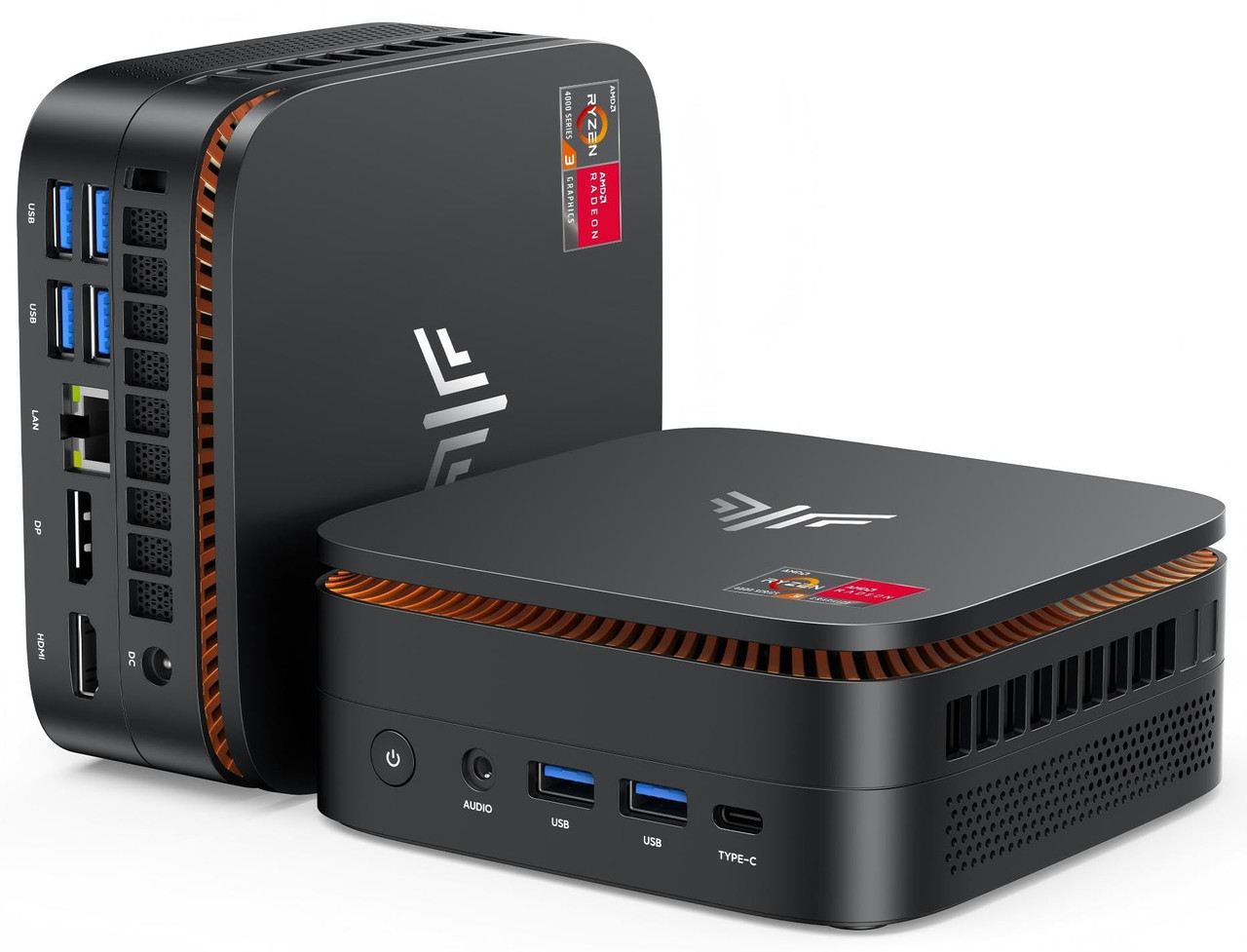 Short Description
The KAMRUI Pinova P1 focuses on accessible home-office computing. With Windows 11 Pro listed and multiple display connections, it is a practical candidate for basic workstations.
Key Specifications
- Processor: AMD Ryzen 3 Pro 7330U
- Advertised boost frequency: Up to 4.3GHz
- Memory: 8GB RAM
- Storage: 256GB SSD
- Operating system: Windows 11 Pro
- Connections: HDMI, DisplayPort, USB Type-C, Wi-Fi, Bluetooth
- Display support: Advertised 4K output
Pros
- Windows 11 Pro listed
- Multiple display connection options
- SSD-equipped configuration
- Suitable specifications for basic office tasks
Cons
- 8GB RAM limits heavier multitasking
- 256GB storage is relatively restrictive
- Specific display-output combinations need verification
My Experience
I would consider this mini PC for email, online classes, web browsing, and routine paperwork. Its connectivity options are appealing, particularly when assembling a small desk setup.
For substantial multitasking, however, I would prefer a model with 16GB RAM.
What Other Buyers Say
Recurring verified buyer feedback wasn't available. I would check recent user comments about Windows activation, display connectivity, and reliability.
Best For
Basic home offices, reception desks, online learners, and users with modest computing requirements.
➡️➡️➡️ Explore User Feedback and Current Pricing on Amazon
Lenovo ThinkCentre M75Q G2 Micro PC | AMD Ryzen 5 PRO 5650GE | 16GB RAM | 256GB NVME | Windows 11 Pro | Mini PC | Business Pc (Renewed)

Short Description
The Lenovo ThinkCentre M75Q G2 is a business-oriented micro desktop offered as a renewed product. Its Ryzen PRO processor and Windows 11 Pro configuration make it relevant for professional environments.
Key Specifications
- Processor: AMD Ryzen 5 PRO 5650GE
- Memory: 16GB RAM
- Storage: 256GB NVMe
- Operating system: Windows 11 Pro
- Condition: Renewed
- Form factor: Micro PC
Pros
- Business-focused ThinkCentre product line
- Ryzen PRO processor
- 16GB RAM
- NVMe storage
- Windows 11 Pro listed
Cons
- Renewed rather than new
- 256GB storage capacity
- Hardware condition and included accessories may vary
My Experience
I consider the ThinkCentre a worthwhile alternative for buyers prioritizing established business-desktop designs over consumer-oriented features.
Its renewed condition deserves particular attention. I would confirm the seller's refurbishment standards, warranty coverage, and return policy before ordering.
What Other Buyers Say
I couldn't verify a reliable recurring feedback pattern for this specific renewed listing. For refurbished computers, reports about condition, included power adapters, and seller support are especially important.
Best For
Small businesses, administrative workstations, and buyers comfortable purchasing renewed professional hardware.
➡️➡️➡️ Explore User Feedback and Current Pricing on Amazon
How to Choose the Right PC Gaming Product
Although these computers are intended for non-gaming use, several traditional PC hardware considerations still matter.
1. Processor performance
For basic office applications, a modern Ryzen 3 processor may be sufficient. Ryzen 5 and Ryzen 7 systems provide additional headroom for multitasking, while higher-end Core Ultra configurations suit more demanding software.
2. Memory capacity
I recommend 16GB RAM for most users in 2026. An 8GB configuration can handle lighter tasks, but 32GB becomes attractive for development tools, virtual machines, and demanding productivity applications.
3. SSD storage
A 256GB SSD can work for basic office use. However, 500GB or 1TB is more comfortable when storing numerous programs, files, and media.
4. Connectivity and monitors
Check HDMI, DisplayPort, USB-C, Ethernet, Wi-Fi, and Bluetooth requirements. Don't assume a USB-C port supports video output unless the specific configuration confirms it.
5. Cooling, power, and noise
Compact computers have limited thermal space. Consider sustained workload performance, fan acoustics, ventilation clearance, and power-adapter requirements.
6. Upgradeability and durability
Verify whether memory and SSDs are replaceable. For renewed computers, review warranty terms, component condition, and return coverage.
7. Overall value
The cheapest option is not automatically the best purchase. I would compare processor capability, memory, storage, warranty, and the potential cost of upgrades.
FAQs
1. What is the best non gaming mini PC for 2026?
My best overall pick is the GEEKOM A7, thanks to its Ryzen 5 7535HS, 16GB DDR5 RAM, and 1TB SSD.
2. Is 8GB RAM enough for a non-gaming mini PC in 2026?
Yes, for light browsing, email, and basic documents. However, I prefer 16GB for comfortable multitasking and longer-term usefulness.
3. Can non-gaming mini PCs support multiple monitors?
Many can. The KAMRUI Pinova P1, for example, lists HDMI, DisplayPort, and USB-C connections. Verify simultaneous monitor support for your particular model.
4. Are mini PCs suitable for working from home?
Yes. A properly configured mini PC can handle office software, video calls, spreadsheets, and web-based business applications without requiring a full-size desktop.
5. Should I buy a premium or budget mini PC in 2026?
Choose based on your actual workloads. Budget configurations make sense for light tasks, while premium hardware is more appropriate for intensive multitasking, development, and specialized professional applications.
Conclusion
The top 6 best non gaming mini PC for 2026 demonstrate that compact computers can serve a wide range of home, educational, and professional needs without relying on gaming-focused hardware.
My final recommendations are:
- Best Overall: GEEKOM A7 Mini PC — A balanced combination of processor capability, DDR5 memory, and 1TB storage.
- Best Value: Beelink EQR5 Mini PC — A sensible everyday configuration with 16GB RAM and SSD storage, provided its current price is competitive.
- Best Premium Choice: GEEKOM IT15 AI Mini PC — A powerful option featuring Intel Core Ultra 9 processing and 32GB DDR5 memory.
For most people, I would choose the GEEKOM A7 because it offers a practical balance of everyday productivity features. If your applications demand more processing power and memory, the GEEKOM IT15 deserves serious consideration.
Ultimately, the right non-gaming mini PC depends on your software requirements, multitasking habits, available desk space, and budget. Confirm the current configuration, compatibility, warranty, and purchase terms before making your final decision.