Introduction
Finding the best PC build for 1440p 240Hz gaming for 2026 means balancing exceptional graphics performance with a processor capable of delivering consistently high frame rates. A 2560×1440 monitor running at 240Hz offers outstanding clarity and responsiveness, but taking full advantage of it requires serious gaming hardware.
For competitive games such as Valorant, Counter-Strike 2, and Fortnite, strong CPU performance and low frame-time variation matter enormously. For demanding AAA games, GPU power, sufficient VRAM, and advanced upscaling technologies become equally important.
I've selected six prebuilt gaming desktops featuring NVIDIA GeForce RTX 5070, RTX 5070 Ti, RTX 5080, or AMD Radeon RX 9070 XT graphics. These systems offer different approaches to high-refresh-rate 1440p gaming, from competitive esports configurations to premium gaming and streaming machines.
One important distinction: a 240Hz monitor does not guarantee 240 FPS. Actual performance depends on the game, graphics settings, drivers, and whether technologies such as upscaling or frame generation are enabled.
Quick Summary
For gamers targeting high-refresh-rate 1440p gameplay in 2026, I recommend prioritizing an RTX 5070 Ti or RTX 5080 alongside a capable modern processor. My top overall recommendation is the Skytech Gaming Chronos 3 with Ryzen 7 9800X3D and RTX 5080, thanks to its powerful gaming-focused CPU, 16GB graphics card, 32GB DDR5 memory, and comprehensive cooling configuration. The RTX 5070 and Radeon RX 9070 XT alternatives are also worth considering for different budgets and gaming preferences.
Top Product List
- Skytech Gaming Chronos 3 Gaming PC, AMD Ryzen 7 9800X3D 4.7GHz, NVIDIA RTX 5080 16GB VRAM, X670 Board, 2TB Gen4 NVMe SSD, 32GB DDR5 RAM 6000, 850W Gold ATX 3 PSU, 360 ARGB AIO, Wi-Fi 5, Windows 11 — Best for overall 1440p 240Hz gaming
- ASUS ROG GM700 (2026) Gaming Desktop PC, AMD Ryzen™ 7 9800X3D Processor, NVIDIA® GeForce RTX™ 5080, 2TB M.2 NVMe™ PCIe® 4 SSD, 32GB DDR5 RAM, Windows 11 Home, GM700TZ-PS787 — Best for premium gaming enthusiasts
- Skytech Gaming PC Desktop, Ryzen 7 9800X3D, RTX 5070 Ti, 32GB RAM, 1TB SSD — Best for balanced high-refresh-rate gaming
- Skytech Gaming PC Desktop, Ryzen 7 9800X3D, RX 9070 XT, 32GB RAM, 2TB SSD — Best for AMD graphics enthusiasts
- msi Aegis ZS Gaming Desktop, AMD Ryzen 9 9900X, GeForce RTX 5080, 32GB RAM, 2TB SSD, Liquid Cooling, Wi-Fi 7, Keyboard & Mouse Included, DIY Friendly, Windows 11 Pro — Best for gaming, streaming, and multitasking
- Lenovo Legion Tower 5-2026 - Gaming Desktop - NVIDIA GeForce RTX 5070 - Ryzen 7 7800X3D - 32GB Memory - 1TB Storage - Windows 11 Home - Eclipse Black - Free 3 Months PC Game Pass — Best for value-focused competitive gaming
Top 6 Best PC Build for 1440p 240Hz Gaming for 2026
Skytech Gaming Chronos 3 Gaming PC, AMD Ryzen 7 9800X3D 4.7GHz, NVIDIA RTX 5080 16GB VRAM, X670 Board, 2TB Gen4 NVMe SSD, 32GB DDR5 RAM 6000, 850W Gold ATX 3 PSU, 360 ARGB AIO, Wi-Fi 5, Windows 11

Short Description
The Skytech Gaming Chronos 3 combines one of AMD's gaming-focused X3D processors with NVIDIA's RTX 5080. Its specifications make it my strongest overall choice for ambitious 1440p 240Hz setups.
Key Specifications
- CPU: AMD Ryzen 7 9800X3D
- GPU: NVIDIA RTX 5080, 16GB VRAM
- RAM: 32GB DDR5-6000
- Storage: 2TB Gen4 NVMe SSD
- Motherboard: X670
- Cooling: 360mm ARGB AIO
- Power Supply: 850W Gold ATX 3
- Connectivity: Wi-Fi 5
- Operating System: Windows 11
Pros
- Excellent CPU and GPU pairing for demanding games.
- 32GB DDR5 memory is well suited to modern gaming.
- Spacious 2TB NVMe storage.
- Substantial liquid-cooling and power-supply specifications.
Cons
- Wi-Fi 5 is relatively dated for a premium system.
- RTX 5080 hardware may be unnecessary for lighter esports titles.
- A consistent native 240 FPS is not guaranteed in demanding games.
My Experience
Based on its specifications rather than hands-on testing, this is the configuration I would prioritize for serious high-refresh-rate gaming. The Ryzen 7 9800X3D is particularly attractive for CPU-sensitive games, while the RTX 5080 provides considerable graphics capability.
I also appreciate the clearly specified PSU and cooling hardware, although actual temperatures and noise depend on assembly quality and fan configuration.
What Other Buyers Say
I couldn't independently establish recurring buyer feedback for this exact configuration. I recommend checking recent verified-purchase comments about system assembly, fan noise, temperatures, and after-sales support.
Best For
Enthusiasts who want one powerful desktop for competitive 1440p gaming, visually demanding AAA titles, and long-term use.
➤➤➤ Click Here to Check Price on Amazon
➡️➡️➡️ Explore User Feedback and Current Pricing on Amazon
ASUS ROG GM700 (2026) Gaming Desktop PC, AMD Ryzen™ 7 9800X3D Processor, NVIDIA® GeForce RTX™ 5080, 2TB M.2 NVMe™ PCIe® 4 SSD, 32GB DDR5 RAM, Windows 11 Home, GM700TZ-PS787

Short Description
The ASUS ROG GM700 is a premium prebuilt desktop featuring the Ryzen 7 9800X3D and RTX 5080. It's an appealing alternative for gamers who prefer a ROG-branded system.
Key Specifications
- CPU: AMD Ryzen 7 9800X3D
- GPU: NVIDIA GeForce RTX 5080
- RAM: 32GB DDR5
- Storage: 2TB PCIe 4.0 NVMe SSD
- Operating System: Windows 11 Home
- Model: GM700TZ-PS787
Pros
- High-end CPU and graphics combination.
- 32GB DDR5 memory.
- Generous 2TB SSD.
- Well suited to gaming and demanding desktop workloads.
Cons
- Premium hardware can involve a substantial investment.
- Exact cooling and power-supply details require confirmation.
- The listed specifications do not establish upgrade flexibility.
My Experience
My assessment is that this system makes excellent sense for someone seeking high-end 1440p performance without selecting individual components.
The processor is well suited to high-frame-rate gaming, and the RTX 5080 is a strong match for demanding graphics workloads. I would compare its cooling, PSU, warranty, and upgrade access against the Skytech Chronos 3 before deciding.
What Other Buyers Say
Recurring buyer opinions for this precise GM700 configuration were not independently verified. Check purchaser feedback about acoustics, component accessibility, setup, and technical support.
Best For
Premium PC gamers seeking a powerful branded desktop for a 1440p 240Hz monitor and demanding modern games.
➤➤➤ Click Here to Check Price on Amazon
➡️➡️➡️ Explore User Feedback and Current Pricing on Amazon
Skytech Gaming PC Desktop, Ryzen 7 9800X3D, RTX 5070 Ti, 32GB RAM, 1TB SSD

Short Description
This Skytech desktop combines the Ryzen 7 9800X3D with an RTX 5070 Ti, making it a compelling middle ground between premium GPU performance and sensible component selection.
Key Specifications
- CPU: AMD Ryzen 7 9800X3D
- GPU: NVIDIA RTX 5070 Ti
- RAM: 32GB
- Storage: 1TB SSD
Pros
- Gaming-focused X3D processor.
- Strong graphics hardware for 1440p.
- 32GB memory.
- Potentially better value than RTX 5080 systems.
Cons
- Less graphics headroom than RTX 5080 configurations.
- 1TB storage may fill quickly with large game libraries.
- Cooling, PSU, and memory generation are not specified in the listing title.
My Experience
Of the six options, this is one of the configurations I find most balanced on paper. The Ryzen 7 9800X3D offers a strong foundation for high frame rates, while the RTX 5070 Ti avoids stepping all the way up to the RTX 5080 tier.
I would consider it especially attractive if the price difference from the RTX 5080 systems is meaningful.
What Other Buyers Say
I haven't verified a consistent pattern of buyer reviews for this exact model. Check reports of cooling noise, shipping condition, and whether the delivered components match the advertised configuration.
Best For
Competitive and AAA gamers who want a capable 1440p high-refresh-rate PC without automatically choosing the most expensive GPU tier.
➤➤➤ Click Here to Check Price on Amazon
➡️➡️➡️ Explore User Feedback and Current Pricing on Amazon
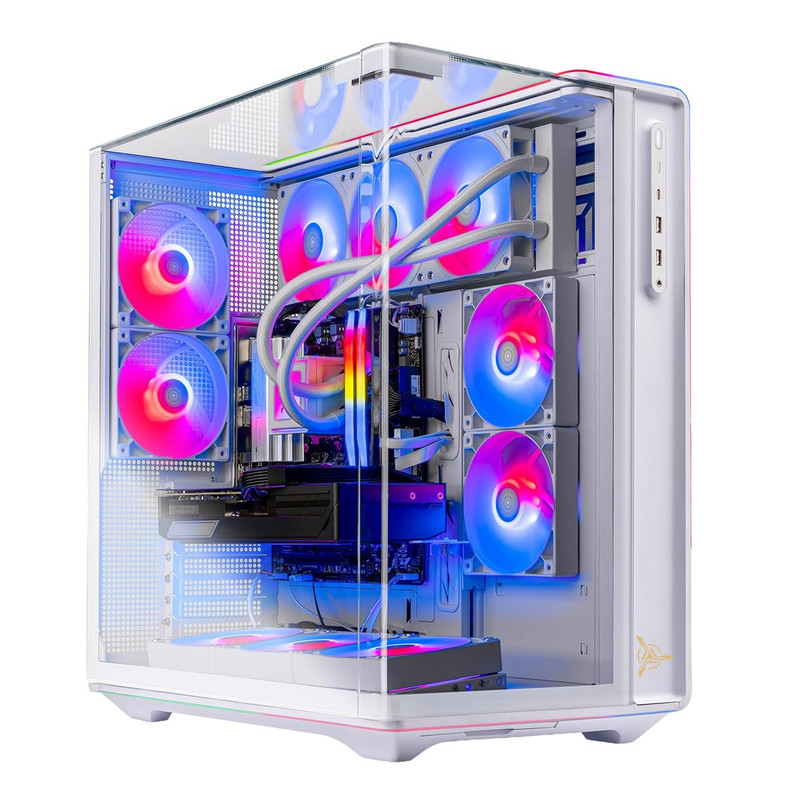
Skytech Gaming PC Desktop, Ryzen 7 9800X3D, RX 9070 XT, 32GB RAM, 2TB SSD
Short Description
For gamers interested in AMD graphics hardware, this Skytech configuration pairs the Ryzen 7 9800X3D with the Radeon RX 9070 XT and provides a generous 2TB SSD.
Key Specifications
- CPU: AMD Ryzen 7 9800X3D
- GPU: AMD Radeon RX 9070 XT
- RAM: 32GB
- Storage: 2TB SSD
Pros
- Strong gaming-oriented processor.
- Capable Radeon GPU for 1440p.
- Large 2TB storage allocation.
- Attractive alternative to NVIDIA-based desktops.
Cons
- Performance varies by game and rendering technology.
- Ray-tracing and upscaling preferences may favor another GPU.
- Cooling and motherboard details require verification.
My Experience
I particularly like the pairing of a Ryzen X3D processor with a capable Radeon GPU. For gamers who prioritize conventional rasterized rendering, this is a configuration worth comparing against the RTX 5070 Ti options.
I would examine game-specific benchmarks before selecting it for a particular 240 FPS target, especially where ray tracing is involved.
What Other Buyers Say
I couldn't substantiate recurring purchaser feedback for this exact system. It's worth reviewing comments about driver setup, assembly quality, cooling, and seller support.
Best For
AMD enthusiasts focused on 1440p gameplay, substantial SSD capacity, and strong traditional graphics performance.
➤➤➤ Click Here to Check Price on Amazon
➡️➡️➡️ Explore User Feedback and Current Pricing on Amazon
msi Aegis ZS Gaming Desktop, AMD Ryzen 9 9900X, GeForce RTX 5080, 32GB RAM, 2TB SSD, Liquid Cooling, Wi-Fi 7, Keyboard & Mouse Included, DIY Friendly, Windows 11 Pro

Short Description
The MSI Aegis ZS offers a different emphasis: an AMD Ryzen 9 9900X, RTX 5080, liquid cooling, and Wi-Fi 7. Its specifications make it interesting for gaming alongside streaming and productivity.
Key Specifications
- CPU: AMD Ryzen 9 9900X
- GPU: NVIDIA GeForce RTX 5080
- RAM: 32GB
- Storage: 2TB SSD
- Cooling: Liquid cooling
- Wireless: Wi-Fi 7
- Accessories: Keyboard and mouse
- Operating System: Windows 11 Pro
Pros
- RTX 5080 graphics performance tier.
- Powerful multicore processor.
- Modern Wi-Fi 7 connectivity.
- Liquid cooling and included peripherals.
- Advertised as DIY-friendly.
Cons
- The Ryzen 9 9900X is not necessarily preferable to an X3D processor for gaming alone.
- Additional CPU capability may be unnecessary for esports.
- Exact cooling and upgrade specifications need confirmation.
My Experience
From a configuration perspective, this is the PC I would consider when gaming is only part of the workload.
The Ryzen 9 9900X makes sense for computationally demanding multitasking, while the RTX 5080 supports graphically intensive games. For pure competitive gaming, however, I would compare it carefully against the Ryzen 7 9800X3D alternatives.
What Other Buyers Say
Verified recurring feedback for this specific configuration wasn't established. I recommend examining purchaser reports about cooling, supplied accessories, BIOS setup, and upgrade accessibility.
Best For
Gamers who also stream, create content, multitask, or use demanding productivity applications.
➤➤➤ Click Here to Check Price on Amazon
➡️➡️➡️ Explore User Feedback and Current Pricing on Amazon
Lenovo Legion Tower 5-2026 - Gaming Desktop - NVIDIA GeForce RTX 5070 - Ryzen 7 7800X3D - 32GB Memory - 1TB Storage - Windows 11 Home - Eclipse Black - Free 3 Months PC Game Pass

Short Description
The Lenovo Legion Tower 5-2026 combines an AMD Ryzen 7 7800X3D with an RTX 5070. It's a particularly interesting choice for competitive gamers looking for strong CPU performance while spending less on graphics hardware than premium RTX 5080 systems.
Key Specifications
- CPU: AMD Ryzen 7 7800X3D
- GPU: NVIDIA GeForce RTX 5070
- RAM: 32GB
- Storage: 1TB
- Operating System: Windows 11 Home
- Included offer: Three months of PC Game Pass, as listed
Pros
- Gaming-focused Ryzen X3D processor.
- RTX 5070 graphics.
- 32GB memory.
- Potentially economical option for competitive gaming.
Cons
- Less GPU headroom than RTX 5070 Ti and RTX 5080 desktops.
- Demanding AAA games may require reduced graphics settings.
- The 1TB storage allocation is relatively modest.
My Experience
I see this as an appealing entry point into serious 1440p high-refresh-rate gaming.
The Ryzen 7 7800X3D is especially relevant to CPU-sensitive games. Paired with an RTX 5070, it looks more appropriate for competitive settings than for expecting maximum-quality AAA visuals at 240 FPS.
I would verify the system's video outputs and cooling specifications before pairing it with a 1440p 240Hz monitor.
What Other Buyers Say
I couldn't independently confirm recurring feedback for this exact 2026 listing. Look for verified reports about fan acoustics, preinstalled software, warranty service, and upgrade access.
Best For
Value-focused esports gamers who prioritize responsiveness and high frame rates over maximum graphics settings.
➤➤➤ Click Here to Check Price on Amazon
➡️➡️➡️ Explore User Feedback and Current Pricing on Amazon
How to Choose the Right PC Gaming Product
1. Prioritize the right GPU. For a 1440p 240Hz monitor, graphics capability matters substantially. RTX 5080 systems offer greater headroom than RTX 5070 systems, although actual frame rates remain game-dependent.
2. Choose a gaming-focused CPU. Ryzen X3D processors are particularly appealing for high-FPS gaming. The Ryzen 7 9800X3D and 7800X3D are strong candidates for competitive setups.
3. Consider memory and storage. I recommend 32GB RAM for a premium 2026 gaming build. A 2TB NVMe SSD is preferable if you regularly install large AAA titles.
4. Check cooling and power. Review the cooling design, GPU airflow, PSU specifications, and manufacturer warranty. Powerful hardware is only useful when the system can sustain performance reliably.
5. Verify monitor connectivity. Confirm that the graphics card and monitor support 2560×1440 at 240Hz through a compatible DisplayPort or HDMI connection. Cable capability and display settings matter too.
6. Match performance to games. Competitive games may benefit from reduced settings to maximize responsiveness. Graphically intensive games generally demand more GPU resources, and frame generation does not replace low native latency.
7. Consider upgradeability and value. Check available storage slots, memory expansion, case clearance, and standardized components. The best purchase is not automatically the fastest desktop; it is the one that meets your actual gaming requirements at a worthwhile cost.
FAQs
1. What is the best PC build for 1440p 240Hz gaming in 2026?
My overall pick is the Skytech Gaming Chronos 3 with Ryzen 7 9800X3D and RTX 5080. It provides a strong CPU/GPU combination for this demanding target.
2. Is an RTX 5070 enough for 1440p 240Hz gaming?
It can be suitable for high-refresh-rate esports gaming, particularly with optimized settings. It won't guarantee 240 FPS in every demanding AAA title.
3. Is the Ryzen 7 9800X3D good for 240Hz gaming?
Yes. Its gaming-oriented architecture makes it a strong choice for CPU-sensitive titles where high frame rates and consistent frame times are important.
4. Do I need 32GB RAM for 1440p 240Hz gaming?
Not every game requires 32GB, but it is a sensible recommendation for a modern premium gaming computer, especially when multitasking.
5. Can a 1440p 240Hz gaming PC also handle streaming?
Yes. Modern systems with capable multicore processors and GPUs can support gaming and streaming, although performance depends on the stream configuration and gaming workload.
Conclusion
Selecting the best PC build for 1440p 240Hz gaming for 2026 comes down to matching your games, graphics preferences, and budget to the right CPU and GPU combination.
Best Overall: Skytech Gaming Chronos 3 with Ryzen 7 9800X3D and RTX 5080. Its balanced high-end specifications make it my leading recommendation.
Best Value: Lenovo Legion Tower 5-2026 with Ryzen 7 7800X3D and RTX 5070. It is a compelling lower-GPU-tier choice for esports-focused gamers, provided its actual selling price offers worthwhile savings.
Best Premium Choice: ASUS ROG GM700 (2026) with Ryzen 7 9800X3D and RTX 5080. It is an excellent premium contender for buyers who prefer a ROG-branded desktop.
For my own 1440p 240Hz purchasing shortlist, I would prioritize the Ryzen 7 9800X3D configurations, compare the RTX 5070 Ti and RTX 5080 price differences, and verify real game benchmarks before ordering. That approach offers the best chance of choosing a system that matches both your monitor and your gaming expectations.