Introduction
Finding the best PC configuration for 4K gaming in 2026 means balancing graphics performance, processor capability, memory, cooling, and long-term upgrade potential. At 3840 × 2160 resolution, modern AAA games demand significantly more graphics processing power than traditional 1080p gaming.
For me, the graphics card is the starting point. A powerful NVIDIA GeForce RTX 5080 or RTX 5090, paired with a modern AMD Ryzen processor, makes an excellent foundation for demanding 4K gaming. However, options such as the Radeon RX 9070 XT and RTX 5070 Ti also deserve consideration when overall value matters.
I've selected six prebuilt gaming desktops covering premium performance, balanced configurations, AMD graphics, and more accessible 4K gaming. My assessments are based on published hardware specifications and the capabilities of their component classes, rather than personal hands-on testing.
Quick Summary
For gamers seeking excellent 4K performance without immediately choosing the most expensive hardware tier, my top recommendation is the ASUS ROG GM700 (2026) with its Ryzen 7 9800X3D and RTX 5080. The MSI Infinite ZS is my premium choice for demanding 4K gaming, while the Skytech RX 9070 XT configuration is particularly attractive to AMD enthusiasts. Gamers with tighter budgets should also consider the RTX 5070 Ti and RTX 5070 configurations, with realistic expectations about graphics settings.
Top Product List
- msi Infinite ZS Gaming PC, AMD Ryzen 9 9950X3D 4.3GHz Processor; NVIDIA GeForce RTX 5090 32GB GDDR7; 32GB DDR5 RAM; 2TB M.2 NVMe Gen5 SSD, 2.5GbE LAN, WiFi 7 — Best for ultimate premium 4K gaming.
- ASUS ROG GM700 (2026) Gaming Desktop PC, AMD Ryzen™ 7 9800X3D Processor, NVIDIA® GeForce RTX™ 5080, 2TB M.2 NVMe™ PCIe® 4 SSD, 32GB DDR5 RAM, Windows 11 Home, GM700TZ-PS787 — Best for overall 4K gaming.
- Skytech Gaming Chronos 3 Gaming PC, AMD Ryzen 7 9800X3D 4.7GHz, NVIDIA RTX 5080 16GB VRAM, X670 Board, 2TB Gen4 NVMe SSD, 32GB DDR5 RAM 6000, 850W Gold ATX 3 PSU, 360 ARGB AIO, Wi-Fi 5, Windows 11 — Best for a well-specified 4K gaming configuration.
- Skytech Gaming PC Desktop, Ryzen 7 9800X3D, RX 9070 XT, 32GB RAM, 2TB SSD — Best for AMD-powered 4K gaming.
- Skytech Gaming PC Desktop, Ryzen 7 9800X3D, RTX 5070 Ti, 32GB RAM, 1TB SSD — Best for balanced 4K gaming value.
- KOTIN Prebuilt Gaming PC RTX 5070 12GB, Ryzen 7 9700X, 32GB DDR5, 1TB SSD — Best for entry-level 4K gaming.
Top 6 Best PC Configuration for 4K Gaming for 2026
msi Infinite ZS Gaming PC, AMD Ryzen 9 9950X3D 4.3GHz Processor; NVIDIA GeForce RTX 5090 32GB GDDR7; 32GB DDR5 RAM; 2TB M.2 NVMe Gen5 SSD, 2.5GbE LAN, WiFi 7

Short Description
The MSI Infinite ZS represents the highest-performance tier in my selection. Combining AMD's Ryzen 9 9950X3D with NVIDIA's RTX 5090, this desktop is designed for gamers who prioritize advanced visual settings, ray tracing, and demanding 4K workloads.
Key Specifications
- Processor: AMD Ryzen 9 9950X3D
- Graphics: NVIDIA GeForce RTX 5090, 32GB GDDR7
- Memory: 32GB DDR5
- Storage: 2TB M.2 NVMe Gen5 SSD
- Networking: 2.5GbE LAN and Wi-Fi 7
Pros
- Flagship-class graphics hardware with substantial VRAM.
- Powerful X3D processor for gaming and multitasking.
- Fast Gen5 SSD storage.
- Modern wired and wireless networking.
Cons
- Premium hardware typically demands a substantial budget.
- Cooling and power requirements deserve careful consideration.
- Included 32GB memory may be worth upgrading for unusually memory-intensive professional workloads.
My Experience
Based on its specifications, I consider this the strongest option for gamers who want maximum graphics capability rather than minimum cost. Its RTX 5090 is particularly appealing for challenging ray-traced games and high-resolution creative work.
I would verify the exact power supply, airflow design, and warranty before purchasing.
What Other Buyers Say
I couldn't verify a reliable pattern of owner feedback for this exact configuration. Cooling noise, shipping protection, and support experiences are worth checking in recent verified-owner reviews.
Best For
Enthusiasts using premium 4K high-refresh-rate monitors, demanding AAA games, ray tracing, and content-creation applications.
➡️➡️➡️ Explore User Feedback and Current Pricing on Amazon
ASUS ROG GM700 (2026) Gaming Desktop PC, AMD Ryzen™ 7 9800X3D Processor, NVIDIA® GeForce RTX™ 5080, 2TB M.2 NVMe™ PCIe® 4 SSD, 32GB DDR5 RAM, Windows 11 Home, GM700TZ-PS787
 #### Short Description
The ASUS ROG GM700 combines the gaming-focused Ryzen 7 9800X3D with the RTX 5080, making it my best overall configuration for enthusiasts who want strong 4K capabilities without stepping into RTX 5090 territory.
Key Specifications
- Processor: AMD Ryzen 7 9800X3D
- Graphics: NVIDIA GeForce RTX 5080
- Memory: 32GB DDR5
- Storage: 2TB PCIe 4.0 NVMe SSD
- Operating system: Windows 11 Home
Pros
- Excellent gaming-oriented processor.
- High-end GPU suited to demanding 4K titles.
- Generous memory and storage.
- Complete Windows gaming desktop.
Cons
- Still a premium configuration.
- RTX 5080 has less graphics memory than RTX 5090.
- Specific cooling and PSU details require confirmation.
My Experience
This is the configuration I would examine first for an all-around high-end 4K gaming setup. The Ryzen 7 9800X3D is especially attractive for gaming, while the RTX 5080 provides a strong foundation for high-resolution visuals and NVIDIA's supported upscaling technologies.
The main question is whether its final price represents good value compared with similarly equipped desktops.
What Other Buyers Say
I haven't established recurring verified-owner feedback for this exact GM700 model. I recommend reviewing recent comments about fan behavior, build quality, and warranty support.
Best For
Gamers seeking an excellent combination of 4K AAA gaming, high-refresh-rate gaming, and everyday desktop performance.
➡️➡️➡️ Explore User Feedback and Current Pricing on Amazon
Skytech Gaming Chronos 3 Gaming PC, AMD Ryzen 7 9800X3D 4.7GHz, NVIDIA RTX 5080 16GB VRAM, X670 Board, 2TB Gen4 NVMe SSD, 32GB DDR5 RAM 6000, 850W Gold ATX 3 PSU, 360 ARGB AIO, Wi-Fi 5, Windows 11
 #### Short Description
The Skytech Chronos 3 delivers an attractive mix of high-end graphics, gaming-oriented processing, and clearly specified supporting components.
Its cooling system, motherboard, and power supply make it particularly interesting for buyers who scrutinize the entire configuration rather than the GPU alone.
Key Specifications
- Processor: AMD Ryzen 7 9800X3D
- Graphics: RTX 5080, 16GB VRAM
- Motherboard: X670
- Memory: 32GB DDR5-6000
- Storage: 2TB Gen4 NVMe SSD
- Cooling: 360mm ARGB AIO
- Power supply: 850W Gold ATX 3
- Connectivity: Wi-Fi 5
Pros
- Strong RTX 5080 and Ryzen X3D combination.
- Clearly specified memory speed and power supply.
- Large liquid CPU cooler.
- Good storage capacity.
Cons
- Wi-Fi 5 is older than newer wireless standards.
- Liquid cooling introduces additional components to maintain.
- Exact chassis airflow and operating noise need confirmation.
My Experience
I especially appreciate how much of this system's supporting hardware is disclosed. The 850W Gold ATX 3 PSU and 360mm liquid cooler are meaningful specifications when evaluating a high-end gaming desktop.
I would compare it directly against the ASUS ROG GM700, particularly on warranty, price, and upgrade accessibility.
What Other Buyers Say
Reliable recurring feedback for this exact configuration wasn't established. Before ordering, I would examine verified buyer comments regarding shipping, fan noise, and initial setup.
Best For
4K gamers who want a clearly documented configuration with powerful components and liquid CPU cooling.
➡️➡️➡️ Explore User Feedback and Current Pricing on Amazon
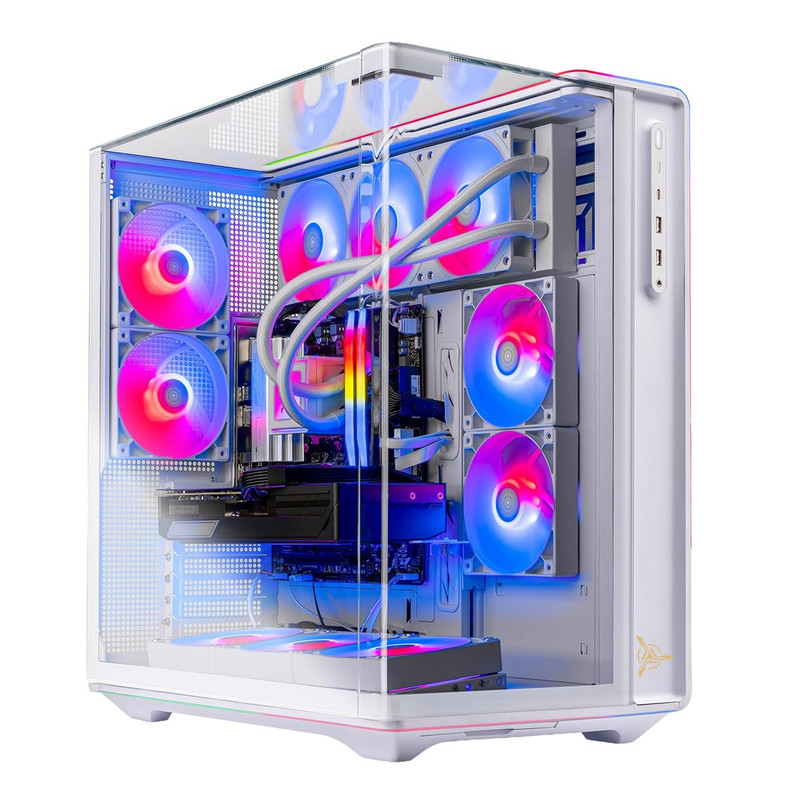
Skytech Gaming PC Desktop, Ryzen 7 9800X3D, RX 9070 XT, 32GB RAM, 2TB SSD
 #### Short Description
This Skytech desktop is an appealing AMD-based alternative for 4K gaming. Its Radeon RX 9070 XT provides 16GB graphics memory, while the Ryzen 7 9800X3D offers strong gaming-oriented processing.
Key Specifications
- Processor: AMD Ryzen 7 9800X3D
- Graphics: AMD Radeon RX 9070 XT
- Graphics memory: 16GB
- System memory: 32GB
- Storage: 2TB SSD
Pros
- Capable GPU for 4K rasterized gaming.
- Generous 16GB graphics memory.
- Gaming-focused Ryzen X3D processor.
- Ample system memory and storage.
Cons
- NVIDIA alternatives may be preferable for particularly demanding ray-tracing workloads.
- Exact PSU and cooling specifications aren't established.
- Gaming performance depends on resolution scaling and individual settings.
My Experience
I view this configuration as a particularly interesting alternative to RTX-based systems. For gamers prioritizing conventional rendering performance, the RX 9070 XT deserves serious consideration.
I would evaluate its actual selling price against the RTX 5070 Ti systems before declaring it the better deal.
What Other Buyers Say
I couldn't substantiate a recurring buyer-feedback pattern for this specific Skytech desktop. Recent verified reviews should help clarify real-world assembly quality and support experiences.
Best For
AMD enthusiasts, single-player AAA gamers, and buyers interested in strong 4K gaming without requiring NVIDIA-exclusive technologies.
➡️➡️➡️ Explore User Feedback and Current Pricing on Amazon
Skytech Gaming PC Desktop, Ryzen 7 9800X3D, RTX 5070 Ti, 32GB RAM, 1TB SSD
 #### Short Description
For gamers who want to enter the 4K category without buying an RTX 5080 or RTX 5090, this Skytech desktop offers an appealing middle-ground configuration.
Its RTX 5070 Ti is better described as an entry-to-midrange 4K solution than a no-compromise 4K GPU.
Key Specifications
- Processor: AMD Ryzen 7 9800X3D
- Graphics: NVIDIA GeForce RTX 5070 Ti
- Graphics memory: 16GB GDDR7
- Memory: 32GB RAM
- Storage: 1TB SSD
Pros
- Powerful gaming processor.
- 16GB graphics memory.
- Supports NVIDIA's compatible DLSS technologies.
- Balanced option for 1440p and selected 4K gaming.
Cons
- More demanding 4K games may require upscaling or reduced settings.
- 1TB storage may fill quickly with modern games.
- Cooling and power-supply models need verification.
My Experience
I consider the RTX 5070 Ti an attractive compromise when the desktop's price is sufficiently below RTX 5080 alternatives.
The Ryzen 7 9800X3D also gives this configuration an excellent CPU foundation, although I would prioritize the GPU when comparing pure 4K gaming value.
What Other Buyers Say
There isn't enough verified, configuration-specific feedback available to summarize consistent owner experiences confidently. I recommend checking recent reviews for thermal behavior and component consistency.
Best For
Value-conscious enthusiasts playing at 1440p high refresh rates or 4K with carefully optimized graphics settings.
➡️➡️➡️ Explore User Feedback and Current Pricing on Amazon
KOTIN Prebuilt Gaming PC RTX 5070 12GB, Ryzen 7 9700X, 32GB DDR5, 1TB SSD
 #### Short Description
The KOTIN prebuilt gaming PC is the most accessible 4K-oriented option in this shortlist. With an RTX 5070 and Ryzen 7 9700X, it offers strong general gaming capability, although demanding native 4K gaming is not its primary strength.
Key Specifications
- Processor: AMD Ryzen 7 9700X
- Graphics: NVIDIA GeForce RTX 5070
- Graphics memory: 12GB
- System memory: 32GB DDR5
- Storage: 1TB SSD
Pros
- Modern Ryzen processor.
- 32GB DDR5 memory.
- RTX graphics with supported DLSS features.
- Suitable for 1440p gaming and less demanding 4K experiences.
Cons
- 12GB VRAM is less generous than the higher-ranked options.
- Heavy 4K ray tracing can be challenging.
- Demanding games may require noticeable graphics compromises.
My Experience
I would consider this machine primarily for gamers who split their time between 1440p and 4K.
Its processor and memory form a capable foundation, but the RTX 5070 determines its limitations at ultra-high resolutions. Upscaling can help, provided the game supports it and the resulting image quality meets your expectations.
What Other Buyers Say
I couldn't verify consistent owner feedback for this exact KOTIN configuration. I would pay particular attention to verified reports concerning component quality and after-sales service.
Best For
Gamers wanting a versatile desktop for high-quality 1440p gaming, lighter 4K titles, and occasional 4K AAA gaming with adjusted settings.
➡️➡️➡️ Explore User Feedback and Current Pricing on Amazon
How to Choose the Right PC Gaming Product
When selecting a gaming PC for 2026, I recommend prioritizing the following considerations:
- Graphics performance: RTX 5080 and RTX 5090 configurations are better suited to demanding 4K workloads. RTX 5070 Ti and RX 9070 XT offer less expensive routes to 4K gaming, depending on prices and settings.
- Processor: Modern Ryzen 7 and Ryzen 9 CPUs offer substantial gaming capability. X3D models are especially attractive for CPU-sensitive games.
- RAM: 32GB is a sensible target for a premium gaming system.
- Storage: A 2TB SSD offers more flexibility for large AAA game libraries than a 1TB model.
- Cooling and airflow: Verify case ventilation, CPU cooling, and noise characteristics rather than relying on RGB lighting.
- Power supply: Confirm wattage, connector compatibility, electrical protections, and manufacturer quality.
- Connectivity: Consider Ethernet, Wi-Fi, USB ports, and monitor outputs.
- Upgradeability: Check motherboard expansion, standardized components, case clearance, and warranty restrictions.
- Value: Compare the total configuration, not simply the GPU model. A lower-tier GPU at a substantially better price can sometimes be the more sensible purchase.
FAQs
1. What is the best PC configuration for 4K gaming in 2026?
For most high-end gamers, I recommend a Ryzen 7 9800X3D, RTX 5080, 32GB DDR5 RAM, and a 2TB NVMe SSD. The ASUS ROG GM700 offers this combination.
2. Is 32GB RAM enough for 4K gaming?
Yes. 32GB is sufficient for most current gaming workloads. More memory can benefit specialized content creation and unusually demanding multitasking.
3. Is the RTX 5070 Ti good enough for 4K gaming?
Yes, for many games, particularly with appropriate settings and supported upscaling. However, it is not guaranteed to deliver high frame rates at maximum native 4K settings in every demanding title.
4. Is RTX 5080 or RX 9070 XT better for 4K gaming?
The RTX 5080 is generally the stronger choice for premium 4K performance and demanding ray tracing. The RX 9070 XT can be attractive when its price makes it a better overall value.
5. Do I need an RTX 5090 for 4K gaming?
No. An RTX 5090 is a premium option for enthusiasts seeking maximum capability. Many gamers will be well served by an RTX 5080 or another suitably powerful GPU.
Conclusion
Choosing among the top 6 best PC configuration for 4K gaming for 2026 depends on how much performance you need, which games you play, and the final price of each system.
Best Overall: ASUS ROG GM700 (2026), combining the Ryzen 7 9800X3D and RTX 5080 for an excellent high-end gaming foundation.
Best Value: Skytech Gaming PC Desktop with Ryzen 7 9800X3D and RTX 5070 Ti, my preferred balanced-value candidate, assuming competitive pricing.
Best Premium Choice: MSI Infinite ZS with Ryzen 9 9950X3D and RTX 5090, offering the strongest hardware configuration in this selection.
My recommendation is to invest in the graphics capability your 4K monitor and favorite games actually require, while leaving sufficient budget for reliable cooling, storage, and power delivery.