Introduction
Finding the best prebuilt gaming PC for 4K for 2026 means looking beyond flashy RGB lighting and powerful-sounding processor names. At 3840 × 2160 resolution, modern AAA games demand substantial graphics performance, enough video memory, reliable cooling, and a balanced system that can sustain demanding workloads.
A well-equipped 4K gaming desktop should offer a powerful graphics card, a capable processor, at least 32GB of system memory for a premium build, and fast SSD storage. NVIDIA's GeForce RTX 50-series GPUs and AMD's Radeon RX 9000-series graphics cards are particularly relevant options.
I've selected six gaming desktops based on their advertised hardware, suitability for high-resolution gaming, storage, cooling, and overall configuration. These are specification-based recommendations, not claims of personal hands-on testing. Actual frame rates, temperatures, and noise will depend on the individual system and game.
Quick Summary
For gamers targeting high-quality 4K visuals, demanding AAA titles, and high-refresh-rate displays, I recommend starting with an RTX 5080-equipped desktop. My Best Overall choice is the ASUS ROG GM700 (2026), combining a Ryzen 7 9800X3D with an RTX 5080. The MSI Infinite ZS with RTX 5090 is my premium performance pick, while the Skytech Ryzen 7 9800X3D and Radeon RX 9070 XT configuration is an appealing value-oriented alternative, depending on current pricing.
Top Product List
- msi Infinite ZS Gaming PC, AMD Ryzen 9 9950X3D 4.3GHz Processor; NVIDIA GeForce RTX 5090 32GB GDDR7; 32GB DDR5 RAM; 2TB M.2 NVMe Gen5 SSD, 2.5GbE LAN, WiFi 7 — Best for Ultimate 4K Gaming Performance
- ASUS ROG GM700 (2026) Gaming Desktop PC, AMD Ryzen™ 7 9800X3D Processor, NVIDIA® GeForce RTX™ 5080, 2TB M.2 NVMe™ PCIe® 4 SSD, 32GB DDR5 RAM, Windows 11 Home, GM700TZ-PS787 — Best for Overall 4K Gaming
- Skytech Gaming Chronos 3 Gaming PC, AMD Ryzen 7 9800X3D 4.7GHz, NVIDIA RTX 5080 16GB VRAM, X670 Board, 2TB Gen4 NVMe SSD, 32GB DDR5 RAM 6000, 850W Gold ATX 3 PSU, 360 ARGB AIO, Wi-Fi 5, Windows 11 — Best for High-End Cooling and Hardware Transparency
- msi Aegis ZS Gaming Desktop, AMD Ryzen 9 9900X, GeForce RTX 5080, 32GB RAM, 2TB SSD, Liquid Cooling, Wi-Fi 7, Keyboard & Mouse Included, DIY Friendly, Windows 11 Pro — Best for 4K Gaming and Content Creation
- Skytech Gaming PC Desktop, Ryzen 7 9800X3D, RX 9070 XT, 32GB RAM, 2TB SSD — Best for Value-Oriented 4K Gaming
- ZOTAC MEK Gaming PC Desktop, Ryzen 7 9700X, NVIDIA GeForce RTX 5070 Ti 16GB — Best for Entry-Level 4K Gaming Enthusiasts
Top 6 Best Prebuilt Gaming PC for 4K for 2026
msi Infinite ZS Gaming PC, AMD Ryzen 9 9950X3D 4.3GHz Processor; NVIDIA GeForce RTX 5090 32GB GDDR7; 32GB DDR5 RAM; 2TB M.2 NVMe Gen5 SSD, 2.5GbE LAN, WiFi 7

Short Description
The MSI Infinite ZS is my premium choice for gamers who want exceptionally powerful hardware for demanding 4K titles. Its RTX 5090 and Ryzen 9 9950X3D combination is designed for users who prioritize graphics performance alongside serious multitasking capabilities.
Key Specifications
- Processor: AMD Ryzen 9 9950X3D
- Graphics: NVIDIA GeForce RTX 5090
- Video Memory: 32GB GDDR7
- RAM: 32GB DDR5
- Storage: 2TB M.2 NVMe Gen5 SSD
- Networking: 2.5GbE Ethernet and Wi-Fi 7
Pros
- Flagship-class graphics card with substantial VRAM.
- Ryzen X3D processor suited to demanding gaming workloads.
- Fast Gen5 SSD specification.
- Modern wired and wireless networking.
Cons
- Premium hardware may be excessive for casual gaming.
- Cooling and power-supply details require confirmation.
- High-end hardware can involve significant heat and power requirements.
My Experience
From my assessment of the specifications, the RTX 5090 is the defining advantage. Its 32GB of VRAM gives this configuration substantial room for demanding textures, rendering workloads, and future games.
I also like the pairing with AMD's Ryzen 9 9950X3D because it balances gaming-focused cache technology with high-end processing capabilities. I would verify the installed cooling solution and power supply before purchasing.
What Other Buyers Say
I couldn't establish a reliable pattern of verified buyer feedback for this exact configuration. Buyers should check recent reviews for fan noise, shipping protection, assembly quality, and technical support.
Best For
Enthusiasts who want flagship 4K gaming hardware, high-quality visual settings, demanding ray-traced games, and powerful multitasking.
➡️➡️➡️ Explore User Feedback and Current Pricing on Amazon
ASUS ROG GM700 (2026) Gaming Desktop PC, AMD Ryzen™ 7 9800X3D Processor, NVIDIA® GeForce RTX™ 5080, 2TB M.2 NVMe™ PCIe® 4 SSD, 32GB DDR5 RAM, Windows 11 Home, GM700TZ-PS787
 #### Short Description
The ASUS ROG GM700 is my Best Overall pick because its Ryzen 7 9800X3D and GeForce RTX 5080 provide a compelling combination for serious 4K gaming without requiring an RTX 5090.
Key Specifications
- Processor: AMD Ryzen 7 9800X3D
- Graphics: NVIDIA GeForce RTX 5080
- Video Memory: 16GB GDDR7
- RAM: 32GB DDR5
- Storage: 2TB PCIe 4.0 NVMe SSD
- Operating System: Windows 11 Home
Pros
- Excellent gaming-focused processor.
- RTX 5080 targets demanding high-resolution gaming.
- Generous 2TB storage capacity.
- 32GB DDR5 memory for modern gaming and multitasking.
Cons
- Less GPU horsepower than an RTX 5090 configuration.
- Chassis cooling and expansion options need checking.
- Extremely demanding ray-traced titles may still benefit from upscaling.
My Experience
What stands out to me is the balanced pairing of the 9800X3D and RTX 5080. Rather than spending heavily on additional CPU cores that may not improve 4K gaming substantially, this configuration emphasizes a gaming-oriented processor and a powerful GPU.
The 2TB SSD is another practical advantage for maintaining a large modern game library.
What Other Buyers Say
I haven't verified enough model-specific customer feedback to summarize a dependable consensus. I'd focus on reviews discussing temperatures, noise, manufacturer support, and ease of upgrading.
Best For
Gamers seeking a premium, well-balanced prebuilt system for 4K single-player adventures, competitive games, and everyday multitasking.
➡️➡️➡️ Explore User Feedback and Current Pricing on Amazon
Skytech Gaming Chronos 3 Gaming PC, AMD Ryzen 7 9800X3D 4.7GHz, NVIDIA RTX 5080 16GB VRAM, X670 Board, 2TB Gen4 NVMe SSD, 32GB DDR5 RAM 6000, 850W Gold ATX 3 PSU, 360 ARGB AIO, Wi-Fi 5, Windows 11
 #### Short Description
The Skytech Chronos 3 offers a detailed hardware configuration that appeals to gamers who care about cooling, component specifications, and future maintenance.
Key Specifications
- Processor: AMD Ryzen 7 9800X3D
- GPU: NVIDIA RTX 5080, 16GB VRAM
- Motherboard: X670
- RAM: 32GB DDR5-6000
- Storage: 2TB Gen4 NVMe SSD
- Cooling: 360mm ARGB AIO
- Power Supply: 850W Gold-rated ATX 3
- Connectivity: Wi-Fi 5
Pros
- Powerful CPU and GPU combination.
- Specified 360mm liquid cooling.
- Detailed motherboard and PSU information.
- Fast DDR5 memory and spacious SSD.
Cons
- Wi-Fi 5 is older than the wireless standards on several alternatives.
- Liquid cooling introduces additional maintenance considerations.
- Cooling effectiveness still depends on airflow and assembly quality.
My Experience
I particularly appreciate how much hardware information this listing provides. The combination of a 360mm AIO cooler, an 850W Gold-rated PSU, and an X670 motherboard makes evaluating the build easier.
For extended 4K gaming sessions, cooling design matters. However, I wouldn't assume this machine runs quietly without independent temperature and acoustic measurements.
What Other Buyers Say
Verified recurring feedback for this exact configuration isn't established here. I recommend checking purchaser reports about radiator noise, packaging, cable management, and warranty service.
Best For
Enthusiasts who want an RTX 5080 gaming desktop with clearly specified cooling, memory, motherboard, and power components.
➡️➡️➡️ Explore User Feedback and Current Pricing on Amazon
msi Aegis ZS Gaming Desktop, AMD Ryzen 9 9900X, GeForce RTX 5080, 32GB RAM, 2TB SSD, Liquid Cooling, Wi-Fi 7, Keyboard & Mouse Included, DIY Friendly, Windows 11 Pro
 #### Short Description
The MSI Aegis ZS is a strong option for someone who wants to combine 4K gaming with streaming, video editing, and productivity. Its Ryzen 9 processor makes it particularly interesting for workloads beyond games.
Key Specifications
- Processor: AMD Ryzen 9 9900X
- Graphics: NVIDIA GeForce RTX 5080
- RAM: 32GB
- Storage: 2TB SSD
- Cooling: Liquid cooling
- Wireless: Wi-Fi 7
- Operating System: Windows 11 Pro
- Accessories: Keyboard and mouse included
Pros
- Powerful CPU suited to multitasking.
- High-end RTX 5080 graphics.
- Modern Wi-Fi 7 connectivity.
- Included keyboard and mouse.
- Advertised DIY-friendly design.
Cons
- Ryzen 9 isn't necessarily faster for gaming than an X3D-focused CPU.
- Included peripherals may not satisfy competitive gamers.
- Specific liquid-cooling components aren't identified.
My Experience
I see this as one of the more versatile configurations in the selection. The Ryzen 9 9900X makes sense if gaming shares your schedule with editing, recording, or CPU-intensive applications.
The RTX 5080 keeps the system focused on high-resolution gaming, while Wi-Fi 7 and Windows 11 Pro provide useful supporting features.
What Other Buyers Say
I haven't confirmed a consistent body of customer reviews for this particular specification. Buyer feedback about upgrade accessibility, cooling noise, and included accessories would be especially relevant.
Best For
Content creators, streamers, and gamers who need a single powerful desktop for 4K gaming and demanding productivity tasks.
➡️➡️➡️ Explore User Feedback and Current Pricing on Amazon
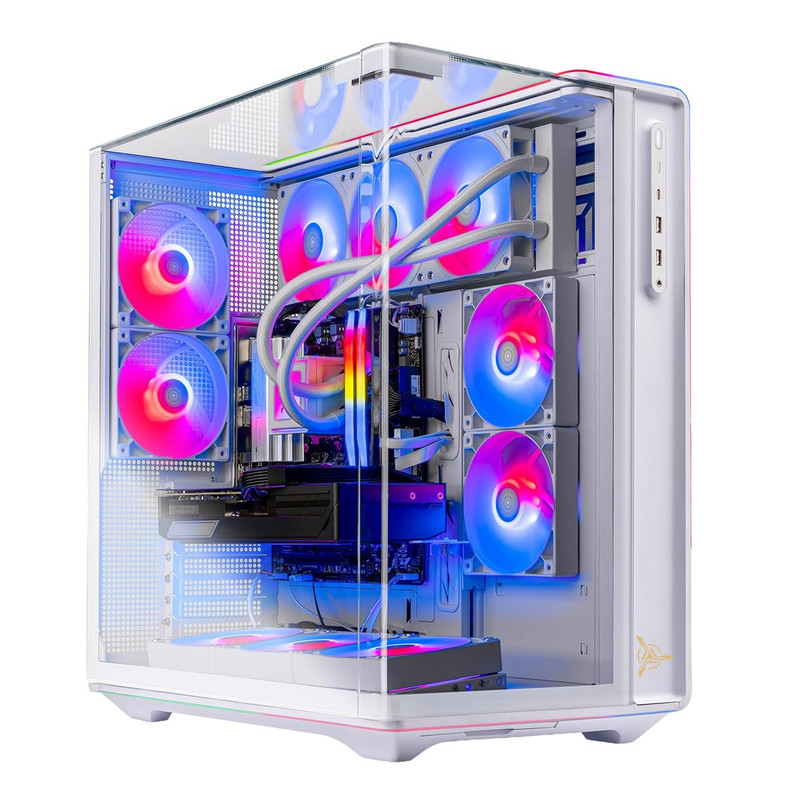
Skytech Gaming PC Desktop, Ryzen 7 9800X3D, RX 9070 XT, 32GB RAM, 2TB SSD
 #### Short Description
This Skytech configuration is my value-oriented 4K recommendation. It combines AMD's gaming-focused Ryzen 7 9800X3D with the Radeon RX 9070 XT, offering an alternative to NVIDIA-based prebuilt desktops.
Key Specifications
- Processor: AMD Ryzen 7 9800X3D
- Graphics: AMD Radeon RX 9070 XT
- Video Memory: 16GB GDDR6
- RAM: 32GB
- Storage: 2TB SSD
Pros
- Strong gaming-oriented processor.
- 16GB graphics memory.
- Suitable hardware foundation for 4K rasterized gaming.
- Spacious SSD and 32GB RAM.
Cons
- Less compelling than higher-end NVIDIA options for some demanding ray-tracing workloads.
- Exact cooling and PSU specifications aren't listed.
- Actual value depends on its selling price relative to RTX 5080 desktops.
My Experience
I like the balance of this configuration for gamers who prioritize traditional rendering performance rather than demanding maximum ray-tracing settings.
The RX 9070 XT's 16GB VRAM is useful for high-resolution textures. I would consider it especially attractive when the price difference from RTX 5080 systems is substantial.
What Other Buyers Say
I couldn't verify recurring buyer feedback for this exact Skytech configuration. Recent owner reviews covering GPU cooling, system stability, and warranty support would help confirm its overall value.
Best For
Gamers who want high-quality 4K gameplay, prefer AMD graphics, and are willing to adjust demanding visual settings or use upscaling.
➡️➡️➡️ Explore User Feedback and Current Pricing on Amazon
ZOTAC MEK Gaming PC Desktop, Ryzen 7 9700X, NVIDIA GeForce RTX 5070 Ti 16GB
 #### Short Description
The ZOTAC MEK is an approachable option for gamers stepping into 4K without choosing an RTX 5080 or RTX 5090 system. Its RTX 5070 Ti offers meaningful high-resolution capability, although demanding games may require optimized settings.
Key Specifications
- Processor: AMD Ryzen 7 9700X
- Graphics: NVIDIA GeForce RTX 5070 Ti
- Video Memory: 16GB GDDR7
Other specifications, including installed RAM, SSD capacity, and power supply, should be verified for the exact configuration.
Pros
- RTX 5070 Ti with 16GB graphics memory.
- Modern Ryzen 7 processor.
- NVIDIA upscaling and ray-tracing support.
- Potentially attractive entry point into 4K gaming.
Cons
- Less GPU performance headroom than RTX 5080 or RTX 5090 options.
- Missing RAM, storage, and cooling details.
- Native 4K at maximum settings may be unrealistic in demanding titles.
My Experience
My assessment is that this machine makes the most sense for gamers comfortable using DLSS, adjusting graphics settings, and prioritizing smooth gameplay over maximum visual presets.
I wouldn't choose it over an RTX 5080 desktop at a similar price. However, with a meaningful price advantage and an adequately configured supporting system, it could be sensible.
What Other Buyers Say
Reliable recurring feedback for the exact model hasn't been established. I would review customer experiences concerning power supply quality, memory configuration, thermal behavior, and customer service.
Best For
Gamers moving from 1080p or 1440p toward 4K who prefer an NVIDIA graphics card and don't require maximum ray-tracing settings.
➡️➡️➡️ Explore User Feedback and Current Pricing on Amazon
How to Choose the Right PC Gaming Product
1. Prioritize GPU performance. At 4K, the graphics card is usually the most important component. RTX 5090 desktops provide the greatest performance headroom among these choices, while RTX 5080 systems offer a compelling high-end balance. RTX 5070 Ti and RX 9070 XT desktops may require more compromises in demanding games.
2. Choose adequate VRAM. I prefer 16GB or more for a premium 4K-focused build, especially when using high-resolution textures. VRAM capacity alone, however, doesn't determine frame rates.
3. Match the CPU to your workload. Ryzen X3D processors are attractive for gaming, while Ryzen 9 chips can make sense for heavy multitasking and content creation.
4. Check memory and storage. Look for 32GB of RAM and ideally a 2TB NVMe SSD. Make sure the desktop has enough expansion capacity for future upgrades.
5. Evaluate cooling and power. A powerful GPU requires suitable case airflow, CPU cooling, and a properly sized, high-quality power supply. Look for disclosed component models rather than relying solely on RGB lighting or marketing descriptions.
6. Verify compatibility and connectivity. Confirm the desktop's graphics output supports your 4K monitor's desired refresh rate. Check USB ports, Ethernet, Wi-Fi, monitor connections, and available expansion slots.
7. Consider durability and ownership costs. Review warranty coverage, service options, replacement-part availability, noise, dust-filter access, and whether the chassis uses standard components.
8. Compare total value. Don't assume the most expensive gaming PC is the best choice. Compare the actual GPU, processor, RAM, SSD, cooling, warranty, and current price before deciding.
FAQs
1. What is the best prebuilt gaming PC for 4K for 2026?
My Best Overall choice is the ASUS ROG GM700 with Ryzen 7 9800X3D and RTX 5080. For maximum hardware capability among these six, the MSI Infinite ZS with RTX 5090 is the stronger premium option.
2. Is an RTX 5080 powerful enough for 4K gaming in 2026?
Yes. An RTX 5080 is a capable high-end 4K gaming GPU. Actual performance depends on the title, graphics settings, ray tracing, and whether upscaling is enabled.
3. Is 32GB RAM enough for a 4K gaming PC?
Yes. 32GB is a strong capacity for modern gaming and general multitasking. Heavy content creation, virtual machines, or specialized workloads may benefit from more memory.
4. Do I need an RTX 5090 for 4K gaming?
No. The RTX 5090 is primarily attractive to enthusiasts seeking greater performance headroom for especially demanding settings, ray tracing, and other GPU-intensive workloads.
5. Can an RTX 5070 Ti or Radeon RX 9070 XT handle 4K games?
Yes, both can support 4K gaming, but demanding titles may require optimized graphics settings, upscaling, or reduced ray-tracing quality. Neither should be assumed to deliver a fixed frame rate across all games.
Conclusion
Choosing the best prebuilt gaming PC for 4K for 2026 comes down to your desired image quality, performance expectations, upgrade plans, and budget.
My three final recommendations are:
- Best Overall: ASUS ROG GM700 (2026) with Ryzen 7 9800X3D and RTX 5080 — the most appealing balanced high-end gaming configuration.
- Best Value: Skytech Gaming PC Desktop with Ryzen 7 9800X3D and RX 9070 XT — a promising option if its current price provides worthwhile savings.
- Best Premium Choice: MSI Infinite ZS with Ryzen 9 9950X3D and RTX 5090 — my choice for maximum graphics capability and demanding workloads.
For most serious 4K gamers, I would start by comparing the ASUS ROG GM700 and Skytech Chronos 3 RTX 5080 configurations. Both offer powerful gaming-focused hardware without requiring a flagship RTX 5090.
Ultimately, the right machine is the one that delivers the performance you need with reliable cooling, suitable components, upgrade flexibility, and a price that makes sense for your setup.