Introduction
Finding the best specs for a 1440p gaming PC in 2026 means balancing graphics performance, processor speed, memory capacity, storage, and cooling. At 2560 × 1440 resolution, gamers can enjoy sharper visuals than 1080p while maintaining smooth gameplay without necessarily investing in an extreme 4K gaming system.
For demanding AAA games, competitive shooters, open-world adventures, and streaming, I recommend prioritizing a capable dedicated graphics card, a modern processor, and sufficient RAM. Graphics cards such as the NVIDIA GeForce RTX 5070, RTX 5070 Ti, RTX 5080, and AMD Radeon RX 9070 XT are particularly relevant to different levels of 1440p gaming.
In this guide, I compare six prebuilt gaming desktops for 2026, covering affordable entry points, balanced configurations, AMD graphics alternatives, and premium systems.
Quick Summary
For gamers who want strong 1440p performance without automatically choosing the most expensive hardware, I recommend a desktop with an RTX 5070-class graphics card, 32GB RAM, and at least 1TB of SSD storage. My best overall recommendation is the Lenovo Legion Tower 5-2026, thanks to its Ryzen 7 7800X3D, RTX 5070, and 32GB memory configuration. Budget-conscious gamers should consider the CyberPowerPC RTX 5060 Ti system, while enthusiasts seeking additional graphics headroom should examine the ASUS ROG GM700 with RTX 5080.
Top Product List
- Lenovo Legion Tower 5-2026 - Gaming Desktop - NVIDIA GeForce RTX 5070 - Ryzen 7 7800X3D - 32GB Memory - 1TB Storage - Windows 11 Home - Eclipse Black - Free 3 Months PC Game Pass — Best for balanced 1440p gaming.
- CyberPowerPC Gaming PC, AMD Ryzen 7 8700F, GeForce RTX 5060 Ti 8GB — Best for entry-level 1440p gaming.
- Skytech Gaming PC Desktop, Ryzen 7 9800X3D, RTX 5070 Ti, 32GB RAM, 1TB SSD — Best for high-refresh-rate 1440p gaming.
- Skytech Gaming PC Desktop, Ryzen 7 9800X3D, RX 9070 XT, 32GB RAM, 2TB SSD — Best for AMD graphics enthusiasts.
- msi Codex R2 Gaming Desktop PC | NVIDIA GeForce RTX 5070 12GB | Intel Core i5-14400F | 32GB DDR5 RAM | 1TB NVMe SSD | Air Cooling | Wi-Fi 6E | Windows 11 Home | VR Ready | D14NVP5-613US — Best for practical Intel-based 1440p gaming.
- ASUS ROG GM700 (2026) Gaming Desktop PC, AMD Ryzen™ 7 9800X3D Processor, NVIDIA® GeForce RTX™ 5080, 2TB M.2 NVMe™ PCIe® 4 SSD, 32GB DDR5 RAM, Windows 11 Home, GM700TZ-PS787 — Best for premium 1440p gaming.
Top 6 Best Specs for 1440p Gaming PC for 2026
Lenovo Legion Tower 5-2026 - Gaming Desktop - NVIDIA GeForce RTX 5070 - Ryzen 7 7800X3D - 32GB Memory - 1TB Storage - Windows 11 Home - Eclipse Black - Free 3 Months PC Game Pass

Short Description
The Lenovo Legion Tower 5-2026 combines a gaming-focused Ryzen 7 7800X3D processor with an RTX 5070 graphics card. I consider this an excellent specification balance for gamers primarily targeting 1440p.
Key Specifications
- Processor: AMD Ryzen 7 7800X3D
- Graphics: NVIDIA GeForce RTX 5070
- Memory: 32GB
- Storage: 1TB
- Operating System: Windows 11 Home
- Included offer: Three months of PC Game Pass
Pros
- Gaming-oriented X3D processor
- RTX 5070 suited to demanding 1440p workloads
- Generous 32GB memory configuration
- SSD storage for games and applications
Cons
- 1TB can fill quickly with large game libraries
- Not as much graphics headroom as RTX 5080 configurations
My Experience
Based on its listed hardware rather than hands-on testing, I especially like the Ryzen 7 7800X3D and RTX 5070 pairing. It avoids putting the entire budget toward the processor while neglecting graphics performance.
For my preferred balanced gaming setup, this is the type of configuration I would shortlist first.
What Other Buyers Say
I haven't verified enough independent buyer reviews to establish recurring feedback for this exact configuration. I recommend examining recent comments about cooling noise, delivery condition, and technical support.
Best For
Gamers who want a balanced 1440p desktop for competitive multiplayer gaming, demanding single-player titles, and everyday productivity.
➤➤➤ Click Here to Check Price on Amazon
➡️➡️➡️ Explore User Feedback and Current Pricing on Amazon
CyberPowerPC Gaming PC, AMD Ryzen 7 8700F, GeForce RTX 5060 Ti 8GB

Short Description
This CyberPowerPC desktop combines an AMD Ryzen 7 8700F with an RTX 5060 Ti 8GB graphics card. It is a more modest 1440p configuration suitable for gamers willing to adjust demanding graphics settings.
Key Specifications
- Processor: AMD Ryzen 7 8700F
- Graphics: NVIDIA GeForce RTX 5060 Ti
- Graphics Memory: 8GB
Pros
- Dedicated RTX graphics
- Modern eight-core Ryzen processor
- Reasonable starting point for 1440p gaming
Cons
- 8GB VRAM can restrict texture settings in demanding games
- Less graphics headroom than RTX 5070-class systems
- RAM and storage capacities are not established here
My Experience
I view this system as a practical lower-tier option rather than a maximum-settings gaming machine. Its RTX 5060 Ti should be considered with realistic expectations about demanding 1440p titles.
I would prioritize checking the installed memory, SSD capacity, and power supply before purchasing.
What Other Buyers Say
Reliable recurring buyer feedback for this particular listing is not established. Reviews discussing actual configuration details, fan noise, and warranty handling would be the most helpful.
Best For
Budget-conscious gamers who play esports titles, lighter games, and AAA releases with adjustable graphics settings.
➤➤➤ Click Here to Check Price on Amazon
➡️➡️➡️ Explore User Feedback and Current Pricing on Amazon
Skytech Gaming PC Desktop, Ryzen 7 9800X3D, RTX 5070 Ti, 32GB RAM, 1TB SSD

Short Description
The Skytech Ryzen 7 9800X3D desktop offers a compelling combination of a high-end gaming CPU and RTX 5070 Ti graphics. It targets gamers seeking additional 1440p performance headroom.
Key Specifications
- Processor: AMD Ryzen 7 9800X3D
- Graphics: NVIDIA GeForce RTX 5070 Ti
- Memory: 32GB RAM
- Storage: 1TB SSD
Pros
- Powerful X3D processor for gaming
- Stronger graphics tier than the standard RTX 5070
- 32GB memory supports modern gaming and multitasking
- Suitable hardware foundation for high-refresh gaming
Cons
- 1TB storage may require expansion
- Actual cooling configuration needs confirmation
- Higher-tier hardware may offer diminishing value for casual gaming
My Experience
On paper, this is one of my favorite configurations for players who care about competitive responsiveness and graphically demanding games.
The RTX 5070 Ti provides additional GPU capability, while the Ryzen 7 9800X3D is especially attractive for CPU-intensive gaming scenarios. Actual frame rates depend on individual titles and graphics settings.
What Other Buyers Say
I cannot substantiate a consistent buyer-review consensus for this exact system. Prospective buyers should examine comments about sustained cooling performance and acoustic behavior.
Best For
Enthusiasts using 1440p high-refresh-rate monitors who want substantial CPU and GPU performance.
➤➤➤ Click Here to Check Price on Amazon
➡️➡️➡️ Explore User Feedback and Current Pricing on Amazon
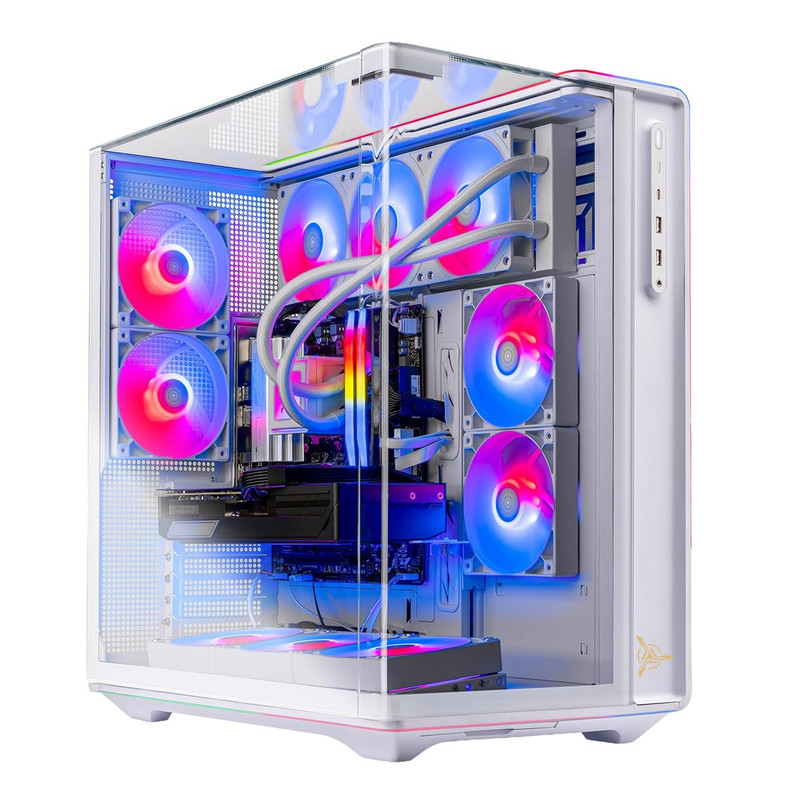
Skytech Gaming PC Desktop, Ryzen 7 9800X3D, RX 9070 XT, 32GB RAM, 2TB SSD
Short Description
This Skytech desktop combines AMD's Ryzen 7 9800X3D CPU and Radeon RX 9070 XT graphics, making it an appealing alternative to NVIDIA-powered 1440p systems.
Key Specifications
- Processor: AMD Ryzen 7 9800X3D
- Graphics: AMD Radeon RX 9070 XT
- Memory: 32GB RAM
- Storage: 2TB SSD
Pros
- Strong gaming-focused processor
- High-performance Radeon graphics
- Spacious 2TB SSD
- 32GB memory configuration
Cons
- NVIDIA-specific software features may not be available
- Exact cooling and motherboard details require confirmation
- Ray-tracing preferences may influence GPU choice
My Experience
I particularly appreciate the combination of a gaming-focused CPU and 2TB storage. In my assessment, that storage capacity makes the system more convenient for a large collection of modern games.
The Radeon GPU also makes it worth comparing with RTX 5070 Ti systems, particularly when traditional rasterized gaming performance matters most.
What Other Buyers Say
I haven't confirmed recurring customer feedback for this exact model. I would focus on verified purchase reports discussing graphics drivers, cooling behavior, and system stability.
Best For
AMD enthusiasts, AAA gamers, and players wanting a large SSD without immediately planning a storage upgrade.
➤➤➤ Click Here to Check Price on Amazon
➡️➡️➡️ Explore User Feedback and Current Pricing on Amazon
msi Codex R2 Gaming Desktop PC | NVIDIA GeForce RTX 5070 12GB | Intel Core i5-14400F | 32GB DDR5 RAM | 1TB NVMe SSD | Air Cooling | Wi-Fi 6E | Windows 11 Home | VR Ready | D14NVP5-613US

Short Description
The MSI Codex R2 pairs an Intel Core i5-14400F with RTX 5070 graphics, 32GB DDR5 memory, and a 1TB NVMe SSD. It is a sensible option for gamers who prefer an Intel-based prebuilt desktop.
Key Specifications
- Processor: Intel Core i5-14400F
- Graphics: NVIDIA RTX 5070 12GB
- Memory: 32GB DDR5
- Storage: 1TB NVMe SSD
- Cooling: Air cooling
- Wireless: Wi-Fi 6E
- Operating System: Windows 11 Home
Pros
- RTX 5070 graphics suited to 1440p
- 32GB DDR5 RAM
- Fast NVMe storage interface
- Modern Wi-Fi 6E connectivity
Cons
- Less gaming-focused CPU than AMD X3D alternatives
- 1TB SSD may limit very large game collections
- Air-cooling performance depends on the actual cooler and chassis airflow
My Experience
My assessment is that this configuration prioritizes practical component balance. I like the emphasis on RTX 5070 graphics and 32GB memory rather than spending heavily on a flagship processor.
For a typical gaming-focused desktop, it provides an appealing specification mix, although actual value depends on the selling price.
What Other Buyers Say
A dependable review consensus for this exact configuration has not been verified. Before ordering, I recommend checking comments about fan noise, preinstalled software, and customer support.
Best For
Intel-preferring gamers looking for an RTX 5070 gaming desktop with DDR5 memory and Wi-Fi 6E.
➤➤➤ Click Here to Check Price on Amazon
➡️➡️➡️ Explore User Feedback and Current Pricing on Amazon
ASUS ROG GM700 (2026) Gaming Desktop PC, AMD Ryzen™ 7 9800X3D Processor, NVIDIA® GeForce RTX™ 5080, 2TB M.2 NVMe™ PCIe® 4 SSD, 32GB DDR5 RAM, Windows 11 Home, GM700TZ-PS787

Short Description
The ASUS ROG GM700 represents the premium end of this comparison. With Ryzen 7 9800X3D processing power and RTX 5080 graphics, it offers an exceptionally capable hardware foundation for 1440p gaming.
Key Specifications
- Processor: AMD Ryzen 7 9800X3D
- Graphics: NVIDIA GeForce RTX 5080
- Memory: 32GB DDR5
- Storage: 2TB PCIe 4.0 NVMe SSD
- Operating System: Windows 11 Home
Pros
- High-end RTX 5080 graphics
- Gaming-focused Ryzen X3D processor
- Spacious 2TB SSD
- 32GB DDR5 memory
- Significant performance headroom for demanding gaming workloads
Cons
- Premium hardware may be unnecessary for casual gaming
- Likely to require a larger budget than midrange systems
- Actual noise, cooling, and power characteristics need configuration-specific verification
My Experience
From a specifications standpoint, I consider the GM700 the strongest premium choice among these six systems.
Its combination of RTX 5080 graphics and Ryzen 7 9800X3D processing should appeal to gamers seeking high-quality visual settings, demanding ray-traced workloads, and flexibility for future gaming requirements.
I have not personally tested its thermal or acoustic performance.
What Other Buyers Say
I haven't established reliable recurring buyer feedback for this specific GM700 configuration. I recommend checking detailed ownership reviews for cooling quality, build reliability, and upgrade access.
Best For
Enthusiasts seeking premium 1440p performance, high-refresh gaming capability, and substantial hardware headroom.
➤➤➤ Click Here to Check Price on Amazon
➡️➡️➡️ Explore User Feedback and Current Pricing on Amazon
How to Choose the Right PC Gaming Product
Choosing a gaming PC for 1440p requires more than simply selecting the fastest processor.
Graphics card: The GPU usually has the greatest impact on performance at 1440p. RTX 5060 Ti systems provide a more modest entry point, while RTX 5070 and RTX 5070 Ti configurations are attractive mainstream and upper-tier options. RTX 5080 systems provide additional performance headroom.
Processor: AMD Ryzen X3D processors are especially appealing for gaming-intensive workloads. However, balanced alternatives such as Intel Core i5 and other Ryzen 7 processors remain relevant.
RAM: I recommend 32GB for a new gaming desktop in 2026, especially if you run background applications, stream, or multitask.
Storage: A 1TB SSD is a practical starting point, but 2TB is preferable for gamers installing multiple large AAA titles.
Cooling and power: Verify the CPU cooler, GPU airflow, case ventilation, PSU wattage, and power connectors. Higher-performance configurations need appropriately designed cooling and reliable power delivery.
Connectivity and compatibility: Confirm the motherboard's upgrade options, rear ports, wireless networking, and display outputs. Ensure the system supports your monitor's desired resolution and refresh rate through an appropriate connection.
Upgradeability and durability: Look for accessible SSD slots, standard-compatible components where possible, adequate case clearance, and clear warranty coverage.
Value: Compare complete system specifications and current pricing rather than choosing solely by CPU or GPU model.
FAQs
1. What are the best specs for a 1440p gaming PC in 2026?
I recommend an RTX 5070-class or comparable graphics card, a capable modern six- or eight-core processor, 32GB RAM, and a 1TB–2TB NVMe SSD for a well-balanced system.
2. Is an RTX 5070 good for 1440p gaming in 2026?
Yes. The RTX 5070 is a suitable option for 1440p gaming, although achievable frame rates depend on the game, graphics settings, and ray-tracing requirements.
3. Is 16GB or 32GB RAM better for 1440p gaming?
Both can work, but I prefer 32GB for a new 2026 gaming build because it provides additional capacity for modern games and background applications.
4. Do I need an RTX 5080 for 1440p gaming?
No. An RTX 5080 is a premium option rather than a requirement. An RTX 5070 or RTX 5070 Ti may provide a more sensible balance for many players.
5. What monitor should I pair with a 1440p gaming PC?
A 2560 × 1440 monitor with a 144Hz, 165Hz, or higher refresh rate is an attractive choice. Adaptive-sync support and good response-time characteristics are also worth considering.
Conclusion
The top 6 best specs for 1440p gaming PC for 2026 cover several performance levels, from accessible RTX 5060 Ti configurations to high-end RTX 5080 desktops.
My final recommendations are:
- Best Overall: Lenovo Legion Tower 5-2026 with Ryzen 7 7800X3D and RTX 5070, offering a balanced gaming-focused configuration.
- Best Value: MSI Codex R2 with Core i5-14400F and RTX 5070, a promising specification-based value choice, subject to actual pricing.
- Best Premium Choice: ASUS ROG GM700 with Ryzen 7 9800X3D and RTX 5080, ideal for enthusiasts prioritizing graphics performance.
For most gamers, I would start by comparing RTX 5070 systems with 32GB RAM and an NVMe SSD. Those wanting additional graphics power should consider the RTX 5070 Ti, RX 9070 XT, and RTX 5080 alternatives.
Ultimately, the right 1440p gaming PC is the one that matches your favorite games, target refresh rate, upgrade plans, and budget without paying for performance you do not need.