Introduction
Finding the best workstation for 3D modeling in 2026 means choosing a computer that can handle complex geometry, detailed textures, demanding rendering workloads, and professional creative software without unnecessary slowdowns.
Whether you're working in Blender, Autodesk Maya, 3ds Max, Cinema 4D, or CAD applications, the right workstation can make a significant difference in your daily workflow.
I prioritize four components when evaluating a 3D modeling workstation: a powerful multicore processor, a capable dedicated graphics card, sufficient RAM, and fast SSD storage.
For this guide, I've selected six desktop computers and compact workstation alternatives that offer useful hardware configurations for 3D creation. Most are gaming-oriented PCs rather than certified professional workstations, so application-specific compatibility and driver support deserve attention.
Quick Summary
For serious 3D artists, I recommend a desktop with at least 32GB RAM, a modern multicore CPU, and a dedicated NVIDIA RTX graphics card. My top recommendation is the msi Aegis ZS2 Gaming Desktop because its Ryzen 9 processor, RTX 5080 graphics, and 64GB RAM make it an especially attractive configuration for demanding creative workflows.
The iBUYPOWER Element is a strong alternative for users seeking a balanced CPU and GPU combination, while the Dell Tower ECT1250 makes sense for moderately demanding modeling tasks.
Top Product List
- msi Aegis ZS2 Gaming Desktop, AMD Ryzen 9 9900X, NVIDIA GeForce RTX 5080 16GB GDDR7, 64GB DDR5, 5TB Storage (4TB SSD+1TB Docking Station Set), Wi‑Fi 7, Keyboard & Mouse, Windows 11 Pro, Black — Best for professional 3D modeling and heavy rendering.
- msi Aegis ZS Gaming Desktop, AMD Ryzen 9 9900X, GeForce RTX 5080, 32GB RAM, 2TB SSD, Liquid Cooling, Wi-Fi 7, Keyboard & Mouse Included, DIY Friendly, Windows 11 Pro — Best for high-end GPU rendering.
- iBUYPOWER Element Gaming PC Desktop Computer AMD Ryzen 9 7900X CPU, NVIDIA GeForce RTX 5070 12GB GPU, 32GB DDR5 RAM, 1TB NVMe SSD, Windows 11 Home, Gamer Keyboard and Mouse - EWA9N5702 — Best for balanced modeling and rendering.
- msi Aegis R2 AI Gaming Desktop: Intel Core Ultra 9 285, Geforce RTX 5070Ti, 32GB DDR5, 2TB M.2 NVMe SSD, Air Cooling, USB Type C, VR-Ready, Window 11 Home: C2NVR9-1452US — Best for Intel-based creative workflows.
- Dell Tower Desktop ECT1250, Ultra 7 265F, RTX 5060, 32GB RAM, 1TB SSD — Best for everyday 3D design and value-focused buyers.
- MS-01 Mini Workstation Core i9-13900H 32GB RAM 1TB SSD Mini PC, HDMI+2X USB4 8K Display, 2x10G SFP+ Port, 2x2.5G LAN Port, Support M.2 2280/22110/U.2 SSD/RTX 3050 Graphics Cards — Best for compact 3D modeling setups.
top 6 best workstation for 3d modeling for 2026
msi Aegis ZS2 Gaming Desktop, AMD Ryzen 9 9900X, NVIDIA GeForce RTX 5080 16GB GDDR7, 64GB DDR5, 5TB Storage (4TB SSD+1TB Docking Station Set), Wi‑Fi 7, Keyboard & Mouse, Windows 11 Pro, Black
 Short Description
This MSI desktop is my best overall choice for demanding 3D modeling and rendering. Its combination of a Ryzen 9 9900X, RTX 5080, and 64GB RAM gives creators substantial resources for large projects.
Key Specifications
- Processor: AMD Ryzen 9 9900X
- Graphics: NVIDIA GeForce RTX 5080 16GB GDDR7
- Memory: 64GB DDR5
- Storage: 4TB SSD plus 1TB docking station storage
- Connectivity: Wi-Fi 7
- Operating System: Windows 11 Pro
Pros
- Powerful multicore processor.
- 16GB GPU memory for demanding scenes.
- Generous 64GB system memory.
- Large storage configuration.
Cons
- High-end hardware may be excessive for beginners.
- Professional GPU certification is not established.
- Large desktop footprint compared with mini PCs.
My Experience
Based on its configuration, this is the machine I would prioritize for demanding Blender projects, detailed architectural visualization, and GPU rendering. I particularly appreciate the 64GB RAM allocation because complex scenes can consume memory quickly.
I haven't physically tested this workstation, so I cannot confirm its sustained temperatures, acoustics, or actual rendering times.
What Other Buyers Say
I couldn't establish a reliable pattern of verified buyer feedback for this exact configuration. Before purchasing, I would check recent comments about cooling, component quality, and support.
Best For
Professional 3D artists, architectural visualization specialists, and creators regularly handling large scenes.
➡️➡️➡️ Explore User Feedback and Current Pricing on Amazon
msi Aegis ZS Gaming Desktop, AMD Ryzen 9 9900X, GeForce RTX 5080, 32GB RAM, 2TB SSD, Liquid Cooling, Wi-Fi 7, Keyboard & Mouse Included, DIY Friendly, Windows 11 Pro
 Short Description
The MSI Aegis ZS combines a powerful desktop processor with RTX 5080 graphics and liquid cooling. It's a compelling alternative for artists who want high-end rendering hardware without starting with 64GB RAM.
Key Specifications
- Processor: AMD Ryzen 9 9900X
- Graphics: NVIDIA GeForce RTX 5080
- Memory: 32GB RAM
- Storage: 2TB SSD
- Cooling: Liquid cooling
- Connectivity: Wi-Fi 7
- OS: Windows 11 Pro
Pros
- Strong CPU and GPU pairing.
- Liquid cooling system.
- Spacious SSD.
- Advertised DIY-friendly design.
Cons
- 32GB RAM may need upgrading for complex productions.
- Liquid cooling adds maintenance considerations.
- Exact GPU memory configuration should be confirmed.
My Experience
I see this as an attractive workstation alternative for Blender Cycles and other compatible GPU rendering workflows. The Ryzen 9 processor also makes it appealing for CPU-intensive creative tasks.
My main consideration would be whether its memory can be expanded conveniently as projects become more demanding.
What Other Buyers Say
Reliable recurring buyer feedback for this exact listing was unavailable. I recommend checking current owner comments for liquid-cooling noise, build consistency, and upgrade access.
Best For
Experienced 3D artists who prioritize GPU rendering and want an upgrade-friendly desktop.
➡️➡️➡️ Explore User Feedback and Current Pricing on Amazon
iBUYPOWER Element Gaming PC Desktop Computer AMD Ryzen 9 7900X CPU, NVIDIA GeForce RTX 5070 12GB GPU, 32GB DDR5 RAM, 1TB NVMe SSD, Windows 11 Home, Gamer Keyboard and Mouse - EWA9N5702
 Short Description
The iBUYPOWER Element offers a practical combination of Ryzen 9 processing and RTX 5070 graphics. I consider it a balanced option for artists combining modeling, animation, and rendering.
Key Specifications
- Processor: AMD Ryzen 9 7900X
- Graphics: NVIDIA RTX 5070 12GB
- Memory: 32GB DDR5
- Storage: 1TB NVMe SSD
- OS: Windows 11 Home
- Accessories: Keyboard and mouse
Pros
- Capable multicore Ryzen 9 processor.
- NVIDIA RTX graphics for supported GPU renderers.
- 32GB DDR5 memory.
- Fast NVMe storage interface.
Cons
- 12GB VRAM limits particularly large GPU scenes.
- 1TB storage can fill quickly with project assets.
- No verified professional workstation certification.
My Experience
I like the balance here. The CPU is suitable for demanding multitasking, while the GPU offers dedicated rendering capabilities for compatible applications.
For someone moving from hobby projects into freelance visualization work, I would consider this configuration before investing in substantially more expensive hardware.
What Other Buyers Say
I couldn't verify consistent owner feedback for this specific configuration. Check recent reviews for shipping condition, memory expansion, and after-sales service.
Best For
Freelance 3D modelers, animation students, and Blender users seeking balanced hardware.
➡️➡️➡️ Explore User Feedback and Current Pricing on Amazon
msi Aegis R2 AI Gaming Desktop: Intel Core Ultra 9 285, Geforce RTX 5070Ti, 32GB DDR5, 2TB M.2 NVMe SSD, Air Cooling, USB Type C, VR-Ready, Window 11 Home: C2NVR9-1452US
 Short Description
The MSI Aegis R2 AI combines an Intel Core Ultra 9 processor with RTX 5070 Ti graphics, making it an appealing choice for creators who prefer an Intel-based desktop.
Key Specifications
- Processor: Intel Core Ultra 9 285
- Graphics: NVIDIA GeForce RTX 5070 Ti
- Memory: 32GB DDR5
- Storage: 2TB M.2 NVMe SSD
- Cooling: Air cooling
- Connectivity: USB Type-C
- OS: Windows 11 Home
Pros
- High-end Intel processor.
- Strong dedicated NVIDIA GPU.
- 2TB NVMe storage.
- Conventional air-cooling design.
Cons
- 32GB RAM may be insufficient for very large scenes.
- GPU VRAM capacity isn't specified in the listing title.
- Professional application certification is unverified.
My Experience
For a mixed workload involving 3D modeling, rendering, and everyday productivity, I find this configuration particularly interesting.
The 2TB SSD is useful for keeping project files, texture libraries, and creative applications on fast local storage.
What Other Buyers Say
I wasn't able to confirm recurring feedback from verified purchasers of this exact model. I would examine reports about fan noise, airflow, and software setup before ordering.
Best For
Intel-focused creators working with Maya, Blender, Cinema 4D, and general-purpose design applications.
➡️➡️➡️ Explore User Feedback and Current Pricing on Amazon
Dell Tower Desktop ECT1250, Ultra 7 265F, RTX 5060, 32GB RAM, 1TB SSD
 Short Description
The Dell Tower ECT1250 is a sensible choice for creators who need a modern desktop for modeling, CAD work, and moderately demanding rendering.
Key Specifications
- Processor: Intel Core Ultra 7 265F
- Graphics: NVIDIA RTX 5060
- Memory: 32GB RAM
- Storage: 1TB SSD
- Form Factor: Desktop tower
Pros
- Modern Intel desktop processor.
- Dedicated RTX graphics.
- 32GB RAM suitable for many modeling projects.
- Straightforward tower configuration.
Cons
- Less GPU headroom than RTX 5070 Ti or 5080 systems.
- Large GPU scenes may exceed available VRAM.
- Upgrade space and power supply specifications require confirmation.
My Experience
I would consider this Dell for a home studio focused primarily on modeling rather than continuous high-end rendering.
It offers a useful starting configuration, although demanding artists should investigate GPU memory and expansion options carefully.
What Other Buyers Say
I couldn't substantiate a consistent review pattern for this exact system. Current purchaser feedback should be checked for cooling behavior, upgrade restrictions, and reliability.
Best For
CAD students, independent designers, and users whose projects prioritize modeling over extremely demanding final renders.
➡️➡️➡️ Explore User Feedback and Current Pricing on Amazon
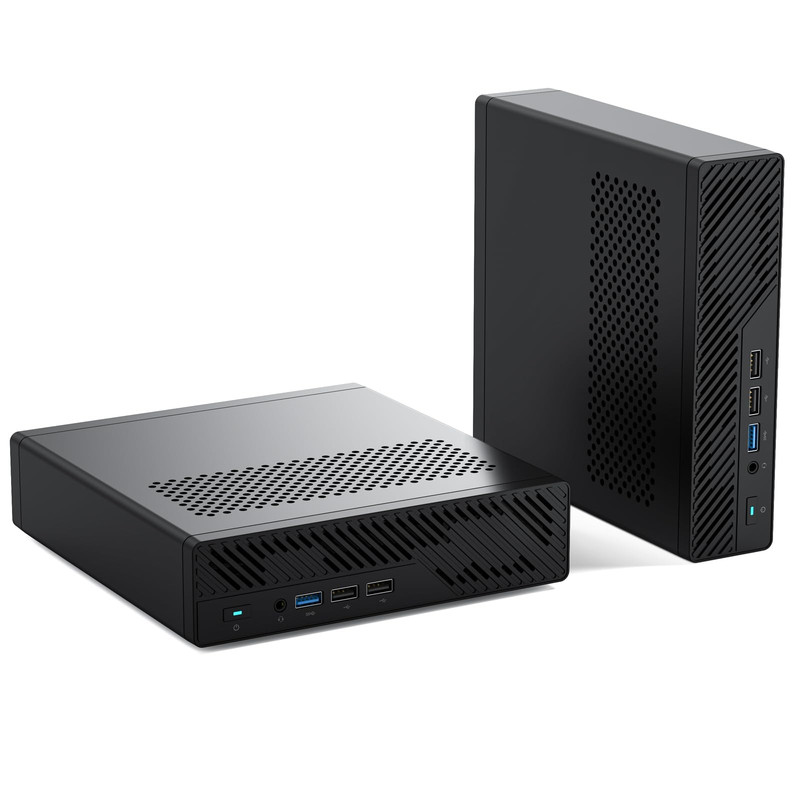
MS-01 Mini Workstation Core i9-13900H 32GB RAM 1TB SSD Mini PC, HDMI+2X USB4 8K Display, 2x10G SFP+ Port, 2x2.5G LAN Port, Support M.2 2280/22110/U.2 SSD/RTX 3050 Graphics Cards
Short Description
The MS-01 is a compact workstation-style mini PC offering an Intel Core i9 processor, 32GB RAM, and unusually extensive networking connectivity.
It's a close alternative for space-constrained modeling setups, but its listing describes RTX 3050 support rather than confirming a dedicated RTX 3050 is included.
Key Specifications
- Processor: Intel Core i9-13900H
- Memory: 32GB RAM
- Storage: 1TB SSD
- Display Connectivity: HDMI and two USB4 connections
- Networking: Two 10G SFP+ ports and two 2.5G LAN ports
- Expansion: Listed support for multiple SSD formats and RTX 3050 graphics cards
Pros
- Compact workstation-oriented design.
- Strong networking connectivity.
- Flexible storage interface options.
- 32GB included RAM.
Cons
- Dedicated GPU inclusion is not confirmed.
- Graphics expansion is more constrained than in conventional towers.
- Not my first choice for demanding GPU rendering without a verified GPU configuration.
My Experience
I find the MS-01 interesting for technical artists, CAD users, and creators working with shared storage or network-based workflows.
Its compact footprint is appealing, but I would verify its graphics hardware before relying on it for GPU-intensive 3D applications.
What Other Buyers Say
I couldn't verify a reliable consensus from purchasers of this exact configuration. I recommend checking feedback on fan noise, storage installation, and GPU expansion limitations.
Best For
Compact workspaces, technical modeling, network-connected studios, and users prioritizing flexibility over maximum GPU rendering capability.
➡️➡️➡️ Explore User Feedback and Current Pricing on Amazon
How to Choose the Right PC Gaming Product
When selecting a workstation for 3D modeling, I recommend evaluating the complete system instead of focusing only on the graphics card.
Processor performance: Modern multicore CPUs help with simulations, multitasking, and CPU rendering. Strong single-core performance also matters for interactive modeling.
Graphics performance: NVIDIA RTX GPUs are attractive for creative software supporting CUDA or OptiX. Verify your specific application's renderer and driver requirements.
RAM capacity: 32GB is a practical starting point for serious modeling. Consider 64GB or more for complex assemblies, large environments, and demanding simulations.
Storage: A fast NVMe SSD improves file transfers and asset-loading workflows. Large texture libraries and project archives benefit from additional capacity.
Cooling and power: Sustained rendering stresses the hardware. Look for adequate airflow, appropriately sized power supplies, and effective cooling rather than assuming a powerful GPU guarantees consistent performance.
Compatibility: Confirm operating-system support, application requirements, GPU drivers, and any professional certifications your workflow requires.
Upgradeability: Check available memory slots, SSD connections, expansion space, and PSU capacity before purchasing.
Value: The best workstation isn't necessarily the most expensive. Spend according to whether your work is primarily modeling, CPU rendering, GPU rendering, or simulation.
FAQs
1. What is the best workstation for 3D modeling in 2026?
Among these six configurations, my top choice is the MSI Aegis ZS2 with Ryzen 9 9900X, RTX 5080, and 64GB RAM. It offers a strong hardware foundation for demanding modeling and rendering.
2. Is 32GB RAM enough for Blender and Maya?
Yes, 32GB is sufficient for many moderate projects. Larger scenes, simulations, and complex production workflows may benefit substantially from 64GB or more.
3. Is an RTX 5080 necessary for 3D modeling?
No. An RTX 5060 or RTX 5070 can suit many modeling workflows. A more powerful GPU becomes valuable when scenes and rendering workloads justify it.
4. Are gaming PCs suitable for professional 3D modeling?
Yes, many gaming desktops have powerful hardware suitable for creative applications. However, they may lack certified workstation drivers, ECC memory, or specialized enterprise support.
5. Should I prioritize CPU or GPU for 3D modeling?
Prioritize strong CPU performance for interactive modeling and CPU-based tasks. For GPU rendering, graphics performance and VRAM capacity become especially important.
Conclusion
Choosing the best workstation for 3D modeling in 2026 depends on your project complexity, rendering software, workspace, and budget.
My final selections are:
- Best Overall: MSI Aegis ZS2 Gaming Desktop — Its Ryzen 9 9900X, RTX 5080, and 64GB RAM make it my strongest all-around recommendation.
- Best Value: Dell Tower Desktop ECT1250 — A practical configuration to consider for moderate creative workloads, subject to current pricing.
- Best Premium Choice: MSI Aegis ZS Gaming Desktop — A high-end alternative with powerful RTX graphics and liquid cooling.
For demanding professional projects, I would prioritize sufficient RAM and GPU memory first, followed by sustained CPU performance and storage expandability. A thoughtfully chosen system can serve both today's creative projects and more ambitious 3D workflows in the future.